Have you found problems building ruby on a local machine? How to configure your local environment once and for all?
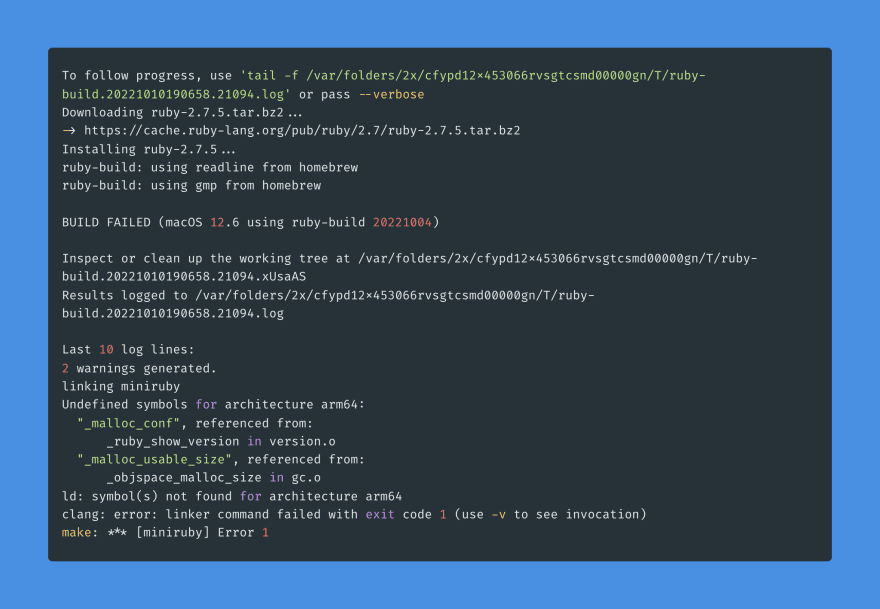
Building ruby is dependent on several key elements: build tools, compilers, linkers, also shared libraries like openssl, libyaml, readline and etc. And we need to help ruby-build to find all those tools and libraries.
The shared solution is designed for macOS with Homebrew.
Install system packages
brew install gmp libyaml rbenv readline zlib
As a bonus, it will also install Xcode Command Line Tools.
Preconfigure ruby-build
export RUBY_CONFIGURE_OPTS="
  --with-libyaml-dir=$(brew --prefix libyaml)
  --with-zlib-dir=$(brew --prefix zlib)
"
Install Ruby 3.1+
brew install openssl@3 rust
export RUBY_CONFIGURE_OPTS="$RUBY_CONFIGURE_OPTS --with-openssl-dir=$(brew --prefix openssl@3)"
rbenv install 3.2.0-preview2
Note: We need
rustfor the new YJIT.
Install Ruby 2.x-3.x
brew install openssl@1.1
export RUBY_CONFIGURE_OPTS="$RUBY_CONFIGURE_OPTS --with-openssl-dir=$(brew --prefix openssl@1.1)"
rbenv install 2.7.5
(Optional) Let’s add Jemalloc
To enable Jemalloc we need to do next before ruby installation:
brew install jemalloc

export LDFLAGS="$LDFLAGS -L$(brew --prefix jemalloc)/lib"
export CPPFLAGS="$CPPFLAGS -I$(brew --prefix jemalloc)/include"
export PKG_CONFIG_PATH="$(brew --prefix jemalloc)/lib/pkgconfig:$PKG_CONFIG_PATH"

export MALLOC_ARENA_MAX=2

export RUBY_CONFIGURE_OPTS="$RUBY_CONFIGURE_OPTS --with-jemalloc"
Best place to have ENV configuration
All those settings are better placed in .profile, .bashenv or .zshenv, then you do not need to recall them each time you install or reinstall ruby.
Next
ruby-build Wiki is good to learn.
Paul Keen is an Open Source Contributor and a Chief Technology Officer at JetThoughts. Follow him on LinkedIn or GitHub.
If you enjoyed this story, we recommend reading our latest tech stories and trending tech stories.