Hello Coders!
This article presents an open-source tool that builds server-side paginated DataTables with minimum effort. The input expected by the Dynamic DataTables module is the model definition plus a single line in the configuration. Sources are published on GitHub and the permissive (MIT) license allows the incorporation in commercial projects or use for eLearning activities. Thanks for reading!
- 👉 Django Dynamic DataTables –
source code - 👉 Free Support (just in case)
DevTool Highlights
Data pagination can be useful in many use cases like management and interaction with registered users of a popular app, students of a class, etc. For all those cases, this tool might be helpful.
Here are the features provided on top of every model defined in our Django project, without any coding effort:
- ✅ Manages the data for
any model - ✅
One-lineconfiguration - ✅
Server-sidepagination - ✅
Search,Data Filters - ✅
Exportsin PDF, CSV formats
Quick Start in Docker
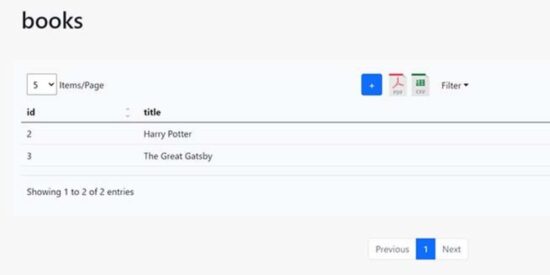
The tool is pre-configured to enable the Dynamic DataTables UI for a simple Books model. Once the project is downloaded and started we should be able to interact with the UI without any efforts.
👉 Step 1 – Download the code from GitHub
$ git clone https://github.com/app-generator/devtool-django-dynamic-datatb.git
$ cd devtool-django-dynamic-datatb
👉 Step 2 – Start the APP in
Docker
$ docker-compose up --build
At this point, we can visit the app in the browser. The dynamic view is live at http://localhost:5085/datatb/books.

How it works
The tool builds a generic layout on top of each model defined in the project and enabled in the configuration.
To showcase the tool, sources are shipped with a working sample for the Books model – Here are the relevant parts:
👉 (1)
BooksModel Definition – in apps/models.py file
class Book(models.Model):
    title = models.CharField(max_length=100)
👉 (2)
ConfigurationforBooksmodel
DYNAMIC_DATATB = {
    'books': "Book",
}
The pattern used in this Python DICT is to use the URL segment as key and Model as the entity to be processed.
So, the above settings enable the Dynamic DataTB for Books model using url: http://localhost:8000/datatb/books
Video Presentation
A full demonstration of this feature can be found on YouTube:
Next Steps
The roadmap of the product includes the following evolutions:
- ✅ Bulk Data Provisioning (drop zone)
- ✅ Independent module installation via PIP
- ✅ Styling Option: Tailwind or BS5
- Note: currently only BS5 is supported.
Thanks for reading! For more resources, feel free to access:
- 👉 Tools for Developers – a
curated list - 👉 API Generator for Django – free tool, recently updated