Running B2B campaigns across multiple channels? It’s easy for the details to get scattered across spreadsheets, decks, and inboxes until no one can say for sure what’s actually working.
This template pulls it all into one place, so you can track campaigns as they run and see the numbers that matter.
What is a B2B campaign tracker template?
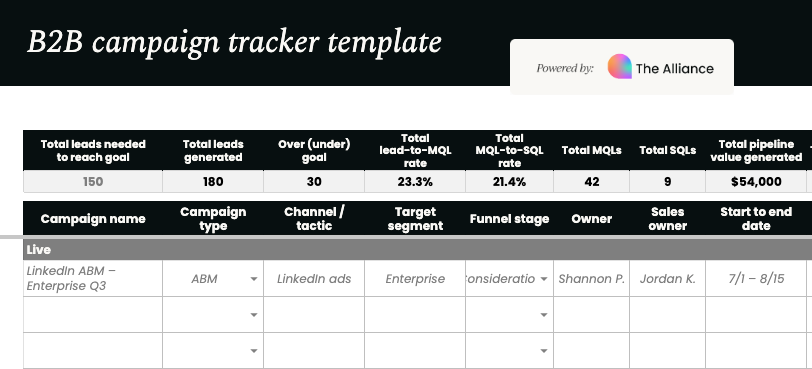
A B2B campaign tracker template is a ready-built spreadsheet for planning and monitoring marketing campaigns aimed at business buyers. It’s organized around the metrics that reflect a B2B sales cycle: leads generated, MQLs, SQLs, conversions, and pipeline value.
Every campaign lives in one of three sections (Live, Upcoming, or Complete), so you can see at a glance what’s running, what’s coming up, and what’s already wrapped.
A dashboard at the top rolls everything up automatically, giving you total leads, total conversions, total pipeline generated, and cost per lead, MQL, and conversion, all without a single manual calculation.
Who is it for?
This template is built for anyone responsible for planning, running, or reporting on B2B campaigns, including growth marketers, product marketers, and CMOs.
If you’re the one building the campaign calendar, it gives you a single source of truth for what’s live and what’s coming next. If you’re reporting upward, it gives you the pipeline and cost metrics leadership actually wants to see, already calculated.
Whether your campaigns are sales-led, product-led, or a mix of both, tracking conversions alongside MQLs and SQLs means you’re not forcing every campaign into the same funnel shape.
How to use the template
Getting started is straightforward:
- Make a copy of the template so you’re working with your own version.
- Add your campaigns under Live, Upcoming, or Complete, with details like campaign type, channel, target segment, and funnel stage.
- Fill in the numbers as they come in, such as budget, spend, leads, MQLs, SQLs, and conversions. The white cells are yours to fill in; everything shaded grey calculates automatically.
- Watch the dashboard update as you go. Rates, costs, and pipeline totals recalculate the moment you add new numbers, so you always have an up-to-date view without lifting a finger.
Not every campaign will use every metric, and that’s fine. A sales-led campaign might never log a “conversion” in the tracker’s sense, while a product-led one might skip MQLs and SQLs altogether. Fill in what’s relevant to how that campaign actually converts, and leave the rest blank.
Think of this as a starting point rather than a fixed structure. Add columns, rename fields, or tweak the funnel stages to match how your team actually talks about campaigns. If you track a metric we haven’t included, or don’t need one we have, make it yours.
Download your B2B campaign tracker