What Is Procore?
Procore is a construction management software platform used to plan, coordinate and monitor construction projects. It is commonly used by general contractors, subcontractors, owners and construction managers to manage drawings, schedules, RFIs, submittals, budgets and field collaboration across commercial and residential projects.
Unlike general-purpose project management tools, Procore is built specifically for construction workflows. The platform combines document management, cost tracking, scheduling, quality and safety tools, communication features and mobile field reporting into a centralized cloud-based system that connects office and jobsite teams in real time.
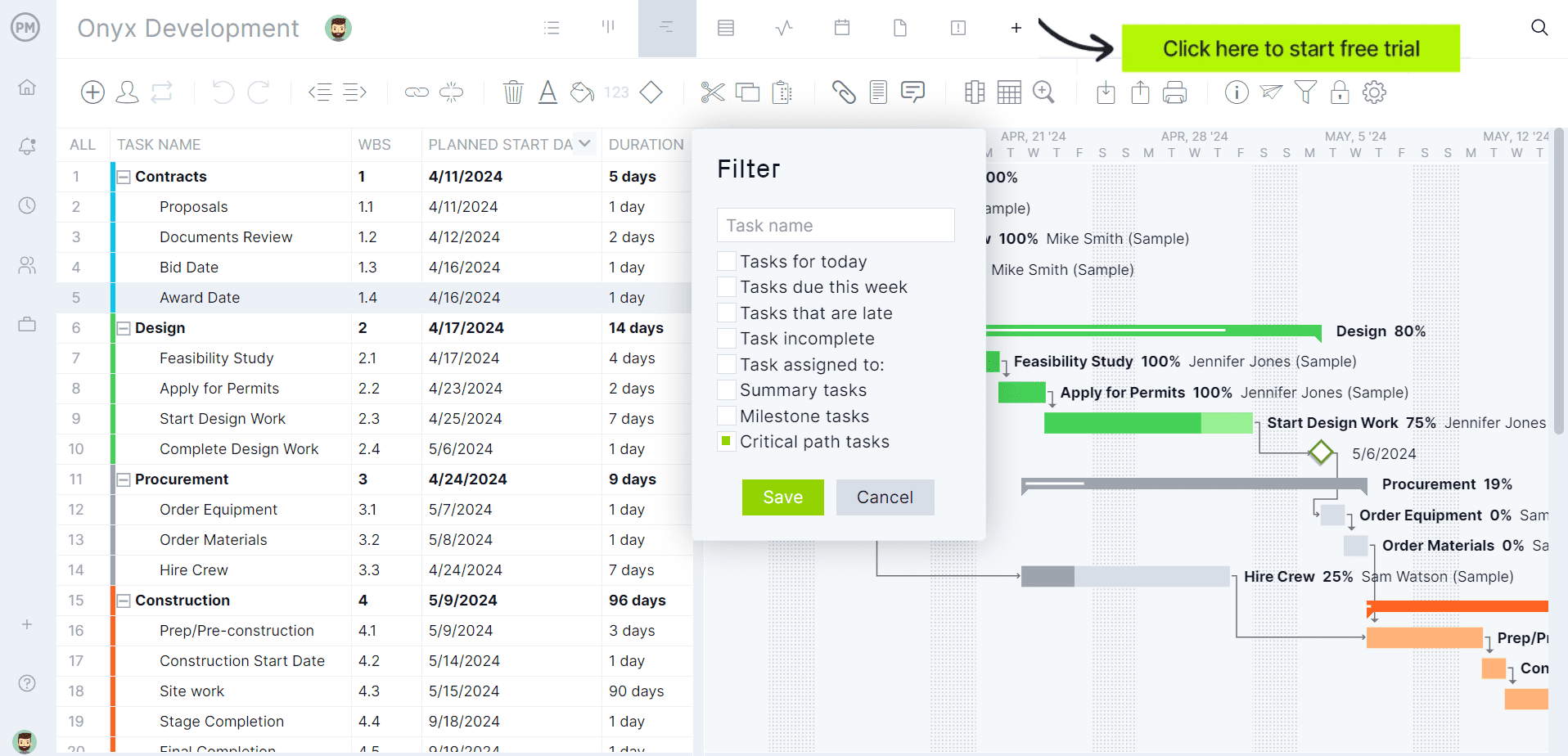
ProjectManager is award-winning construction project management software that gives construction companies tools to ensure projects are completed on time, within budget and within scope. It allows project managers to create detailed construction schedules, estimate costs, allocate resources, set budgets, track progress and compare estimated versus actual project outcomes using real-time dashboards and reports to quickly identify delays or cost overruns. Get started with ProjectManager for free today.
Is Procore Project Management Software?
Procore can be considered a project management software, but it’s primarily a construction management platform. The software offers tools for construction scheduling, budget tracking, document management, progress monitoring and team collaboration, but its strongest functionality is centered around construction-specific features such as RFIs, submittals, punch lists, inspections, drawing management and field coordination, rather than traditional project planning, scheduling and tracking tools.
As a result, Procore is designed more for managing construction workflows than for serving as a complete all-purpose project management system. Because of that, many companies still rely on additional software to handle broader project management activities such as advanced resource capacity planning, workload management, portfolio planning and long-term project forecasting. It’s common for contractors to use Procore alongside tools like Primavera P6 or Microsoft Project when they need more control over project timelines, dependencies, resource allocation and project controls.
Procore Project Management Features
Beyond its construction-specific tools such as RFIs, submittals, punch lists, inspections and drawing management, Procore also includes several features that support project planning, coordination and project tracking activities. The sections below take a closer look at the project management capabilities Procore offers and how construction teams use them to manage schedules, costs, communication and day-to-day execution.
- Project scheduling: Procore allows teams to manage project schedules, track milestones and monitor task progress through integrations with scheduling tools like Microsoft Project and Primavera P6, along with built-in schedule viewing and updating features.
- Budget management: Users can create budgets, monitor committed costs, track actual expenses and compare financial performance against the original project budget throughout the project lifecycle.
- Document management: Centralized document storage helps teams organize contracts, drawings, specifications, reports and other project files while maintaining version control and field accessibility.
- Team collaboration: Built-in communication tools allow office and field teams to share updates, assign responsibilities, track conversations and coordinate project activities in real time.
- Progress tracking: Construction teams can monitor daily activities, production progress, open issues and project performance through logs, reports and field updates.
- Workflow automation: Approval workflows, notifications and project status tracking features help standardize repetitive project processes and reduce delays caused by manual coordination.
- Reporting and dashboards: Procore provides dashboards and customizable reports that give stakeholders visibility into schedule performance, project costs, outstanding items and overall project status.
- Resource coordination: Workforce planning and labor tracking tools help project teams coordinate crews, subcontractors and field activities across active construction projects.
Pros of Procore for Project Management
Despite leaning heavily toward construction operations, Procore still provides several capabilities that help teams plan work, coordinate stakeholders and monitor project performance. Below are some of the strongest advantages Procore offers from a project management perspective.
- Centralized project information: Procore keeps schedules, budgets, documents, reports and communication records in one platform, making it easier for teams to access current project data without switching between multiple systems.
- Strong team collaboration tools: Real-time communication features help office staff, field teams, subcontractors and stakeholders stay aligned on project updates, responsibilities and ongoing issues.
- Real-time project visibility: Dashboards and reporting tools give project managers quick insight into project costs, schedule progress, open items and field activity as work moves forward.
- Mobile accessibility: Procore’s mobile app allows project teams to review project information, submit updates and track progress directly from the jobsite, improving coordination between field and office teams.
- Integration with scheduling and financial tools: The platform connects with software like Primavera P6, Microsoft Project and accounting systems, allowing teams to extend Procore’s project management functionality through integrations.
Cons of Procore for Project Management
Although Procore performs well for construction coordination and field management, its project management capabilities are more limited compared to dedicated project management software platforms. The following drawbacks become more noticeable on large, complex or portfolio-level projects.
- Limited advanced scheduling functionality: Procore does not offer the same level of scheduling depth found in dedicated planning tools such as Primavera P6 or Microsoft Project, especially for dependency management, critical path analysis and schedule optimization.
- Weak portfolio management capabilities: Organizations managing multiple projects may find Procore lacking in portfolio planning, cross-project prioritization, strategic roadmap management and enterprise-wide workload balancing.
- Limited resource management tools: Resource allocation, workforce capacity planning and long-term workload forecasting are not as advanced as what specialized project management platforms provide.
- Heavy focus on construction workflows: Many areas of the platform are built around RFIs, submittals, drawings and field coordination, which can make the software feel less effective for broader project management needs outside construction operations.
- Dependence on integrations for deeper project controls: Teams frequently need external scheduling, reporting or financial tools to handle advanced project controls and detailed planning requirements.
- Less flexible for non-construction projects: The platform is highly specialized for construction environments, making it difficult to adapt for IT, product development, manufacturing or other industries that require different project workflows.
- Complex implementation for enterprise teams: Larger organizations often face longer onboarding periods, process standardization challenges and additional configuration work before Procore fully supports their project management processes.
ProjectManager Is the Best Procore Alternative for Construction Project Management
Although Procore performs well for construction-specific processes like RFIs, submittals, inspections and drawing management, its project planning and scheduling functionality is more limited than what dedicated project management software such as ProjectManager.
Related: 10 Best Procore Alternatives of 2025 (Free + Paid)
ProjectManager offers a more comprehensive construction project management solution with advanced Gantt charts, critical path tracking, workload management, resource scheduling, portfolio roadmaps, real-time dashboards, kanban boards, timesheets and automated reports in a single platform. Compared to Procore’s enterprise-oriented pricing structure, ProjectManager is easier to deploy and more affordable for contractors that need powerful project planning, tracking and resource management tools without excessive complexity.
In addition to traditional construction scheduling capabilities, ProjectManager includes AI-powered project insights, workflow automation and live performance tracking that help teams identify delays, manage risks and improve decision-making. The platform also supports an open API and more than 1,000 integrations with tools like Acumatica, QuickBooks, Microsoft Project, Slack and Google Workspace, allowing construction companies to connect operational and project data across their existing systems.
Watch the video below to learn more!
ProjectManager is online construction project management software that empowers teams to plan, manage and track their projects in real time. We connect architects and engineers in the office with your work crew on the job site so they can share files and comments to foster better collaboration. Get started with ProjectManager today for free.
The post Procore for Project Management: Features, Pros and Cons appeared first on ProjectManager.