Building production-ready AI systems requires a shift from simple prompting to structured orchestration. Using the Google Agent Development Kit (ADK) and Python, you can build robust agents that handle complex reasoning and state management.
In this post, I’ll walk you through the core concepts of the ADK: from defining your first agent to exposing it as a production-ready API using FastAPI.
What is an AI Agent?
Unlike a standard LLM, which simply generates text based on a prompt, an AI agent includes reasoning and decision-making logic. It can interpret user requests, decide which actions to take, and interact with tools or other components to complete a task.
In practice, an agent can:
- Reason: Interpret the user’s intent and understand constraints in the request.
- Act: Call external tools, APIs, or functions to retrieve information or perform operations.
- Collaborate: Work together with other specialized agents to solve more complex tasks.
This makes agents particularly useful for building structured, multi-step AI applications.
Our Use-Case

In this example, we build a travel planning agent that can respond to user queries about trips and destinations. The agent processes the user’s request, generates relevant travel suggestions, and structures the response in a helpful way.
To make the system accessible to other applications, we expose the agent via a REST API built with FastAPI, enabling integration with web applications, chat interfaces, and other services.
Step 0: Setting Up Your Environment
To follow along, you’ll need Python 3.10+ and a package manager like pipx or uv (which is significantly faster than standard pip).
If you don’t have uv yet, you can install it with a simple curl command:
# Install uv
curl -LsSf [https://astral.sh/uv/install.sh](https://astral.sh/uv/install.sh) | sh
Project Structure
For this project, we expect the following project structure:

Initializing Your Project
Once uv is installed, from the root directory of your repository, install the relevant libraries for both the agent & the API layers, and activate the virtual environment:
# Install the Google ADK, FastAPI, and Uvicorn (the ASGI server)
uv add google-adk fastapi uvicorn

# Sync dependencies and activate your environment
uv sync
source .venv/bin/activate
The next step is to initialize your agent through the ADK CLI, which creates the necessary directory structure for your agent’s logic.
# Create a new agent project
adk create my_travel_planner
The .env Configuration
Handling API keys securely is paramount. You should create a .env file inside the my_travel_planner directory (or fill up the existing .env template file created from the above step) to manage credentials.
It is important that you never commit this file to version control. Make sure you add this to the .gitignore file (if it’s not already there).
- Option 1 (Google AI Studio): If you are using a standard Gemini API key from Google AI Studio, set GOOGLE_GENAI_USE_VERTEXAI=False and add your key.
- Option 2 (Vertex AI): If you are working within Google Cloud, set GOOGLE_GENAI_USE_VERTEXAI=True and point to your application credentials. You can follow this link for the exact documentation.
# .env template
GOOGLE_API_KEY=your_gemini_api_key_here
GOOGLE_GENAI_USE_VERTEXAI=False
# Optional for Vertex AI:
# GOOGLE_APPLICATION_CREDENTIALS=path/to/your/credentials.json
Step 1: Defining the Agent
The “Brain” of your system is defined in my_travel_planner/agent.py. Here, we give the agent a name, a specific model (like gemini-2.5-flash), and clear instructions on its persona.
from google.adk.agents import Agent


def get_root_agent():
    # The Root Agent (The "Brain")
    travel_planner = Agent(
        name="travel_planner",
        model="gemini-2.5-flash",
        description="A comprehensive travel planning assistant.",
        instruction="""You are a world-class travel planner.
        Recommend places to visit based on the user's query.""",
    )
    return travel_planner


root_agent = get_root_agent()
Step 2: Managing Memory with Sessions and Runners
Stateless LLMs forget context as soon as the request ends. For production systems, agents need memory. ADK manages this through Sessions and the Runner.
- Sessions: Store conversation history, user info, and intermediate agent states.
- Runner: Orchestrates the full interaction — receiving input, passing it to the brain, and maintaining the state.
Here is how you might execute that pipeline asynchronously. In your repository’s root, create run.py as follows:
from google.adk.sessions import InMemorySessionService
from google.adk.agents.llm_agent import Agent
from google.adk.runners import Runner
from google.genai import types  # For creating message Content/Parts
import asyncio
from pathlib import Path
from dotenv import load_dotenv
load_dotenv(Path(__file__).parent / "my_travel_planner" / ".env")  # Load environment variables from the .env file
from my_travel_planner.agent import get_root_agent

APP_NAME = "travel-planner_app"
USER_ID = "user_1"
SESSION_ID = "session_001"


async def setup_session_and_runner(root_agent: Agent = None, session_id: str = SESSION_ID):
    # Setup Runner for execution
    session_service = InMemorySessionService()
    session = await session_service.create_session(app_name=APP_NAME, user_id=USER_ID, session_id=session_id)
    runner = Runner(agent=root_agent, app_name=APP_NAME, session_service=session_service)
    return session, runner


async def call_agent_async(query: str, root_agent: Agent = None, session_id: str = SESSION_ID) -> str:
    content = types.Content(role='user', parts=[types.Part(text=query)])
    session, runner = await setup_session_and_runner(root_agent=root_agent, session_id=session_id)
    events = runner.run_async(user_id=USER_ID, session_id=session_id, new_message=content)
    final_response_text = "No response received."
    async for event in events:
        # Key Concept: is_final_response() marks the concluding message for the turn.
        if event.is_final_response():
            if event.content and event.content.parts:
                final_response_text = event.content.parts[0].text
            elif event.actions and event.actions.escalate:
                final_response_text = f"Agent escalated: {event.error_message or 'No specific message.'}"
            break

    print(f"<<< Agent Response: {final_response_text}")
    return final_response_text


async def run_agent_pipeline(query: str) -> str:
    root_agent = get_root_agent()
    return await call_agent_async(query=query, root_agent=root_agent, session_id=SESSION_ID)


if __name__ == "__main__":
    user_query = ("I'm planning a trip to Paris in the spring. What are some must-see attractions and local events "
                  "during that time?")
    asyncio.run(run_agent_pipeline(query=user_query))
Step 3: Turning Your Agent into an API
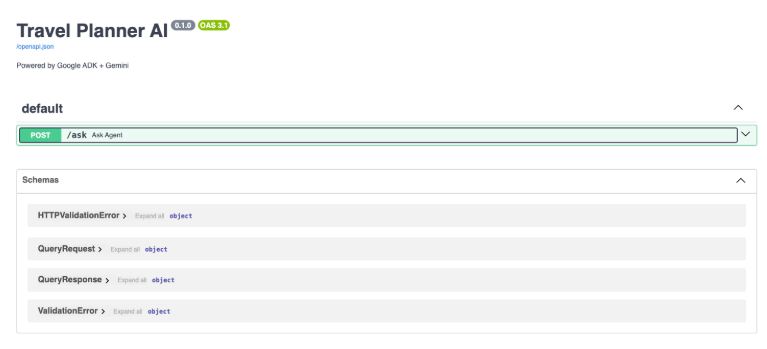
To make your agent useful in the real world, we need to expose it as an API. FastAPI is the modern standard for this because it’s high-performance, uses type hints for validation, and generates automatic Swagger documentation.
By wrapping our ADK pipeline in a POST endpoint, we can connect our agent to frontends, mobile apps, or other microservices.
In the repository root directory, we create api.py, where we define a simple /ask endpoint:
from fastapi import FastAPI
from pydantic import BaseModel
from pathlib import Path
from dotenv import load_dotenv

load_dotenv(Path(__file__).parent / "my_travel_planner" / ".env")

from run import run_agent_pipeline

app = FastAPI(title="Travel Planner AI", description="Powered by Google ADK + Gemini")


class QueryRequest(BaseModel):
    query: str


class QueryResponse(BaseModel):
    query: str
    response: str


@app.post("https://medium.com/ask", response_model=QueryResponse)
async def ask_agent(request: QueryRequest):
    response = await run_agent_pipeline(query=request.query)
    return QueryResponse(query=request.query, response=response)
Run your server with: uv run uvicorn api:app –reload
The server starts at http://localhost:8000 and Interactive docs (Swagger UI): http://localhost:8000/docs
Final Thoughts: The Road to Production
A local script is a great start, but production readiness involves a few more steps:
- Test: Write unit tests to verify that the agent logic handles edge cases.
- Containerize: Use Docker to ensure that “it works on my machine” translates to “it works on the server.”
- Deploy: Ship your container to a cloud provider like Google Cloud (Cloud Run) or AWS.
Ready to build? Grab the code from the GitHub repo and start building your own specialized agentic workflows today!
✨ We thank the Google AI/ML Developer Programs team for supporting us with Google Cloud Credits.
✨ The source code on GitHub can be accessed here.
✨ If you like the article, please subscribe to my latest ones.
To get in touch, contact me on LinkedIn or via ashmibanerjee.com.
GenAI usage disclosure: GenAI models were used to check for grammar inconsistencies in the blog and to refine the text for greater clarity. The authors accept full responsibility for the content presented in this blog.

[Tutorial] From Agents to APIs: Building Production-Ready AI Systems with Google ADK & FastAPI was originally published in Google Developer Experts on Medium, where people are continuing the conversation by highlighting and responding to this story.