Marketing teams generate more data than almost any other function in a business. Campaign performance metrics, budget consumption by channel, lead volume, conversion rates, content publishing status, creative asset inventory. The information exists across a dozen platforms and spreadsheets. The challenge is never a lack of data. It is having too much of it in too many places to see what actually matters without spending hours pulling it together into something that can inform a decision.
A marketing dashboard solves that problem by surfacing the right metrics in one place. Rather than logging into five platforms to understand how a campaign is performing, a well-structured dashboard shows the headline numbers (spend vs. budget, leads generated, conversion rate, channel performance) at a glance, and flags what needs attention before a problem becomes a missed target. It gives marketing managers the overview they need to run the function and gives leadership the visibility they need without requiring a report every time they have a question.
We put together five free marketing dashboard templates for Excel that cover the metrics marketing teams track most, from campaign budget management to creative asset tracking. Each one is free to download and ready to adapt for your team.
1. Marketing Budget Dashboard for Excel
Marketing budgets are allocated months in advance and spent in real time. Paid media burns through spend daily, event costs hit in unpredictable chunks, agency retainers run monthly and campaign investments need to be weighed against results that take time to materialize. Without a dashboard that shows budget consumption against plan across every channel and initiative, overspending in one area quietly offsets opportunities in another before anyone notices the imbalance.
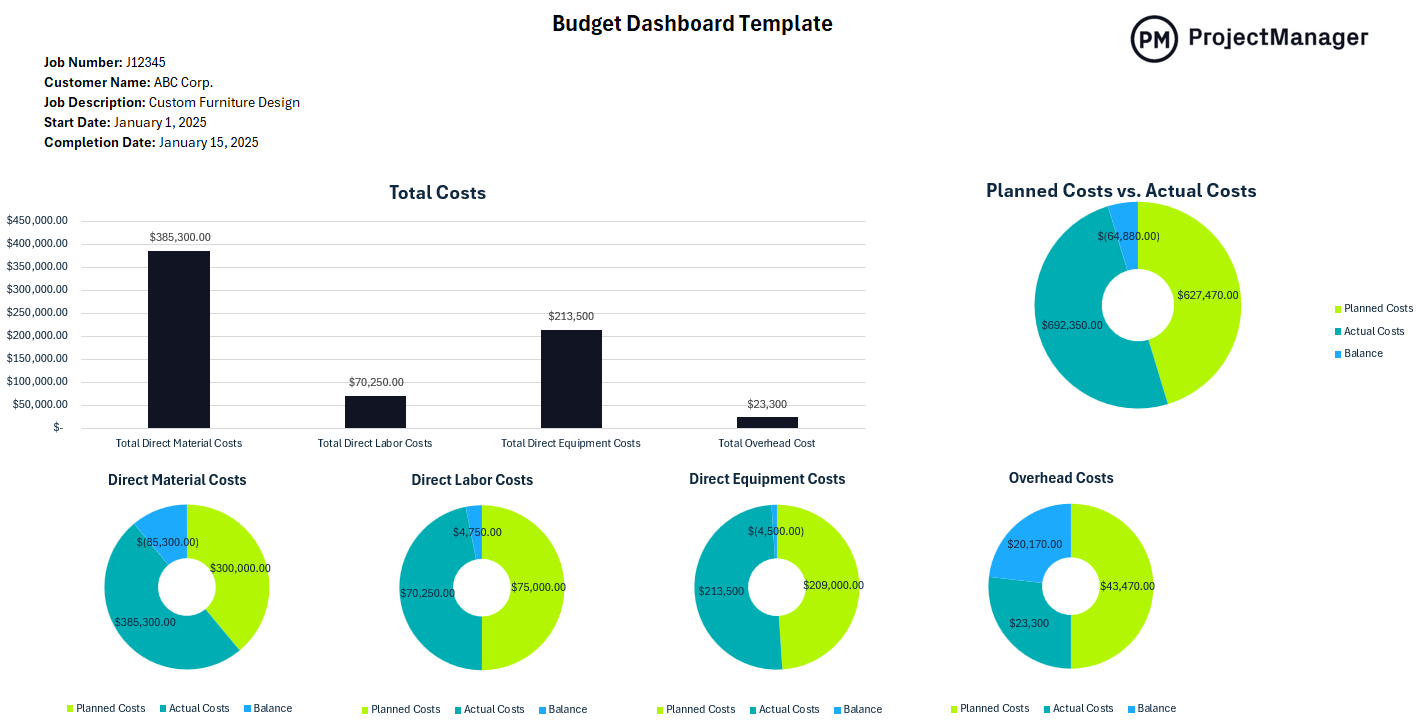
This Excel dashboard tracks planned versus actual spending across marketing categories (paid media, content, events, tools, agency fees and headcount) with variance calculations that immediately show where the budget is running ahead or behind plan. Summary charts give the marketing manager and finance team a visual read on spend performance across the quarter, while the line-item breakdown makes it straightforward to identify which channels or campaigns are consuming budget faster than expected and where room remains to invest.
The right tool for marketing managers and marketing ops teams who need a regular read on budget performance and a format they can use in weekly planning reviews or share with the CFO without pulling numbers from multiple systems first.
2. Marketing Campaign Dashboard for Excel
A marketing campaign involves more moving parts than it appears from the outside. Creative briefs, copy reviews, design approvals, channel setup, landing page builds, media buys, tracking implementation, launch, optimization and reporting. Each campaign is a project with its own timeline, budget and list of dependencies. Without a dashboard that shows campaign health across all those dimensions, it is easy for a launch to slip or a deliverable to get dropped without the team noticing until the go-live date arrives.
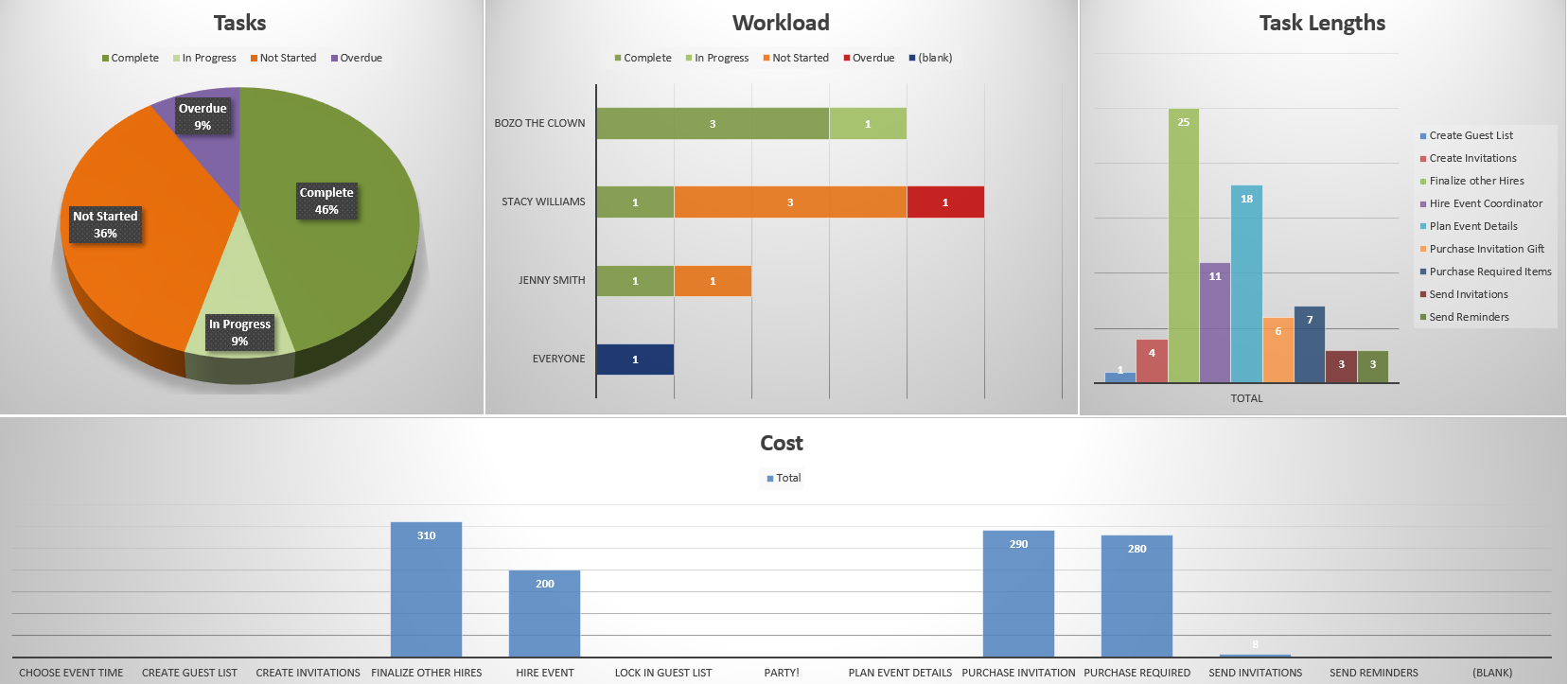
This Excel dashboard covers the key dimensions of campaign health: timeline progress against the launch date, budget consumption, milestone completion, deliverable status by workstream and an open issues log. Updated weekly during the campaign build and shared at team stand-ups, it gives the campaign manager and stakeholders a single reference point for campaign status, replacing the status meetings spent gathering updates with meetings spent making decisions based on a shared, current picture.
Most useful for campaign managers and marketing project leads running multi-channel campaigns, product launches or go-to-market initiatives where multiple teams and external partners are contributing deliverables on a shared timeline with a fixed launch date.
Get AI-Powered Marketing Dashboards: No Manual Updates Required
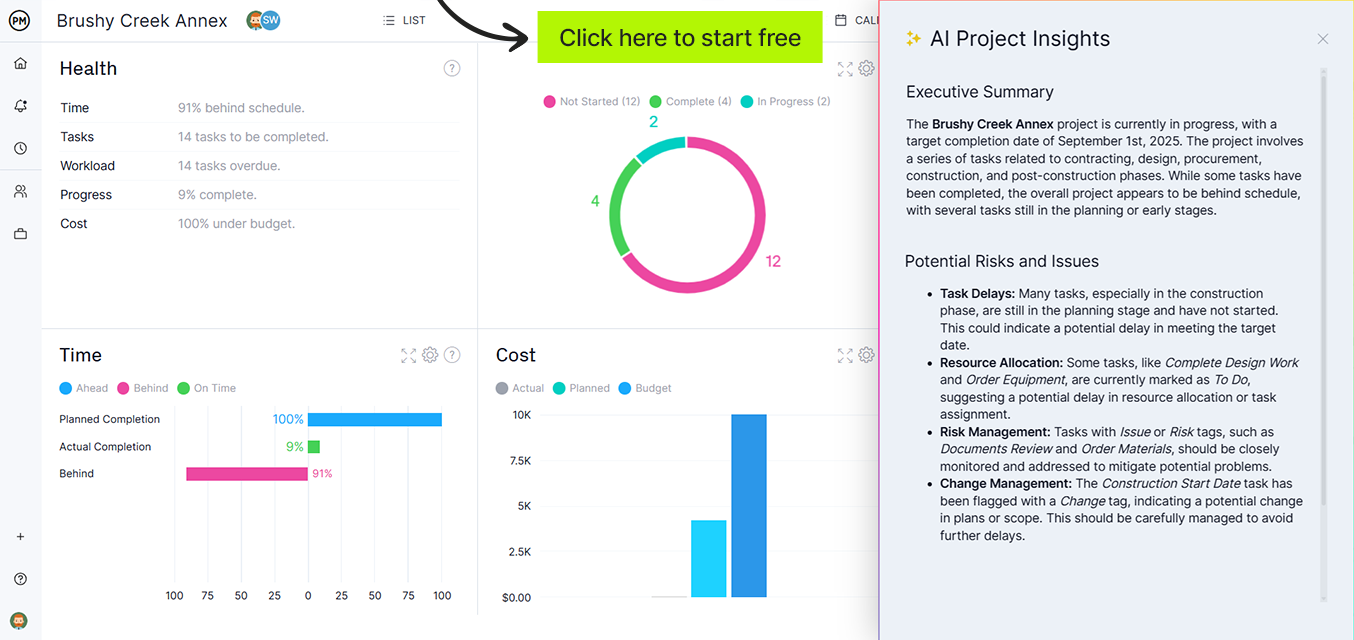
ProjectManager‘s dashboards update automatically as your team completes tasks, logs time and tracks spend. No spreadsheet updates required. AI-powered insights flag what is off track before a deadline slips or a budget is exceeded, so you can act on live data rather than last week’s report. Try it free for 30 days.
3. Marketing KPI Dashboard for Excel
Marketing performance is only as clear as the metrics you are tracking against targets. Impressions and clicks tell you about reach. Leads, MQLs and conversion rates tell you about effectiveness. Cost per acquisition and return on ad spend tell you about efficiency. Tracking all of them in isolation (one metric per platform, one report per channel) makes it impossible to see the full picture of how marketing is performing or where to invest to improve it. A KPI dashboard brings those metrics together in one view.

This Excel dashboard tracks your selected marketing KPIs against target values with visual indicators that immediately show which metrics are on track, which are approaching a threshold and which need attention. You define the KPIs that matter for your strategy (lead volume, conversion rate, CAC, ROAS, email engagement, organic traffic), and the dashboard shows performance against target across the reporting period. The trend view shows whether each metric is moving in the right direction over time, which is more useful for optimization decisions than a single-period snapshot.
Particularly useful for marketing managers running performance reviews, reporting to senior leadership or working with an agency partner where a shared, consistent set of metrics keeps everyone accountable to the same targets regardless of which platform or channel they are responsible for.
4. Marketing Task Tracker Dashboard for Excel
A marketing team’s task list is never short. Blog posts in draft, social content queued for review, email campaigns being built, ad creatives in feedback cycles, landing pages waiting on development, reports due at the end of the week. That is before the ad hoc requests that arrive daily. Without a visible, shared view of what is in progress and what is coming due, tasks get dropped, deadlines get missed and the team spends more time managing the workload than doing the work.
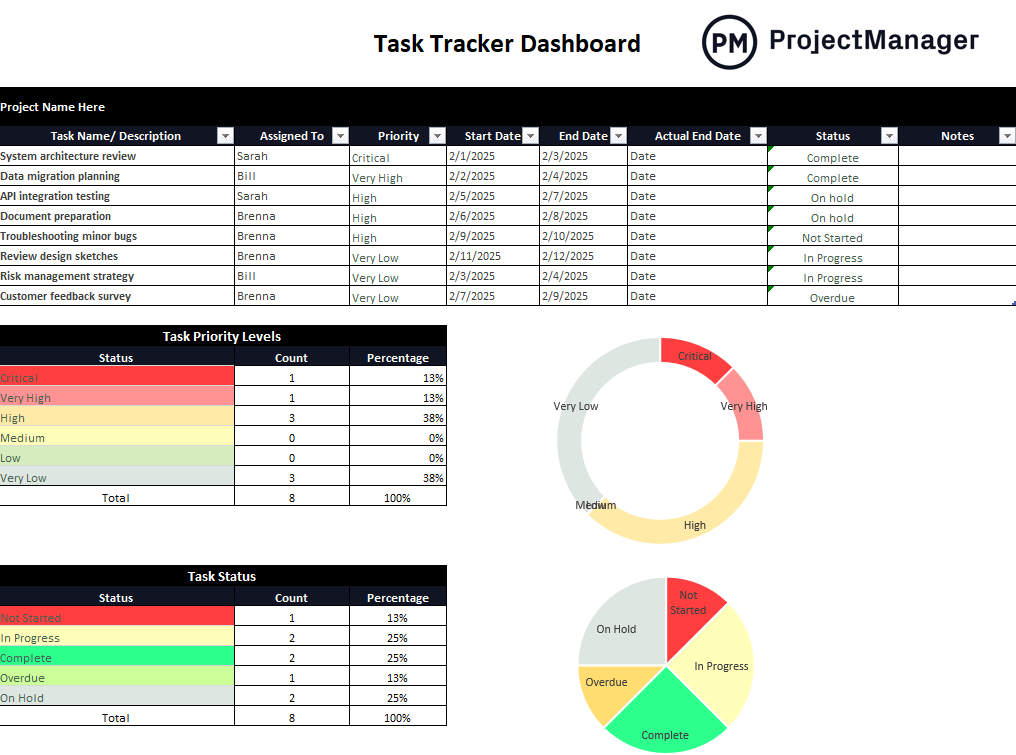
This Excel dashboard logs marketing tasks by campaign, channel or workstream with columns for owner, due date, status and completion percentage. Summary charts show overall workload status across the team and surface overdue items that need immediate attention. Used in weekly team stand-ups or shared as a living document, it gives the marketing manager a current view of what every team member is working on and what is at risk of slipping, without requiring a separate update from each person to get the picture.
Most useful for marketing managers overseeing multiple campaigns or content programs simultaneously, or for teams where the volume of parallel deliverables makes informal tracking unreliable and things falling through the cracks is a recurring problem.
5. Marketing Asset Management Dashboard for Excel
Creative assets are the output that marketing teams produce most consistently: ads, landing pages, email templates, social graphics, brand collateral, videos, whitepapers, case studies. Managing them informally (files scattered across shared drives, status tracked in someone’s head, approvals happening over email) creates the kind of disorganization where a campaign launches with the wrong version of an asset, a brand asset gets used without approval or the team rebuilds something that already exists because no one knew it was there.
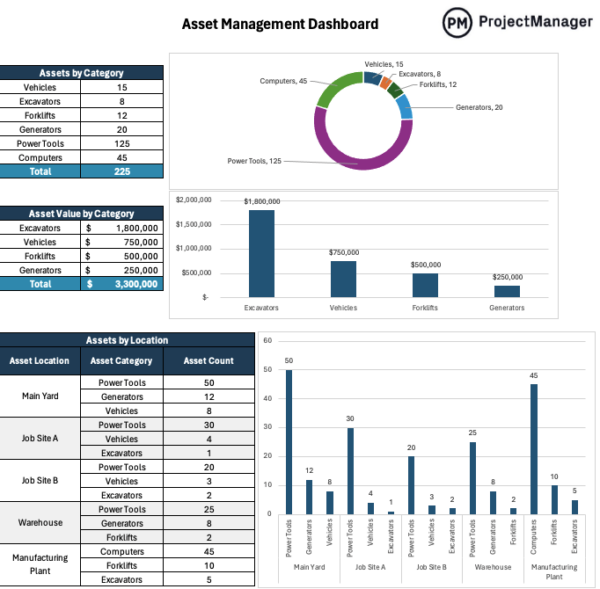
This Excel dashboard tracks your marketing assets with fields for asset name, type, campaign or channel, owner, current status (briefed, in production, in review, approved, live, archived), publish date and location. The summary view shows the pipeline of assets at each stage so the creative director and campaign manager can see at a glance what is ready to use, what is still in production and what is coming up for review. This makes it possible to plan campaign launches around asset readiness rather than discovering gaps at the last minute.
Best used by content teams, creative departments and marketing ops functions managing a high volume of assets across multiple campaigns and channels, where the lack of a shared status view regularly causes delays, version confusion or duplicated work.
Manage Marketing Projects and Campaigns With ProjectManager
Dashboard templates track performance after the fact. The work that drives those metrics (campaigns planned, content produced, budgets managed) needs its own system. ProjectManager gives marketing teams the project management tools to plan campaigns, assign deliverables, track progress and manage budgets in one place, so the numbers that appear in the dashboard reflect execution that was actually coordinated rather than assembled under pressure.
Plan and Launch Campaigns on Schedule
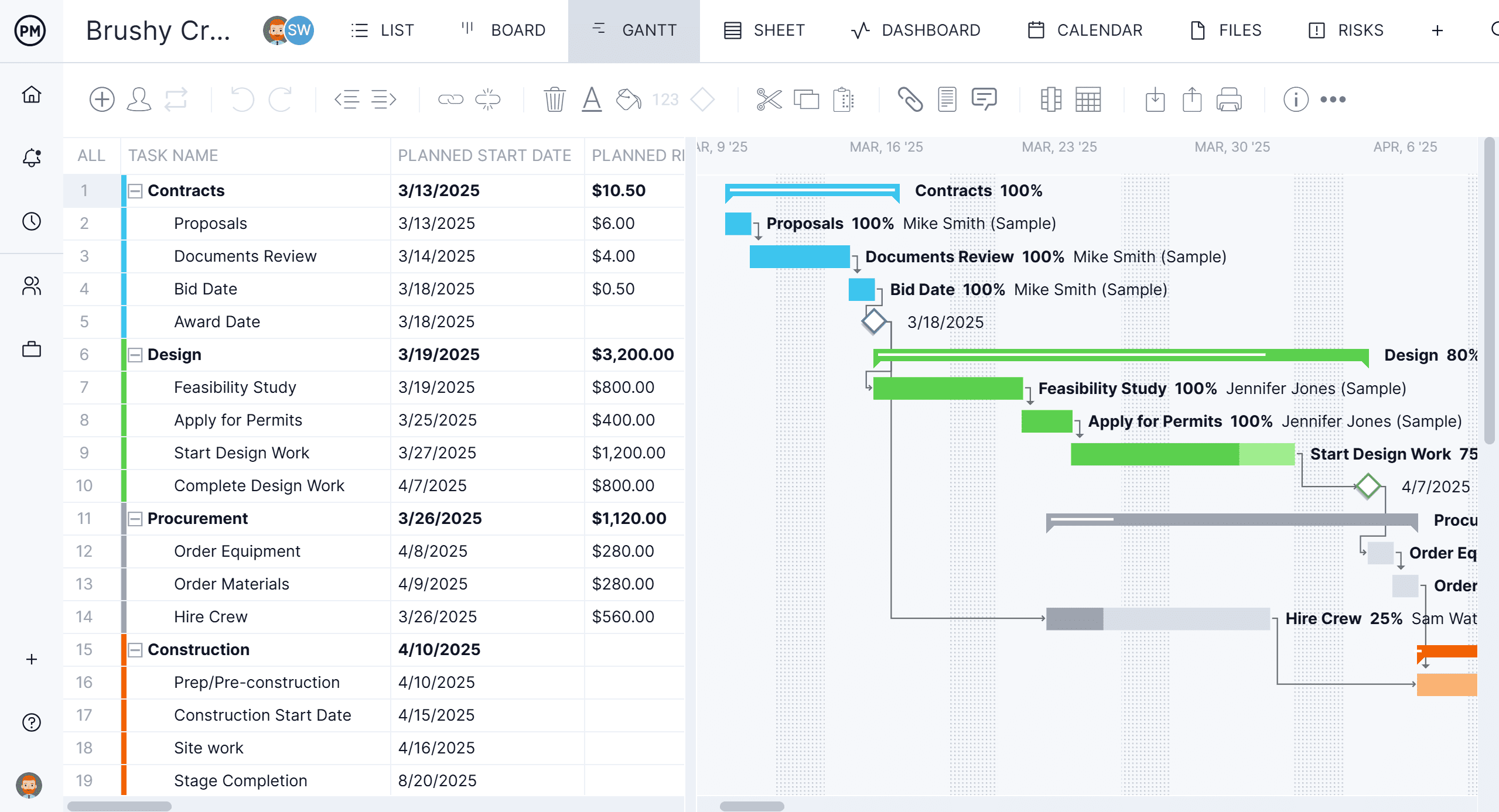
ProjectManager’s Gantt chart turns a campaign plan into a live timeline with tasks assigned to team members, dependencies linked and milestones marked at key dates. When a deliverable slips, the downstream impact is visible immediately so the campaign manager can resequence rather than discovering the delay on launch day. Everyone on the team works from the same updated plan, which reduces the back-and-forth about what is due and who is waiting on what that slows campaign production down.
Track Campaign Budgets Against Plan in Real Time
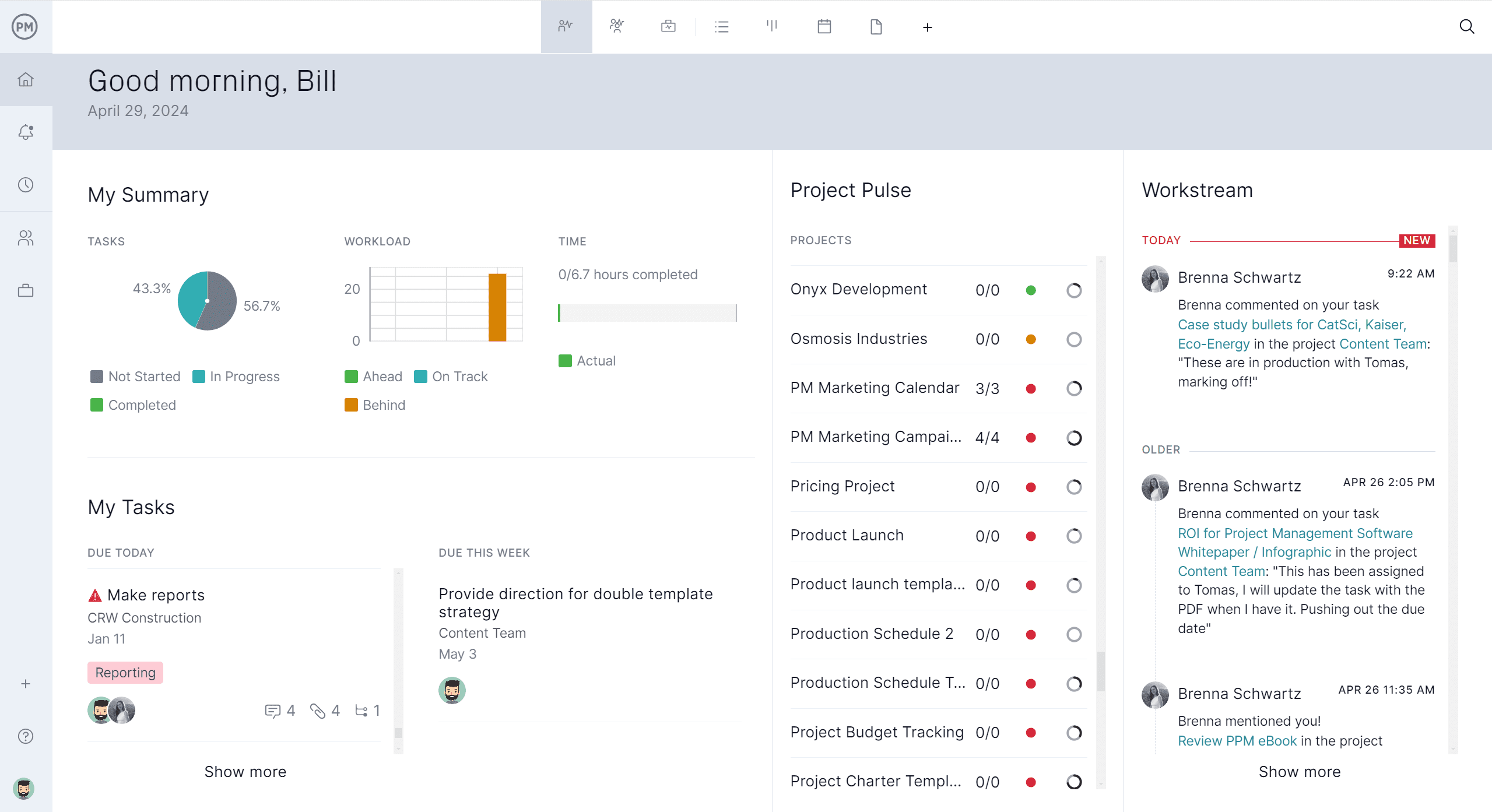
ProjectManager’s budget tracking tools let you set campaign budgets, log costs as they are incurred and compare actual spending to plan at any point during the campaign. When a channel is burning budget faster than expected or an agency invoice comes in higher than estimated, you see the variance in time to reallocate rather than after the quarter is over. Budget reports pull directly from the project record so the numbers in your dashboard reflect what was actually spent rather than what was estimated.
Related Content
- 5 Free Construction Dashboard Templates for Excel
- 5 Free Manufacturing Dashboard Templates for Excel
- 25 Free Project Management Templates for Excel
- 10 Free Status Report Templates for Word and Excel
- 8 Free Work Schedule Templates for Excel
- 20 Free Marketing Templates for Planning and Strategy
- A Quick Guide to Marketing Calendars (Template Included)
- What Is a Marketing Plan and How Do I Make One?
- 18 Budget Templates for Business and Project Budgeting
The post 5 Free Marketing Dashboard Templates for Excel appeared first on ProjectManager.