Hey folks 👋
So let me tell you a quick story.
I’m the kind of developer who changes their portfolio way too often. Sometimes it’s just tiny tweaks — a sentence here, a project title there — but every time I had to jump back into the code, redeploy, maybe even dig through JSON files or a CMS.
It was annoying. 😅
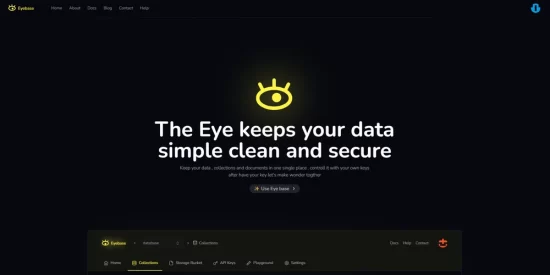
So instead of repeating that cycle forever, I built myself a little backend service to fix the problem. I call it Eyebase — and it’s open source! 🌟
🔗 GitHub: https://github.com/kiraaziz/eyebase
🌐 Eyebase: https://eyebase.vercel.ap
📚 Documentation: https://eyebase-docs.vercel.app
🧑💻 My Website: https://rjaziz.com
🧠 Why I Built Eyebase
Eyebase is my way of creating quick, small databases that I can control from a simple UI. No full-blown CMS. No Firebase setup. Just a lightweight dashboard to manage stuff like:
- My portfolio projects
- Micro-apps data
- Client content
Now, I just log into Eyebase, change what I need, and boom — done. And when I build small apps, I can hook them into Eyebase with an API key and manage the data remotely. Pretty neat, right?
🛠 How to Use the Eyebase App
Here’s a quick walkthrough of how you use Eyebase from the UI:
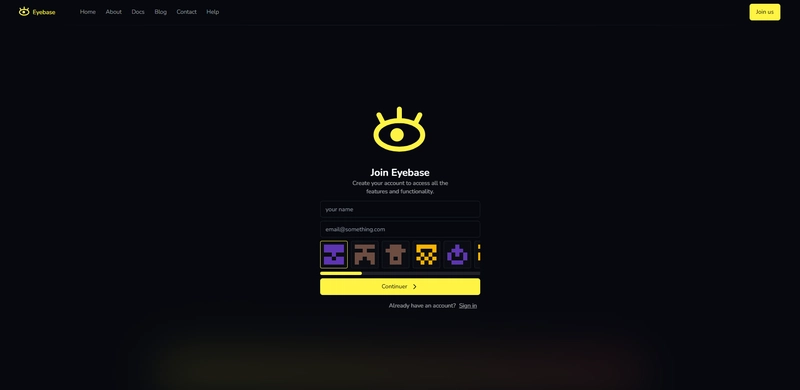
1. Login / Sign up
Go to https://eyebase.vercel.app and sign in. You’ll land on a dashboard where all your databases live.
2. Create a New Database
Click “Create a database” — this is where you’ll keep your collections (think of them like MongoDB collections or folders).
Example: Create a database called portfolio.

3. Add Collections
Inside your database, you can create collections like:
projectsuserstestimonialsproducts
Each collection holds multiple JSON documents.

4. Create/Edit Documents
Click into a collection and start adding documents. The UI lets you:
- Add fields (key-value pairs)
- Update data instantly
- Delete stuff when it’s no longer needed

5. Generate API Key
Go to the API Keys section to generate a key. You can set permissions like:
- Read-only
- Write-only
- Full access

🔗 Now, Use the API to Talk to Eyebase
Let’s get into the fun part — integrating it into your apps.
🔐 Authentication
Every API call needs an Authorization header with your API key.
Authorization: your-api-key
🌐 Base URL
https://eyebase.vercel.app/go/v0.1
🔄 CRUD Operations
📝 Create a Document
fetch('https://eyebase.vercel.app/go/v0.1?collectionName=users', {
  method: 'POST',
  headers: {
    'Authorization': 'your-api-key',
    'Content-Type': 'application/json'
  },
  body: JSON.stringify({
    name: 'John Doe',
    email: 'john@example.com'
  })
})
.then(res => res.json())
.then(console.log);
📖 Read a Document
fetch('https://eyebase.vercel.app/go/v0.1/abc123?collectionName=users', {
  method: 'GET',
  headers: {
    'Authorization': 'your-api-key'
  }
})
.then(res => res.json())
.then(console.log);
✏️ Update a Document
fetch('https://eyebase.vercel.app/go/v0.1/abc123?collectionName=users', {
  method: 'PUT',
  headers: {
    'Authorization': 'your-api-key',
    'Content-Type': 'application/json'
  },
  body: JSON.stringify({
    name: 'John Smith'
  })
})
.then(res => res.json())
.then(console.log);
❌ Delete a Document
fetch('https://eyebase.vercel.app/go/v0.1/abc123?collectionName=users', {
  method: 'DELETE',
  headers: {
    'Authorization': 'your-api-key'
  }
})
.then(res => res.json())
.then(console.log);
📋 List with Filters
const query = {
  pagination: { page: 1, perPage: 5 },
  where: [{ field: 'age', operator: 'gte', value: 25 }]
};

fetch(`https://eyebase.vercel.app/go/v0.1?collectionName=users&query=${JSON.stringify(query)}`, {
  headers: {
    'Authorization': 'your-api-key'
  }
})
.then(res => res.json())
.then(console.log);
🧪 Example Flow
- Create a document in
products - Read it by ID
- Update it with new info
- List all where price > 50
- Delete it when done
Here’s how that looks in Python:
import requests
import json

base_url = 'https://eyebase.vercel.app/go/v0.1'
headers = {
    'Authorization': 'your-api-key',
    'Content-Type': 'application/json'
}

# Create
res = requests.post(f'{base_url}?collectionName=products', headers=headers, json={
    'name': 'Laptop', 'price': 999.99
})
doc_id = res.json()['data']['eyeId_']

# Read
requests.get(f'{base_url}/{doc_id}?collectionName=products', headers=headers)

# Update
requests.put(f'{base_url}/{doc_id}?collectionName=products', headers=headers, json={
    'price': 899.99, 'onSale': True
})

# List
query = {'where': [{'field': 'price', 'operator': 'gt', 'value': 500}]}
requests.get(f'{base_url}?collectionName=products&query={json.dumps(query)}', headers=headers)

# Delete
requests.delete(f'{base_url}/{doc_id}?collectionName=products', headers=headers)
✅ Final Thoughts
Eyebase isn’t meant to replace Firebase or Mongo or Supabase.
But if you want:
- a no-setup JSON backend
- editable from a UI
- API access with fine permissions
…then Eyebase might save you hours — especially for small apps and portfolio tweaks.
Try it here 👉 eyebase.vercel.app
If you end up using it in one of your projects, I’d love to hear about it.