Hi devs
The Event Broker Pattern is an essential part of modern distributed systems, particularly for microservices. It serves as a mediator for communication between producers and consumers of events, ensuring decoupled and scalable systems.
In this post, we’ll implement the Event Broker Pattern using Azure Service Bus in a practical example involving an Order Service, Inventory Service, and Payment Service.
What Is an Event Broker?
An Event Broker is a centralized system that manages the routing of events from producers to consumers. Instead of services directly communicating with each other, they publish or subscribe to events via the broker.
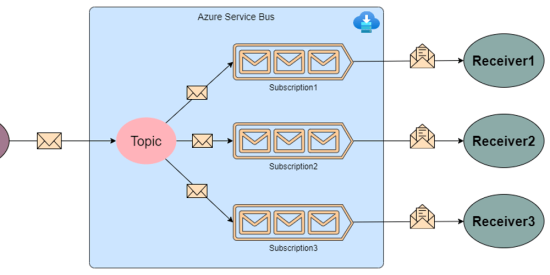
In our implementation, the Azure Service Bus Topic acts as the Event Broker, managing the following:
- Routing events to multiple subscribers.
- Decoupling services, as they don’t need to know about each other.
- Ensuring reliable delivery of messages.
How the Event Broker Works
In this example:
-
Order Service acts as the event producer, publishing an event (
OrderPlaced). - Azure Service Bus acts as the event broker, routing events to subscribers.
-
Inventory Service and Payment Service are the event consumers, processing the
OrderPlacedevent.
This architecture ensures scalability, as new consumers can be added without modifying the producer.
Step-by-Step Implementation
Here’s how to set up and implement the pattern.
Step 1: Prerequisites
-
Azure Setup:
- Create a Service Bus Namespace in the Azure Portal.
- Add a Topic named
OrdersTopic. - Add Subscriptions:
InventorySubscriptionandPaymentSubscription.
-
Development Setup:
- Create a new .NET project:
dotnet new console -n EventBrokerExample
-
Install the
Azure.Messaging.ServiceBuspackage:dotnet add package Azure.Messaging.ServiceBus
Step 2: Define a Shared Order Model
public class Order
{
    public int Id { get; set; }
    public int ProductId { get; set; }
    public int Quantity { get; set; }
    public decimal TotalPrice { get; set; }
}
This model will represent the data passed between the services.
Step 3: Implement the Event Producer (Order Service)
The Order Service publishes events to the Azure Service Bus Topic.
using Azure.Messaging.ServiceBus;
using System.Text.Json;
public class OrderPublisher
{
private readonly ServiceBusSender _sender;
public OrderPublisher(string connectionString, string topicName)
{
var client = new ServiceBusClient(connectionString);
_sender = client.CreateSender(topicName);
}
public async Task PublishOrderPlacedEventAsync(Order order)
{
var message = new ServiceBusMessage(JsonSerializer.Serialize(order))
{
Subject = "OrderPlaced"
};
await _sender.SendMessageAsync(message);
Console.WriteLine($"Published OrderPlaced event for Order ID: {order.Id}");
}
}
// Usage:
var connectionString = "" ;
var topicName = "OrdersTopic";
var publisher = new OrderPublisher(connectionString, topicName);
var order = new Order { Id = 1, ProductId = 101, Quantity = 2, TotalPrice = 50.00m };
await publisher.PublishOrderPlacedEventAsync(order);
This sends an event to the Event Broker (Service Bus Topic).
Step 4: Implement the Event Consumers
Inventory Service
The Inventory Service subscribes to the OrderPlaced event and updates stock.
using Azure.Messaging.ServiceBus;
using System.Text.Json;
public class InventoryService
{
private readonly ServiceBusProcessor _processor;
public InventoryService(string connectionString, string topicName, string subscriptionName)
{
var client = new ServiceBusClient(connectionString);
_processor = client.CreateProcessor(topicName, subscriptionName, new ServiceBusProcessorOptions());
}
public void Start()
{
_processor.ProcessMessageAsync += OnMessageReceived;
_processor.ProcessErrorAsync += OnError;
_processor.StartProcessingAsync();
}
private async Task OnMessageReceived(ProcessMessageEventArgs args)
{
var order = JsonSerializer.Deserialize<Order>(args.Message.Body.ToString());
Console.WriteLine($"InventoryService processing Order ID: {order.Id}");
Console.WriteLine($"Reducing stock for Product ID: {order.ProductId}");
await args.CompleteMessageAsync(args.Message);
}
private Task OnError(ProcessErrorEventArgs args)
{
Console.WriteLine($"Error: {args.Exception.Message}");
return Task.CompletedTask;
}
}
// Usage:
var inventoryService = new InventoryService("" , "OrdersTopic", "InventorySubscription");
inventoryService.Start();
Payment Service
The Payment Service processes the payment for the order.
using Azure.Messaging.ServiceBus;
using System.Text.Json;
public class PaymentService
{
private readonly ServiceBusProcessor _processor;
public PaymentService(string connectionString, string topicName, string subscriptionName)
{
var client = new ServiceBusClient(connectionString);
_processor = client.CreateProcessor(topicName, subscriptionName, new ServiceBusProcessorOptions());
}
public void Start()
{
_processor.ProcessMessageAsync += OnMessageReceived;
_processor.ProcessErrorAsync += OnError;
_processor.StartProcessingAsync();
}
private async Task OnMessageReceived(ProcessMessageEventArgs args)
{
var order = JsonSerializer.Deserialize<Order>(args.Message.Body.ToString());
Console.WriteLine($"PaymentService processing Order ID: {order.Id}");
Console.WriteLine($"Processing payment of {order.TotalPrice:C}");
await args.CompleteMessageAsync(args.Message);
}
private Task OnError(ProcessErrorEventArgs args)
{
Console.WriteLine($"Error: {args.Exception.Message}");
return Task.CompletedTask;
}
}
// Usage:
var paymentService = new PaymentService("" , "OrdersTopic", "PaymentSubscription");
paymentService.Start();
How It All Works
-
Order Service publishes an
OrderPlacedevent to the Service Bus Topic. - Azure Service Bus (Event Broker) forwards the event to all subscribers.
- Inventory Service updates the stock.
- Payment Service processes the payment.
Benefits of This Approach
- Decoupling: Each service is independent and doesn’t directly call others.
- Scalability: Multiple consumers can process events concurrently.
- Flexibility: Adding new consumers requires no changes to existing producers.
- Reliability: Azure Service Bus ensures message delivery with retries.
Conclusion
The Event Broker Pattern simplifies communication between microservices, making systems more scalable and maintainable. Using Azure Service Bus makes it even easier to implement this architecture with minimal effort.
Keep coding 🙂