Remember when AI was just a chatbot? You typed text, and it gave you text back. Those days are rapidly fading. We are entering the era of Multimodal Agentic Systems — where AI doesn’t just “talk,” but acts, creates, and produces media.
For the visual learner, this is a game-changer. Imagine a system where you act as the client, and an AI “Studio Manager” delegates your requests to specialized “Artists” and “Directors” to produce high-fidelity images and cinematic videos.
https://medium.com/media/e2b31d744001a9d28a2024086228f8b9/href
In this article, we will move beyond simple prompt engineering to build a fully autonomous Multimedia Studio using the Google Agent Development Kit (ADK), Gemini 3 Pro, and Veo 2.0.
The Architecture: Why MultiAgent?
Before writing a single line of code, we must understand the architecture. You might ask, “Why not just one big script?”.
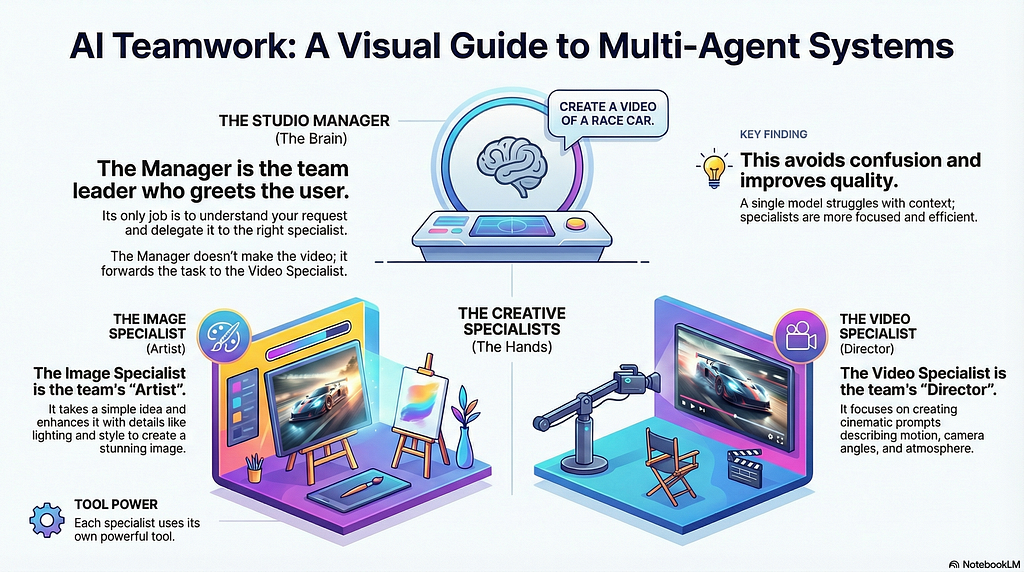
The reality is that a single model often struggles with context switching. If you ask a general model to “make a video,” it might try to write a script instead of generating the actual video file. By using Specialized Agents, we create a robust pipeline:
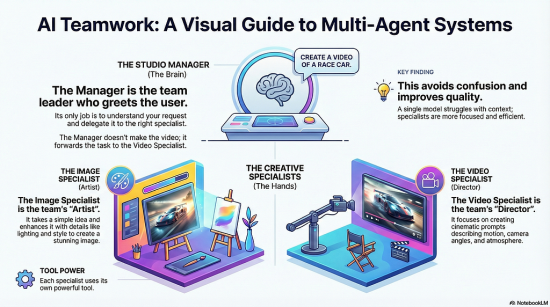
- The Studio Manager (Root Agent): The “Brain.” It understands user intent. If you say “draw me a logo,” it routes you to the Image Department. If you say “film a scene,” it routes you to the Video Department.
- The Image Specialist: The “Artist.” It focuses solely on composition, lighting, and style prompts.
- The Video Specialist: The “Director.” It focuses on camera movement and motion dynamics.
Setting the Stage: Prerequisites
Before we dive into the code, let’s ensure your development environment is primed. To follow this tutorial effectively, you will need a Python environment ready with a specific set of libraries.
Open your terminal and run the following command to install the necessary dependencies:
pip install google-adk google-genai requests pillow
🧰 What’s in the toolkit?
Here is a breakdown of why we need each of these libraries:
- google-adk This serves as the framework for orchestration, helping to manage the flow of the application.
- google-genai The most critical piece of the puzzle. This SDK provides access to Google’s Gemini and Veo models.
- requests We need this library to handle HTTP requests. It is crucial for handling video downloads, specifically because the Veo model generates files asynchronously, and we need a way to retrieve them once they are ready.
- pillow The standard Python Imaging Library (PIL fork), used here for processing image binary data.
Part 1: Defining the “Hands” (The Physical Tools)
Agents are the “brains,” but they need “hands” to interact with the world. We define two physical functions (Tools) that perform the actual API calls.
1. The Artist’s Brush: Gemini 3 Pro Image
This tool utilizes Gemini 3 Pro Image. It takes a prompt, calls the API, processes the raw binary data, saves it locally, and returns an HTML snippet for the UI.
Key Implementation Detail: We use Local Imports inside the function. In ADK, tools are often sandboxed. Importing libraries like genai or PIL inside the function prevents execution errors.
def tool_generate_image(prompt: str) -> dict:
    # ... Local imports ...
    # API Call to Gemini 3 Pro Image
    response = client.models.generate_content(
        model="gemini-3-pro-image-preview",
        contents=prompt,
        config=types.GenerateContentConfig(response_modalities=["IMAGE"])
    )
    # Processing binary data to JPG...
    # Returning HTML...
Function Specification
Now, let’s look at the contract for the function we are building. It takes a simple text input and returns a structured object containing our results.
- Input: prompt (str) A descriptive string.
- Output: dict Contains status and an HTML report.
2. The Director’s Camera: Veo 2.0 (The Asynchronous Challenge)
Video generation is more complex because it is asynchronous. When we ask Veo to make a video, it returns a “Job ID” immediately, but the video takes 1–2 minutes to render.
Our tool must handle Polling (waiting and checking status) and Parsing the specific JSON structure of Veo 2.0.
We use manual polling with requests to bypass SDK wrapper issues and ensure reliable execution.
def tool_generate_video(prompt: str) -> dict:
    # 1. Start the Job
    raw_resp = client.models.generate_videos(
       model="veo-2.0-generate-001", ...
    )
    # 2. Polling Loop (Manual HTTP Requests)
    while True:
        resp = requests.get(poll_url)
        # Check if 'done' is true...
        # Parse the JSON to find 'video_uri'...

    # 3. Authenticated Download
    dl = requests.get(video_uri, params={'key': api_key})
    # Save mp4 file...
Function Specification
This function is specialized for the visual component, likely leveraging the Veo model mentioned in the prerequisites.
- Input: prompt (str) A cinematic description detailing the scene, camera movement, or visual style required.
- Output: dict A dictionary containing the status and an embedded HTML video player to display the result.
Part 2: The Memory (State Management)
How does the Manager pass the user’s request to the Specialist? We use a shared State.
We define a helper tool called append_to_state. When the user says “I want a video of a cat,” the Manager calls this tool to save “video of a cat” into a variable called USER_REQUEST. The Video Specialist then reads this variable to begin its work.
Below is a foundational method for ensuring your AI tools can write to a shared persistent memory.
def append_to_state(tool_context: ToolContext, field: str, response: str) -> dict:
    """Saves text to the shared memory context."""
    # ... logic to append data to tool_context.state ...
    existing_state = tool_context.state.get(field, [])
    if isinstance(existing_state, list):
        tool_context.state[field] = existing_state + [response]
    else:
        tool_context.state[field] = [response]

    logging.info(f"[STATE UPDATE] Added to {field}: {response}")
    return {"status": "success"}
Breaking Down the Architecture
- tool_context: ToolContext: This is the “brain” of the operation. It represents the shared state object that persists across the entire lifecycle of the agent’s task.
- field: str: This allows for categorized memory. Instead of a giant blob of text, you can organize data under specific keys (e.g., “user_preferences” or “search_results”).
- response: str: The actual payload of information being stored.
Part 3: The Brains (The Agents)
Now we define the personalities of our agents.
The Image Specialist
This agent acts as a professional prompter. It doesn’t just pass “cat” to the model; it expands it to “A fluffy Persian cat sitting on a velvet sofa, cinematic lighting, 8k resolution”.
image_agent = Agent(
    name="image_specialist",
    instruction="""
    CONTEXT: { USER_REQUEST? }
    INSTRUCTIONS:
    1. Read USER_REQUEST.
    2. Enhance the prompt (add style, lighting).
    3. Call tool_generate_image.
    """,
    tools=[tool_generate_image]
)
The Video Specialist
Similarly, this agent focuses on motion. It ensures the prompt includes camera instructions (e.g., “slow pan,” “drone shot”) and warns the user about the wait time.
video_agent = Agent(
    name="video_specialist",
    instruction="""
    CONTEXT: { USER_REQUEST? }
    INSTRUCTIONS:
    1. Read USER_REQUEST.
    2. Enhance prompt with CAMERA ANGLES and ATMOSPHERE.
    3. Call tool_generate_video.
    4. Warn user about the wait time.
    """,
    tools=[tool_generate_video]
)
Part 4: The Manager (The Root Agent)
Finally, we tie it all together. In Google ADK, we use the sub_agents parameter to create this hierarchy.
The Manager doesn’t need to know how to make a video; it just knows who can make it.
root_agent = Agent(
    name="multimedia_manager",
    instruction="""
    You are the Studio Manager.
    1. Ask user for their request.
    2. Save it using `append_to_state` to 'USER_REQUEST'.
    3. Delegate to `image_specialist` OR `video_specialist`.
    """,
    sub_agents=[image_agent, video_agent], # <-- The Hierarchy
    tools=[append_to_state]
)
Full Implementation Code
Here is the complete, production-ready code for agent.py. It includes all the fixes for local imports, JSON parsing for Veo 2.0, and state management.
import os
import logging
import base64
import io
import time
import requests
import json
from PIL import Image

from google.adk.agents import Agent
from google.adk.tools.tool_context import ToolContext
from google.genai import types

# Setup Logging
logging.basicConfig(level=logging.INFO)

# =============================================================================
# 1: HELPER TOOLS (STATE MANAGEMENT)
# =============================================================================

def append_to_state(
    tool_context: ToolContext, field: str, response: str
) -> dict[str, str]:
    """
    saves text to state (memory) for operation to sub-agents.
    """
    existing_state = tool_context.state.get(field, [])
    if isinstance(existing_state, list):
        tool_context.state[field] = existing_state + [response]
    else:
        tool_context.state[field] = [response]

    logging.info(f"[STATE UPDATE] Added to {field}: {response}")
    return {"status": "success"}

# =============================================================================
# 2: PHYSICAL TOOLS
# =============================================================================

def tool_generate_image(prompt: str) -> dict:
    """Generates a high-quality static image using Gemini 3 Pro Image."""

    from google import genai
    from google.genai import types
    import os
    import io
    import base64
    from PIL import Image
    # -------------------------------------------------

    print(f"   🎨 [PHYSICAL TOOL] Drawing: {prompt[:30]}...")
    try:
        api_key = os.environ.get("GEMINI_API_KEY") or os.environ.get("GOOGLE_API_KEY")
        client = genai.Client(api_key=api_key)

        response = client.models.generate_content(
            model="gemini-3-pro-image-preview",
            contents=prompt,
            config=types.GenerateContentConfig(response_modalities=["IMAGE"])
        )

        for part in response.candidates[0].content.parts:
            if part.inline_data and part.inline_data.data:
                filename = "generated_image.jpg"
                file_path = os.path.abspath(filename)

                image = Image.open(io.BytesIO(part.inline_data.data))
                if image.mode in ("RGBA", "P"): image = image.convert("RGB")
                image.save(filename, quality=85)

                buffer = io.BytesIO()
                image.thumbnail((600, 600))
                image.save(buffer, format="JPEG", quality=70)
                buffer.seek(0)
                b64_str = base64.b64encode(buffer.read()).decode('utf-8')

                return {
                    "status": "success",
                    "report": f"✅ Image Saved!n"
                }
    except Exception as e:
        return {"status": "error", "report": f"Image Error: {str(e)}"}
    return {"status": "error", "report": "No image returned."}

def tool_generate_video(prompt: str) -> dict:
    """Generates a video using Veo 2.0 with Manual Polling Fix."""

    from google import genai
    from google.genai import types
    import requests
    import time
    import os
    # -------------------------------------------------

    print(f"   🎬 [PHYSICAL TOOL] Filming: {prompt[:30]}...")
    try:
        api_key = os.environ.get("GEMINI_API_KEY") or os.environ.get("GOOGLE_API_KEY")
        client = genai.Client(api_key=api_key)

        # 1. Start Job
        raw_resp = client.models.generate_videos(
            model="veo-2.0-generate-001",
            prompt=prompt,
            config=types.GenerateVideosConfig(number_of_videos=1, aspect_ratio="16:9")
        )
        op_name = raw_resp.name if hasattr(raw_resp, 'name') else str(raw_resp)
        print(f"   --> Job ID: {op_name}")

        # 2. Polling
        poll_url = f"https://generativelanguage.googleapis.com/v1beta/{op_name}?key={api_key}"
        start = time.time()

        while True:
            if time.time() - start > 600: return {"status": "error", "report": "Timeout."}
            resp = requests.get(poll_url)
            if resp.status_code != 200: time.sleep(5); continue

            data = resp.json()
            if data.get('done'):
                if 'error' in data: return {"status": "error", "report": str(data['error'])}

                # Parsing Logic
                video_uri = None
                try:
                    inner = data.get('response') or data.get('result')
                    if inner and 'generateVideoResponse' in inner:
                        video_uri = inner['generateVideoResponse']['generatedSamples'][0]['video']['uri']
                    elif inner and 'generatedVideos' in inner:
                        video_uri = inner['generatedVideos'][0]['video']['uri']
                except: pass

                if not video_uri: return {"status": "error", "report": "Video finished but URL missing."}

                # 3. Download
                dl = requests.get(video_uri, params={'key': api_key}, stream=True)
                if dl.status_code == 200:
                    filename = "generated_movie.mp4"
                    with open(filename, 'wb') as f:
                        for chunk in dl.iter_content(8192): f.write(chunk)
                    return {
                        "status": "success",
                        "report": f"✅ Video Saved!n"
                    }
                return {"status": "error", "report": "Download failed."}

            time.sleep(5)

    except Exception as e:
        return {"status": "error", "report": f"System Error: {str(e)}"}

# =============================================================================
# SUB-AGENTS (SPECIALISTS)
# =============================================================================

image_agent = Agent(
    name="image_specialist",
    model="gemini-3-pro-preview",
    description="Specialist agent that creates static images, photos, and infographics.",
    instruction="""
    CONTEXT FROM MANAGER:
    { USER_REQUEST? }

    INSTRUCTIONS:
    - Read the 'USER_REQUEST' from the state.
    - Create a highly detailed English prompt based on that request (add lighting, style).
    - Use the `tool_generate_image` to create the visual.
    - Return the result to the user.
    """,
    tools=[tool_generate_image]
)

video_agent = Agent(
    name="video_specialist",
    model="gemini-3-pro-preview",
    description="Specialist agent that creates videos, movies, and animations using Veo.",
    instruction="""
    CONTEXT FROM MANAGER:
    { USER_REQUEST? }

    INSTRUCTIONS:
    - Read the 'USER_REQUEST' from the state.
    - Create a prompt describing MOTION, CAMERA ANGLES, and ATMOSPHERE.
    - Use the `tool_generate_video` to create the video.
    - Tell the user to wait a moment while you render it.
    """,
    tools=[tool_generate_video]
)

# =============================================================================
# ROOT AGENT (MANAGER)
# =============================================================================

root_agent = Agent(
    name="multimedia_manager",
    model="gemini-3-pro-preview",
    description="The main receptionist. Greets user and routes tasks to specialists.",
    instruction="""
    You are the Manager of a Multimedia Studio.

    1. Ask the user what they want to create today (Image or Video?).
    2. When they respond:
       - Use `append_to_state` tool to save their description into the 'USER_REQUEST' field.
       - Then, delegate the task to the correct specialist (`image_specialist` or `video_specialist`).

    Example flow:
    User: "I want a video of a cat."
    You: Call append_to_state(field='USER_REQUEST', response='video of a cat') -> Delegate to video_specialist.
    """,
    sub_agents=[image_agent, video_agent],
    tools=[append_to_state]
)
How to Run Your Studio
The easiest way to test your agent is using the built-in web UI provided by ADK.
- Open your terminal in the project directory.
- Run command: adk web
- Open http://localhost:8000
Example Workflow:
- User: “Create a video showing a mind map for learning Python.”
- Manager: (Saves request, routes to Video Specialist).
- Video Specialist: “I am starting the render… Please wait 1–2 minutes.”
- Result: The system displays the generated video player and saves generated_movie.mp4
Conclusion
By combining Gemini 2.5, Veo 2.0, and the Google ADK, we have built a system that understands intent and orchestrates complex, asynchronous media generation tasks. This MultiAgent pattern is scalable — you could easily add an “Audio Specialist” or “Copywriter Specialist” to this team in the future.
Special Thank You to Kevin Jonathan Halim for the collaboration in creating this article and demo

MultiAgent Systems for the Visual Learner: Building an Autonomous Studio with Gemini 3 & Veo was originally published in Google Developer Experts on Medium, where people are continuing the conversation by highlighting and responding to this story.
![[eks-hand-on-series]-introduction-and-setup-environment](https://prodsens.live/wp-content/uploads/2023/09/15015-eks-hand-on-series-introduction-and-setup-environment-380x250.jpg)