While Large Language Models have demonstrated impressive capabilities in generating text and solving reasoning problems, their inability to remember and learn from past interactions has remained a fundamental limitation.
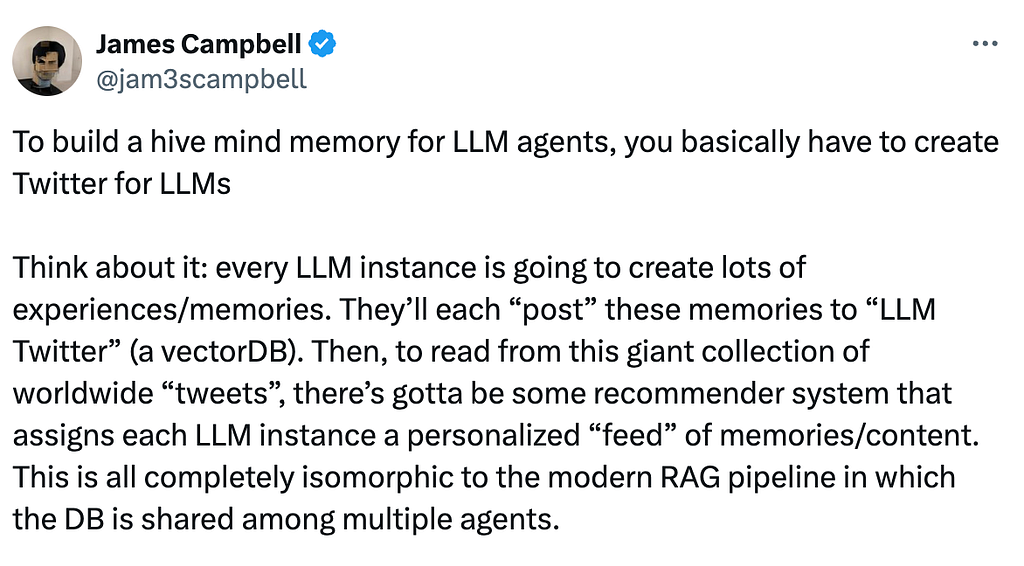
I’ve been playing around with AI memory systems lately and one quick observation is Knowledge graphs has been backbone, and after digging into how systems like Cognee work, I wanted to share why developers are so excited about this approach.
Table of Contents
- Why are developers bullish about using Knowledge graphs for Memory
- It’s About Relationships, Not Just Retrieval
- Deterministic Reasoning and Multi-Hop Queries
- Temporal Awareness and State Evolution
- Persistent State Across Sessions
- Use Memory as a Tool with Google ADK [code]
Why are developers bullish about using Knowledge graphs for Memory?
Traditional approaches to AI memory have been… let’s say limited.
You either dump everything into a Vector database and hope semantic search finds the right stuff, or you store conversations as text and pray the context window is big enough. Knowledge graphs flip this on its head. At their core, Knowledge graphs are structured networks that model entities, their attributes, and the relationships between them.
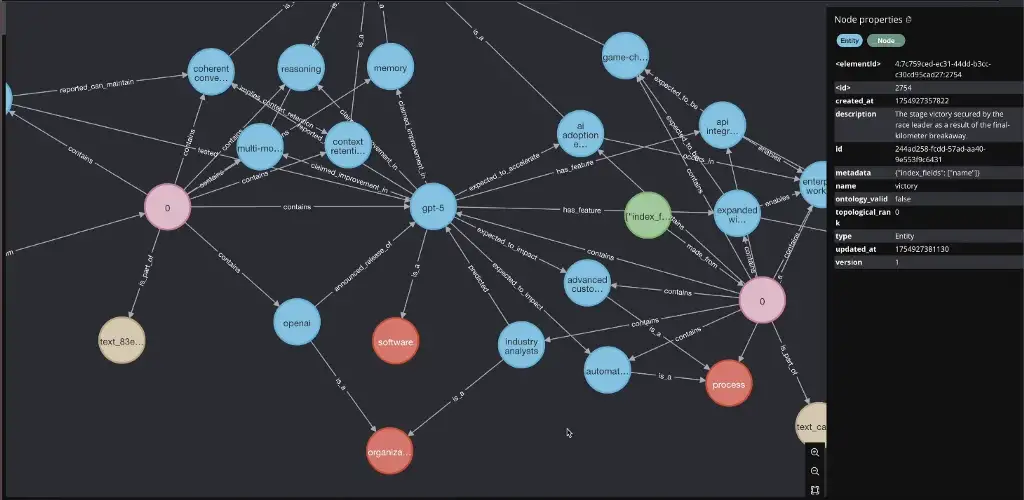
Instead of treating information as isolated facts, a Knowledge graph organizes data in a way that mirrors how people reason: by connecting concepts and enabling semantic traversal across related ideas.
It’s About Relationships, Not Just Retrieval
Here’s the thing: Your brain doesn’t work by searching for similar-sounding memories. It connects concepts. When you think “Italy” your brain fires off connections to “Rome,” “Colosseum”, “Pizza”, “Pasta/Gelato” whatever. Knowledge graphs do this explicitly.
From Italy I remember, I just love Varenna and Lake Como. Best vacation ever. (my core memory of 2025)




Well back to the topic.
In Cognee’s implementation, every piece of information is a node connected to other nodes through typed relationships. A DocumentChunk contains Entities, which have EntityTypes, and these entities relate to each other through specific relationships like “works_for” or “located_in.”
This structure means when you ask “Where did Tarun stay about the Italy in 2025?” the system doesn’t just find documents with “Tarun” and “Italy” in them. It traverses the graph: Tarun → mentioned_in → DocumentChunk → contains → Entity(project) → has_relationship → other related entities. You get actual reasoning paths, not just keyword matches.
Deterministic Reasoning and Multi-Hop Queries
RAG systems struggle with questions that need multiple steps of reasoning. “What F1 circuit did Tarun visit in Italy?” requires finding your Italy trip, identifying which cities you visited, then connecting those cities to F1 circuits.

Traditional vector search tries to find documents that happen to mention “Italy,” “F1,” and “circuit” together. Knowledge graphs just walk the relationships: You → visited → Italy → contains → Monza → has_circuit → Autodromo Nazionale Monza.
Graph completion retriever does something clever here. It doesn’t just pull the top-k most similar vectors. It performs what they call “brute force triplet search” finding relevant entities through vector search, then expanding context by traversing connected graph edges. The system can answer complex queries by hopping across relationships in the graph structure.
This is huge for building Agents that need to maintain coherent understanding across long conversations. The Agent doesn’t need to stuff everything into context or hope the right information surfaces from vector search. The relationships are explicit and traversable.
Temporal Awareness and State Evolution
Information changes. Someone’s job title changes, project statuses update, facts get corrected. Traditional databases handle this by overwriting old data or keeping verbose change logs. Knowledge graphs track this naturally through versioned nodes and temporal edges.
Cognee’s DataPoint model includes versioning and timestamps built-in. When information conflicts, the system can invalidate old relationships without deleting them entirely. This means you can answer both “What is Tarun’s current role?” and “What was Tarun doing in Q3 2024?” from the same graph.
Further Cognee’s ECL (Extract, cognify, Load) pipeline starts with the ingestion of raw content from APIs, databases, or documents. Then, during cognify (a command to use after adding your text using add function), it split the data into chunks, generate embeddings for semantic depth, identify key entities, and map relationships. now with the option to add temporal layers.
Persistent State Across Sessions
Persisting state is important for Context Engineering. In the previous article I have stressed a lot on the Context Engineering, maybe you can check it out after reading this article:
Implement Long-term memory to Large Language models that works
Context isn’t just about individual queries. For Agents, context means maintaining state across entire workflows or even multiple conversations. This is where traditional chat-based systems completely break down.
Knowledge graphs provide persistent state naturally. Every interaction can add nodes and edges to the graph. The graph becomes a living representation of what the Agent knows and has done. When you come back to a project after a week, the Agent doesn’t need to reconstruct context from chat logs as the graph is the context.
Here’s something that took me a while to appreciate: context needs to be query-specific. When you ask “What is project X about?” you need the entities directly connected to that project. When you ask “What projects are similar to project X?” you need a different subgraph entirely projects that share attributes or relationships with X.
Framework like Cognee implements multiple search types for this reason. GRAPH_COMPLETION retrieves and traverses relationships. CHUNKS returns raw text segments. SUMMARIES pulls pre-computed abstracts. The system picks the retrieval strategy based on the query type because different questions genuinely need different context structures.
Its time to take a look of the code implementation. We will be using Google ADK as our Agentic framework.
Agent Development Kit (ADK) is a flexible and modular framework for developing and deploying AI agents.
Use Memory as a Tool with Google ADK [code]
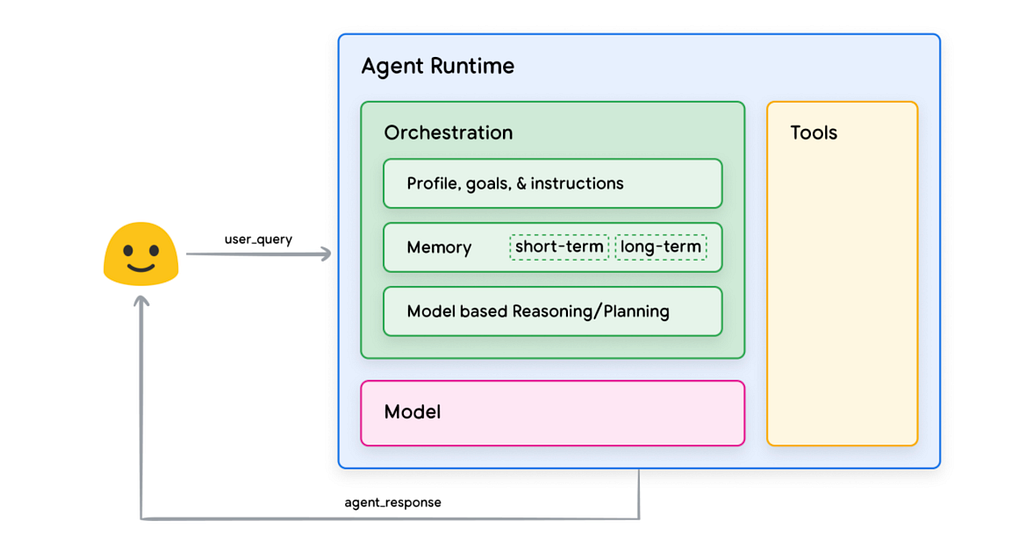
What is an AI agent?
Oh, come on. If you are reading this article, you already know what an AI agent is. And if you do not, then you are completely lost, my friend.
At the core of Agents, we have LLMs, multiple tools, reasoning layer and Memory. But here we will use Cognee as our Long-Term Memory component with Google ADK.
Cognee is the AI Memory layer learns from feedback and auto-tunes itself to deliver better answers over time.
But when it comes to using this with Google ADK or Agno or LangGraph or any Agents framework providers, we can use it as tool. If the information is new, you save it using add_tool, if the information already exist you use search_tool.
Let’s build an Personal Assistant Agent who remembers my preference to plan my itinerary accordingly. This can make your itinerary + restaurant place suggestions based on your preference and habit.
Let’s get started.
Step-1: Installation
uv venv # creates virtual environment

uv add cognee-integration-google-adk
cognee-integration-google-adk combines Cognee’s memory layer with Google’s Agent Development Kit (ADK). This integration allows you to build AI Agents that can efficiently store, search, and retrieve information from a persistent knowledge base.
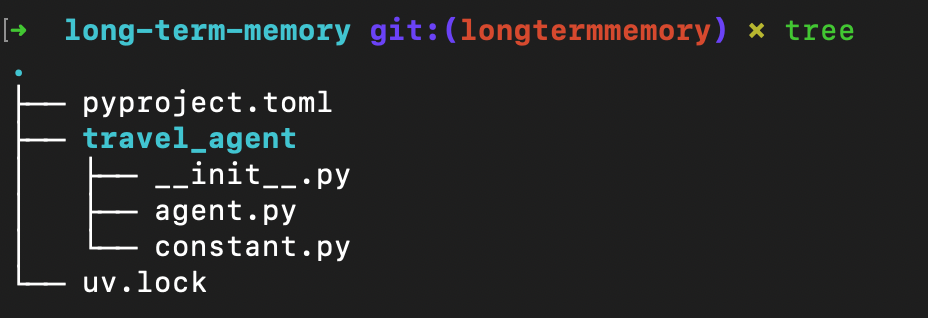
Step-2: Setup Environment Variable.
To config Cognee, you need to config 3 things: LLM, Embedding and Vector database.
- If you have OPENAI API KEY then you just need to provide OPENAI API Key as LLM_API_KEY under .env that we take care of default LLM and Embedding model.
- But if you want to config and use different LLM and Embedding model, in our case we will use Gemini as our LLM and FastEmbed as our Local embedding model that doesn’t require any API key.
FastEmbed by Qdrant is a lightweight library with few external dependencies. You don’t require a GPU and don’t download GBs of PyTorch dependencies, and instead use the ONNX Runtime.
- You can also use custom Vector database adapter in env such as Qdrant Vector database. Cognee <> Qdrant env example.
This is our .env file.
# .env file
# For cognee operations

LLM_PROVIDER=gemini
LLM_MODEL=gemini/gemini-2.5-flash
LLM_API_KEY=your-google-api-key

EMBEDDING_PROVIDER=fastembed
EMBEDDING_MODEL=jinaai/jina-embeddings-v2-base-en
EMBEDDING_DIMENSIONS=768

# For Agents- Gemini models (ADK execution)
GOOGLE_API_KEY=your-google-api-key
or if you have OPENAI_API_KEY, here is how your .env needs to look like:
# .env file
# For cognee operations
LLM_API_KEY=your-openai-api-key
# For Agents- Gemini models (ADK execution)
GOOGLE_API_KEY=your-google-api-key
Read the documentation for the configuring the LLM of your choice:
Quickstart – Cognee Documentation
Step-3: Define Instructions and Preference
Now define the instructions that let’s the Agent to adapt and define the tone to generate the response. Preferences store long term likes and constraints, and instructions ensure every itinerary or restaurant suggestion respects them by default.
This is our constant.py
MY_PREFERENCE = """
- I like to visit places near the beach where I can find the best spots.
- I need locations that are rare to find on blogs but are goldmine places for your eyes
- I prefer Vegetarian meals. Use this when I ask for restaurants recommendation
- I am a Jain so plan accordingly. Garlic and Onions works. But No eggs and Mushrooms.
- For hotel recommendations if I ask: I prefer private bathrooms and minimum 8+ reviews on booking.com and more than 4+ ratings on Google Maps
- My hobbies that might also help in planning Itineraries: I love Anime, F1 and Cricket.
- About me: I am Tarun Jain, AI & Founding Engineer with a YouTube channel: AI with Tarun
"""

INSTRUCTIONS = """
You are a travel planning agent. When the user asks for recommendations:
1. Search memory for relevant user preferences
2. Extract and apply those preferences to filter all results
3. When retrieving cached recommendations from memory, re-validate against preferences
4. Present only options that match ALL preference criteria
5. If preferences conflict with available options, explain why and suggest alternatives
"""
Step-4: Initial Import Statements
Ensure the API keys in the env file are in place and based on your use case you have modified your instructions and preference.
In order to build the Agent using Google ADK, we need Agent object to config the LLM and tools. Since we are using Google ADK, we can directly use Gemini models as LLM, as for tools, we have add_tool and search_tool using Cognee ADK Integration:
GitHub – topoteretes/cognee-integration-google-adk
app.py:
import asyncio
from google.adk.agents import Agent
from google.adk.runners import InMemoryRunner

import cognee
from cognee_integration_google_adk import add_tool, search_tool
from constant import MY_PREFERENCE, INSTRUCTIONS

from dotenv import load_dotenv
load_dotenv()
Step-5: Define your Agent
Using Google ADK’s Agent object we orchestrate everything i.e., the model name (gemini 2.5 pro), Description i.e., the role play for the Agent, Instructions and the tools i.e., add_tool and search_tool for the Memory layer.
root_agent = Agent(
    model="gemini-2.5-pro",
    name="executive_assistant",
    description="You are a Personal Executive Assistant who remembers my preference to plan my itinerary accordingly",
    instruction=INSTRUCTIONS,
    tools=[add_tool, search_tool],
)
Step-6 Execute the Agent
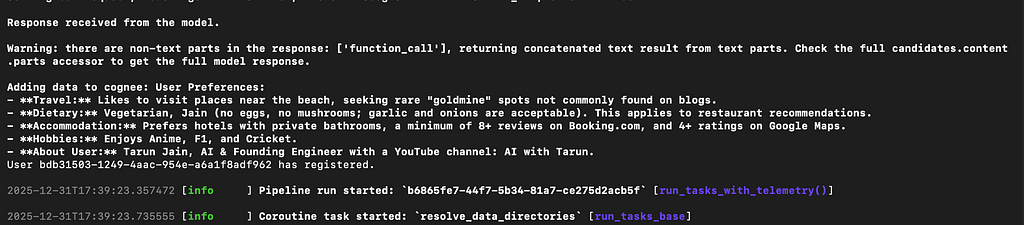
Define the InMemoryRunner for the session execution in the ADK, add the data to be saved using run_debug and once the preference and the data is saved you can pass the user_query to get the personalized response for the given user query.
async def main():
    await cognee.prune.prune_data()
    await cognee.prune.prune_system(metadata=True)

    runner = InMemoryRunner(agent=root_agent)
    events = await runner.run_debug(f"""Remember:
                                    {MY_PREFERENCE}
                                    """
    )

    for event in events:
        if event.is_final_response() and event.content:
            for part in event.content.parts:
                if part.text:
                    print(part.text)

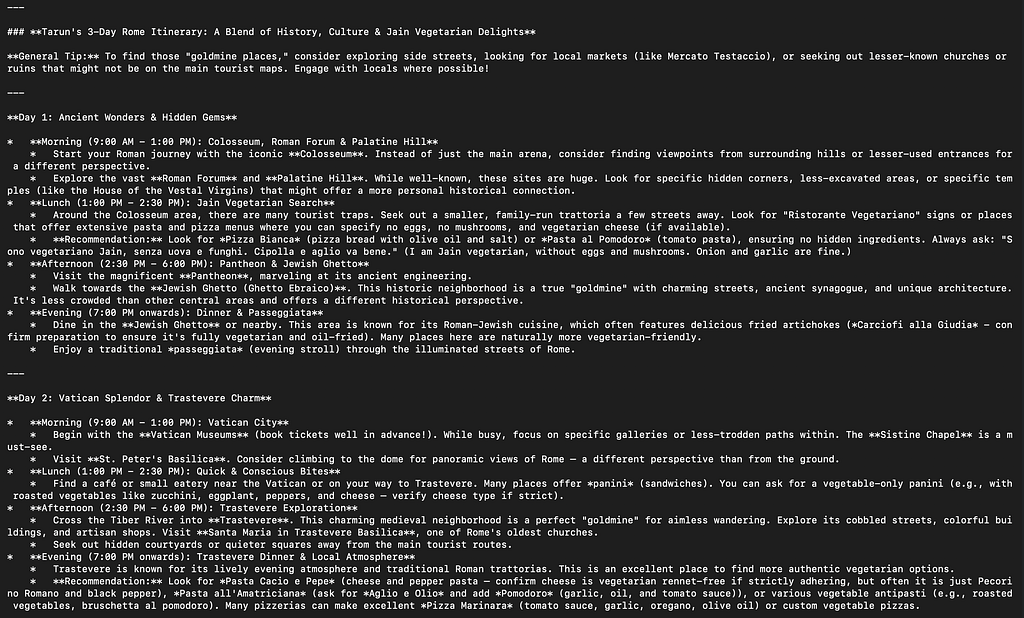
    query = "plan 3 days Itinerary for Rome along with restaurants to try food."
    events = await runner.run_debug(
        query
    )

    for event in events:
        if event.is_final_response() and event.content:
            for part in event.content.parts:
                if part.text:
                    print(part.text)

if __name__ == "__main__":
    asyncio.run(main())
uv run travel_agent/agent.py
Conclusion
So where are we heading with Memory now? After the experiementations, building and contributing to the open source repo that are based in Memory, this is what is the current state of the art:
The AI memory is almost certainly hybrid. Vector search for initial retrieval, knowledge graphs for structured reasoning, and LLMs for synthesis/summarize the facts. We’re moving from “AI that can answer questions” to “AI that actually remembers and reasons about what it knows.” (atleast to some extent). Knowledge graphs provide the structural foundation for that evolution.
Are you stuck somewhere? Schedule a 1:1 Meeting: https://topmate.io/tarun_r_jain
YouTube: https://www.youtube.com/@AIwithTarun
LinkedIn: https://www.linkedin.com/in/jaintarun75/
GitHub: https://github.com/lucifertrj/
Twitter: https://twitter.com/TRJ_0751

Implementing Long Term Memory for Google ADK using Cognee was originally published in Google Developer Experts on Medium, where people are continuing the conversation by highlighting and responding to this story.