Have you ever looked at a complex network diagram — like a map of Game of Thrones characters or Twitter connections — and wished you could just ask it questions?
“Who is the most popular person here?”
“How does Person A know Person B?”
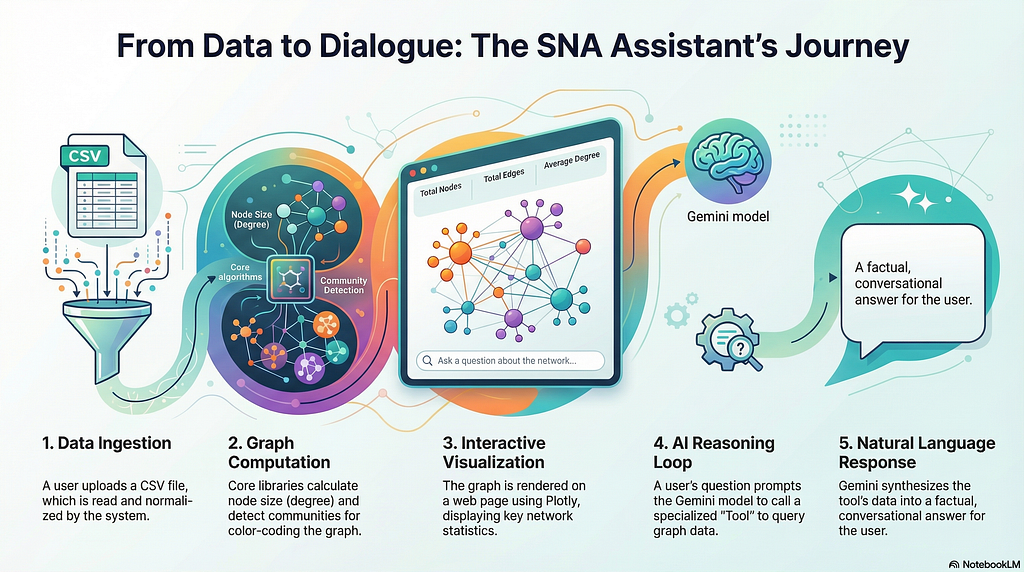
In the world of data science, visualizing connections is only half the battle. The real magic happens when you can “talk” to your data. In this guide, we will build an SNA (Social Network Analysis) Interactive Assistant that combines powerful graph algorithms with the reasoning capabilities of Gemini 3 Pro Preview
https://medium.com/media/dfb4e519a8243bee4b09ecaea58d5346/href
Phase 1: Obtaining Your AI Credentials
Before we touch the code, we need to authorize our AI “brain”3.
- Navigate to aistudio.google.com
- Log in with your Gmail account.
- Click “Get API key”.
- Select “Create API key in new project”.
- Copy the generated code and save it in a temporary Notepad file.
Phase 2: Setting Up the Workspace
Organization is key to a successful project9.
- Create a new folder on your Desktop or in Documents named SNA_Project.
- Inside this folder, we will create our configuration file.
File 1: .env (The Secure Key Vault)
Create a file named .env and paste your key following this format:
GOOGLE_API_KEY=PASTE_YOUR_API_KEY_HERE
(Replace the placeholder with the code you copied in Phase 1)
Phase 3: Developing the System Core (main.py)
Now, let’s dive into the core script. This file, main.py, acts as the engine of our application. We begin by importing the libraries necessary for data processing, graph theory, and web serving.
import pandas as pd
import networkx as nx
import igraph as ig
import json
import plotly
import plotly.graph_objects as go
from flask import Flask, request, render_template_string, jsonify
import time
import os
from dotenv import load_dotenv
#--- 1. SETUP ENVIRONMENT & AUTO-DETECT MODEL ---
load_dotenv()
ACTIVE_MODEL_NAME = None
GEMINI_AVAILABLE = False
CHAT_SESSION = None # Variable to store the session
GLOBAL_IG_OBJECT = None
GLOBAL_NODE_NAMES = []
GLOBAL_NODE_MAP = {} # Name -> Index mappingIntelligence Initialization & Model Discovery
Our script is designed to be future-proof. It automatically scans your account to find the best available model, prioritizing the Gemini 3 series for its advanced reasoning.
try:
    import google.generativeai as genai
    api_key = os.getenv("GOOGLE_API_KEY")
    if api_key:
        genai.configure(api_key=api_key)
        #--- AUTO-DISCOVERY MODEL
        available_models = [m.name for m in genai.list_models() if 'generateContent' in m.supported_generation_methods]

        # Priority list for Gemini 3
        priority_list = [
            "models/gemini-3-pro-preview",
            "models/gemini-3-flash-preview",
            "models/gemini-1.5-flash",
            "models/gemini-1.5-pro"
        ]
        for p in priority_list:
            if p in available_models:
                ACTIVE_MODEL_NAME = p
                break
        if ACTIVE_MODEL_NAME:
            GEMINI_AVAILABLE = True
            print(f" SUCCESS: Using model '{ACTIVE_MODEL_NAME}'")
except Exception as e:
    print(f" Initialization failed: {e}")
Phase 4: Equipping the Assistant with Tools
To prevent the AI from guessing connections, we give it specific Python functions called Tools.
Tool: Shortest Path Finder
This tool calculates the exact route between two nodes in the network using the igraph library. This function calculates the shortest path between two nodes using Breadth-First Search (BFS) or Dijkstra. It even includes “fuzzy search” logic, so if a user types “jon snow” (lowercase), it finds “Jon-Snow” (capitalized).
def tool_get_shortest_path(source_node: str, target_node: str):
    """Finds the shortest path between two nodes. Use this if the user asks about relationships."""
    global GLOBAL_IG_OBJECT, GLOBAL_NODE_MAP, GLOBAL_NODE_NAMES
    src_idx = GLOBAL_NODE_MAP.get(source_node)
    tgt_idx = GLOBAL_NODE_MAP.get(target_node)

    # Case-insensitive fallback
    if src_idx is None:
        found = next((k for k in GLOBAL_NODE_MAP if k.lower() == source_node.lower()), None)
        if found: src_idx = GLOBAL_NODE_MAP[found]

    try:
        paths = GLOBAL_IG_OBJECT.get_shortest_paths(src_idx, to=tgt_idx, output="vpath")
        path_names = [GLOBAL_NODE_NAMES[i] for i in paths[0]]
        return f"Shortest Path: {' -> '.join(path_names)}"
    except:
        return "Path not found."
Tool: Neighbor Lookup
This allows the assistant to see exactly who a specific node is connected to. This function simply looks up who is directly connected to a specific person. To prevent overwhelming the AI, we limit the output to 20 names.
def tool_get_neighbors(node_name: str):
    """Finds direct connections for a node. Use for questions like 'who is X connected to?'."""
    idx = GLOBAL_NODE_MAP.get(node_name)
    neighbors_idx = GLOBAL_IG_OBJECT.neighbors(idx)
    neighbor_names = [GLOBAL_NODE_NAMES[i] for i in neighbors_idx]
    return f"Node '{node_name}' has {len(neighbor_names)} connections: {', '.join(neighbor_names[:20])}"
AGENT_TOOLS = [tool_get_shortest_path, tool_get_neighbors]
Phase 5: The Interactive Interface
We use a Flask-based HTML template to display the graph using Plotly. This allows users to upload files, view stats, and chat with the assistant in a modern UI.
app = Flask(__name__)
HTML_TEMPLATE = """
Gemini Assistant
"""
Phase 6: Processing the Graph
When a CSV is uploaded, the script cleans the data and detects clusters (groups) within the network. We need a function to process the user’s uploaded CSV. This function converts the raw data into a graph structure.
We use a “hybrid” approach:
- NetworkX to clean the data and remove self-loops.
- iGraph to perform heavy calculations (Community Detection and Force-Directed Layouts) because it is much faster.
def process_graph_fast(df):
    global GLOBAL_IG_OBJECT, GLOBAL_NODE_NAMES, GLOBAL_NODE_MAP, CHAT_SESSION
    CHAT_SESSION = None # Reset session for new data
    src_col = next((c for c in df.columns if c in ['source', 'from', 'src']), df.columns[0])
    tgt_col = next((c for c in df.columns if c in ['target', 'to', 'dst']), df.columns[1])

    G_nx = nx.Graph()
    G_nx.add_edges_from(list(zip(df[src_col].astype(str), df[tgt_col].astype(str))))

    nodes_list = list(G_nx.nodes())
    node_map = {name: i for i, name in enumerate(nodes_list)}
    ig_edges = [(node_map[u], node_map[v]) for u, v in G_nx.edges()]
    G_ig = ig.Graph(n=len(nodes_list), edges=ig_edges)

    GLOBAL_IG_OBJECT = G_ig
    GLOBAL_NODE_NAMES = nodes_list
    GLOBAL_NODE_MAP = node_map

    # Community detection
    try: partition = G_ig.community_multilevel()
    except: pass
    return {"num_edges": G_ig.ecount(), "adj_list": G_ig.get_adjlist(), "nodes_list": nodes_list}
Phase 7: Interactive Chat Logic
The final piece is the /chat route. This is where the Gemini model is initialized with Automatic Function Calling, allowing it to use our tools as needed.
@app.route('/chat', methods=['POST'])
def chat():
    global CHAT_SESSION
    user_msg = request.json.get('message', "")
    if CHAT_SESSION is None:
        model = genai.GenerativeModel(
            model_name=ACTIVE_MODEL_NAME,
            tools=AGENT_TOOLS,
            system_instruction="You are an SNA Assistant. Use tools to find paths and neighbors. Don't guess."
        )
        CHAT_SESSION = model.start_chat(enable_automatic_function_calling=True)

    response = CHAT_SESSION.send_message(user_msg)
    return jsonify({"response": response.text})
if __name__ == '__main__':
    app.run(debug=True, port=5000)
Installation & Usage
To get this running on your machine:
- Install Libraries: Open your terminal and run:
pip install pandas networkx igraph plotly flask python-dotenv google-generativeai
- Run: Execute python main.py and navigate tohttp://127.0.0.1:5000
- Analyze: Upload your CSV file and start a conversation with the Gemini 3!
Check out the full code here: https://github.com/estherirawati/snallm
Conclusion: A New Era of Human-Centric Data Analysis
We have seen how Gemini 3 Pro and Flash transform rigid CSV data into a living ecosystem of information. By merging SNA computational power with Generative AI reasoning, we no longer just “look” at data — we “dialogue” with it. By combining a visual graph engine with an LLM, we’ve created a tool that bridges the gap between raw data and human understanding. You don’t just see the network; you communicate with it.
This interactive system opens endless possibilities, from detecting complex fraud patterns and understanding social media community dynamics to accelerating collaborative research. Its true value lies in simplifying complexity, allowing for faster and more accurate strategic decisions.
Enjoy experimenting with your own networks. Remember that behind every node and edge lies a story waiting to be told. Happy analyzing!
https://medium.com/media/dfb4e519a8243bee4b09ecaea58d5346/href
Special thank you to Billie Nathaniel Phalosa for collaborating on this article.

Building an Intelligent Social Network Analysis Assistant with Gemini 3 Pro and Flask was originally published in Google Developer Experts on Medium, where people are continuing the conversation by highlighting and responding to this story.