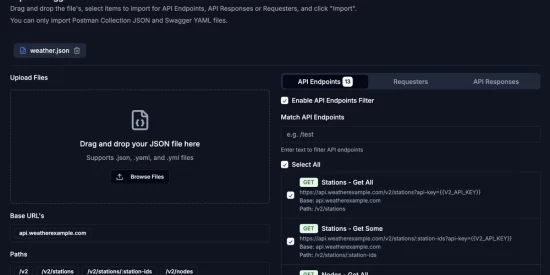
APIs are at the core of modern software development, but setting them up can be tedious, especially when transitioning from documentation to implementation. If you’ve ever manually configured endpoints and request bodies, you know the frustration.
That’s where importing Postman Collections and Swagger YAML files comes in. By leveraging structured API documentation, we can automate endpoint creation, response definitions, and request setups, saving valuable time.
Why Importing Matters
Postman collections and Swagger YAML files contain detailed API definitions, including:
- Endpoints & methods (GET, POST, PUT, DELETE)
- Request bodies & headers
- Expected responses & error handling
Instead of rebuilding this manually, importing these files into a tool like InterlaceIQ.com lets developers instantly visualize, refine, and deploy APIs without redundant setup.
How It Works
🚀 Importing Postman Collections
Postman collections are widely used for testing and documenting APIs. With direct import:
- Requests are mapped automatically.
- Headers and authorization settings remain intact.
- You can tweak endpoints within a drag-and-drop UI.
🔗 Bringing in Swagger YAML Files
Swagger (OpenAPI) provides a structured way to define APIs. When importing Swagger YAML:
- Endpoints and request bodies are auto-generated.
- You get a prebuilt API framework ready for automation.
- Documentation stays consistent with actual implementation.
Saving Time with InterlaceIQ
InterlaceIQ makes API creation easier by combining imports with an intuitive visual builder. Developers can:
✅ Skip manual setup – the platform handles the structure.
✅ Modify endpoints effortlessly -drag and drop to refine APIs.
✅ Automate integrations – generate workflows based on API docs.
Try It Out!
Want to see this in action? Check out the demo: https://www.youtube.com/watch?v=8V8Wvqt_AQA
Have you used Postman or Swagger for API development? Would love to hear how you streamline your workflows!