
Current status
Shortly after completing the Cloud Resume Challenge I decided to revisit it and choose a selection of the suggested modifications to continue adding development features into the application (ie resume page).
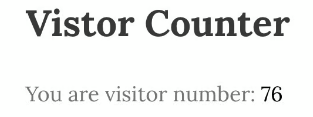
One of the key features of the resume page is highlighting the ‘visitor counter’, an integer that is retrieved from a DynamoDB table through a number of processes and services, this number simply increments by 1 each time the page is reloaded or refreshed.
Counting distinct sessions
I wanted to update this feature so that it counts the browser sessions on the page, rather than the page ‘load count’. To do this I needed to pass the ip_address and user_agent retrieved by API Gateway into the Lambda/Python function for evaluation.
The function would:
- Concatenate these two values
- Add them to the database
- Count the distinct values of these concatenated strings and
- Return the unique value as the session_count
Counting distinct active sessions
Using this data and taking it a step further, I also wanted to count the active sessions within a 1 hour window.
To do this, together with the session_id I would need to add a value for first_accessed (using ‘datetime.now()’ from Python) and also calculate the last_accessed timestamp value of the session_id.
This involved 3 key steps and some pretty interesting logic that I have summarised below:
1) Check if the unique session_id already exists in the database:
If no >> add to the database a new row containing 1) session_id, 2) first_accessed timestamp as ‘now’, and 3) last_accessed timestamp also as ‘now’,
If yes >> update the ‘last_accessed’ timestamp as current time/date
2) Distinct sessions: Count the number of distinct session_ids in the database:
— Scan the entire table and return the distinct count of session_ids
3) Active sessions: Count the number of sessions within the last hour:
— Scan the table, filtering out rows where the last_accessed timestamp is greater than ‘1 hour ago’
— Retrieve and count all remaining session_ids
The Python code for this can be seen below:
# SESSION COUNT ADDED - NON-GDPR COMPLIANT

import json
import boto3
from datetime import datetime, timedelta
import hashlib

# Initialize DynamoDB client
dynamodb = boto3.resource('dynamodb')
table = dynamodb.Table('session_count_hash_table')

def lambda_handler(event, context):

    ################### CREATE UNIQUE IDENTIFIER ###################

    ip_address = event.get('requestContext', {}).get('identity', {}).get('sourceIp', 'Unknown IP')
    user_agent = event.get('requestContext', {}).get('identity', {}).get('userAgent', 'Unknown UserAgent')

    # Generate a unique session ID based on IP address and user agent
    session_id = f"{ip_address}-{user_agent}"


    ################### ACTIVE SESSION COUNT ###################

    # Check if the session exists in DynamoDB
    response = table.get_item(Key={'session_id': session_id}) # sends a request to DynamoDB to retrieve the item that matches the specified key
    session_data = response.get('Item')

    if session_data:
        # Update the session timestamp
        table.update_item(
            Key={'session_id': session_id},
            UpdateExpression='SET last_accessed = :val', # sets contain only unique elements
            ExpressionAttributeValues={':val': datetime.now().isoformat()}
        )
    else:
        # Create a new session entry
        table.put_item(
            Item={
                'session_id': session_id,
                'first_accessed': datetime.now().isoformat(),
                'last_accessed': datetime.now().isoformat()
            }
        )

    # Count the number of active sessions within the last hour
    hour_ago = datetime.now() - timedelta(hours=1)
    response_active = table.scan(
        FilterExpression='last_accessed > :val',
        ExpressionAttributeValues={':val': hour_ago.isoformat()}
    )
    active_sessions = len(response_active['Items'])


    ################### DISTINCT SESSION COUNT ###################

    # Retrieve all session IDs from the database
    response_all = table.scan()
    session_ids = set([item['session_id'] for item in response_all['Items']])

    # Calculate the distinct count of session IDs
    unique_session_count = len(session_ids)


    ################### WHAT TO RETURN (json string)  ###################

    response = {
        "statusCode": 200,
        # HTTP headers that will be included in the response sent back to the client
        "headers": {
            "Content-Type": "application/json",
            "Access-Control-Allow-Origin": "*",  # Allows requests from any origin
            "Access-Control-Allow-Credentials": "true",  # Required for cookies, authorization headers with HTTPS
            "Access-Control-Allow-Methods": "OPTIONS,GET,PUT,POST,DELETE",  # Allowed request methods
            "Access-Control-Allow-Headers": "Content-Type,Authorization",  # Allowed request headers
        },
        "body": json.dumps({  # converts a Python dictionary to a JSON-formatted string
            # Your response body
            'message': 'Session counts updated successfully',
            'unique_session_count': unique_session_count,
            'active_sessions': active_sessions
        }),
    }

    return response
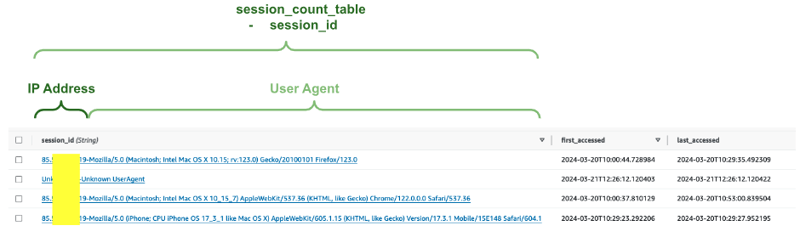
After some configuration and testing this worked well and modified a new DynamoDB table (session_count_table) updating the relevant columns where and when needed, as shown below.
Making it GDPR compliant
As an IP address can potentially be used for location tracking, it is possible that collecting the IP address together with the browser user agent data could be a breach of GDPR.
GDPR (General Data Protection Regulation) is a European Union regulation on information privacy in the European Union and the European Economic Area. The GDPR is an important component of EU privacy law and human rights law, in particular Article 8 of the Charter of Fundamental Rights of the European Union.
To eliminate this issue I replaced the session_id string with a consistent hash, (ie for each distinct session_id, a constant hash is generated) removing the need to store IP addresses.
The session_hash is created using the SHA-256 cryptographic hash function provided by the hashlib module and provides a hexadecimal string as the hash, which will be consistent for the same input.
The important line of Python code added is to create the session_hash, as seen below:
import hashlib

~

session_hash = hashlib.sha256(session_id.encode()).hexdigest()
And from that point on replace session_id with session_hash so as to perform calculations on the hash value, as seen below.
# SESSION COUNT ADDED - GDPR COMPLIANT

import json
import boto3
from datetime import datetime, timedelta
import hashlib

# Initialize DynamoDB client
dynamodb = boto3.resource('dynamodb')
table = dynamodb.Table('session_count_hash_table')

def lambda_handler(event, context):

    ################### CREATE UNIQUE IDENTIFIER ###################

    ip_address = event.get('requestContext', {}).get('identity', {}).get('sourceIp', 'Unknown IP')
    user_agent = event.get('requestContext', {}).get('identity', {}).get('userAgent', 'Unknown UserAgent')

    # Generate a unique session ID based on IP address and user agent
    session_id = f"{ip_address}-{user_agent}"

    # Convert the session id into a consistant sha256 hash, and use session_hash from here on
    session_hash = hashlib.sha256(session_id.encode()).hexdigest()


    ################### ACTIVE SESSION COUNT ###################

    # Check if the session exists in DynamoDB
    response = table.get_item(Key={'session_hash': session_hash}) # sends a request to DynamoDB to retrieve the item that matches the specified key
    session_data = response.get('Item')

    if session_data:
        # Update the session timestamp
        table.update_item(
            Key={'session_hash': session_hash},
            UpdateExpression='SET last_accessed = :val',
            ExpressionAttributeValues={':val': datetime.now().isoformat()}
        )
    else:
        # Create a new session entry
        table.put_item(
            Item={
                'session_hash': session_hash,
                'first_accessed': datetime.now().isoformat(),
                'last_accessed': datetime.now().isoformat()
            }
        )

    # Count the number of active sessions within the last hour
    hour_ago = datetime.now() - timedelta(hours=1)
    response_active = table.scan(
        FilterExpression='last_accessed > :val',
        ExpressionAttributeValues={':val': hour_ago.isoformat()}
    )
    active_sessions = len(response_active['Items'])


    ################### DISTINCT SESSION COUNT ###################

    # Retrieve all session IDs from the database
    response_all = table.scan()
    session_ids = set([item['session_hash'] for item in response_all['Items']])

    # Calculate the distinct count of session IDs
    unique_session_count = len(session_ids)


    ################### WHAT TO RETURN (json string)  ###################

    response = {
        "statusCode": 200,
        # HTTP headers that will be included in the response sent back to the client
        "headers": {
            "Content-Type": "application/json",
            "Access-Control-Allow-Origin": "*",  # Allows requests from any origin
            "Access-Control-Allow-Credentials": "true",  # Required for cookies, authorization headers with HTTPS
            "Access-Control-Allow-Methods": "OPTIONS,GET,PUT,POST,DELETE",  # Allowed request methods
            "Access-Control-Allow-Headers": "Content-Type,Authorization",  # Allowed request headers
        },
        "body": json.dumps({  # converts a Python dictionary to a JSON-formatted string
            # Your response body
            'message': 'Session counts updated successfully',
            'unique_session_count': unique_session_count,
            'active_sessions': active_sessions
        }),
    }

    return response
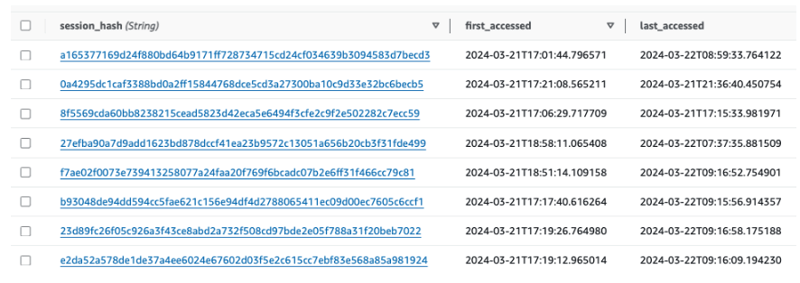
An example of the session_count_hash_table can be seen below:
To complete this part of the project I needed to configure the following:
- Update AWS IAM settings to allow Lambda to connect with the new DynamoDB table
- Add a new endpoint to the existing API Gateway to connect with the new Lambda service for session counts
- Update Terraform API Gateway and Lambda configurations to include these updates as Infrastructure as Code
- Update the frontend webpage to invoke and receive data from API Gateway and display that data on the page.
The frontend update can be seen below:
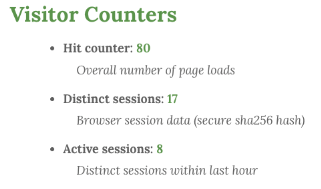
With this update in place, I can see additional metrics that loosely relate to visitors to the webpage and have gained additional experience in implementing additional features to an existing application.