Product development is never a straight line. From validating an idea and defining requirements to building sprints and managing a launch, product teams juggle competing priorities across every stage of the lifecycle. Without structure, critical steps get missed and timelines slip.
Product management templates give your team a repeatable starting point for every phase of development. Instead of rebuilding your tracking systems from scratch for each product, you work from a proven framework that keeps tasks, timelines and stakeholders aligned from the start.
Below are seven free product management templates covering the full product lifecycle, from initial planning through go-to-market execution. Download any of them free and customize for your team.
1. Product Development Template
A product development template gives your team a structured framework for moving from concept to release. Every product involves a sequence of dependent tasks across multiple teams, and without a shared system, those hand-offs break down. This template organizes each phase of development with pre-built columns for start and finish dates, assigned team members, task priority, planned and actual costs and completion percentage.
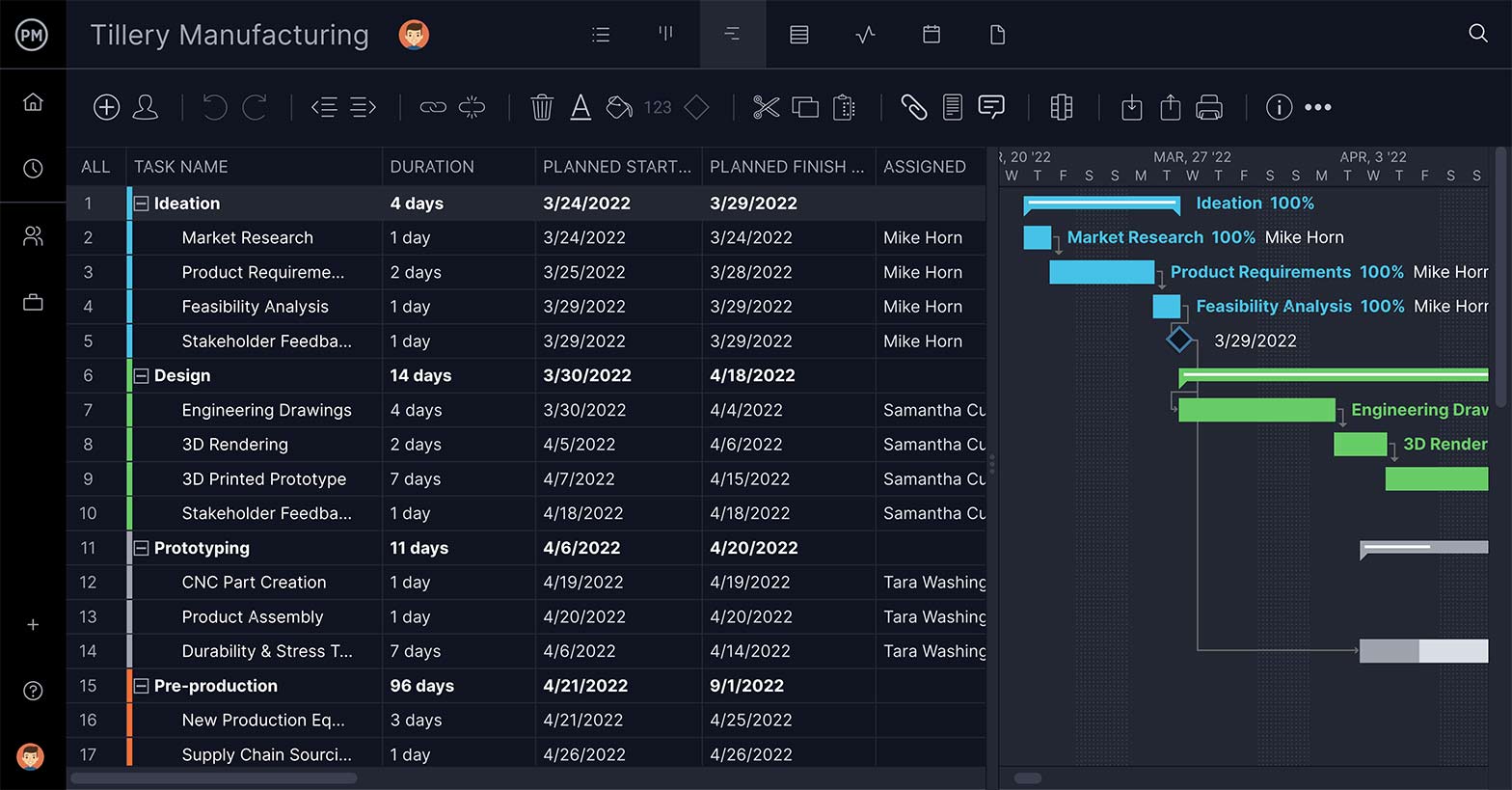
The template supports subtasks for breaking down complex phases into actionable steps and allows file attachments directly on tasks so design specs, schematics and feedback all live in one place. Switch between Gantt, kanban, sheet and calendar views depending on how your team works best.
2. Agile Sprint Plan Template
Sprint planning keeps your development team focused on the right work at the right time. An agile sprint plan template helps your scrum team organize work for each iteration, defining deliverables, assigning tasks and tracking progress through the sprint lifecycle. Without a consistent planning structure, backlogs grow unmanageable and sprint goals drift.

The kanban board view includes customizable columns like Backlog, In Progress, Ready to Deploy and Return from Test so your workflow matches how your team actually operates. A roadmap view connects individual sprints to the full release timeline so product managers and stakeholders can see the big picture alongside the sprint detail.
3. Product Roadmap Template
A product roadmap template translates your product vision into a timeline your whole organization can follow. It answers two questions every stakeholder has: what are we building, and when will it be done. The template organizes tasks and milestones by week, month or quarter, with columns for deliverables, team assignments and dependencies, so every function from engineering to marketing knows what is coming and when.

Dependency linking prevents bottlenecks from cascading across phases, and critical path filtering helps you focus when timelines get compressed. Real-time cost tracking and resource balancing ensure the roadmap stays achievable as priorities shift.
4. Product Launch Template
A product launch template helps you coordinate everything that needs to happen once your product is ready to meet its market. Communications, assignments, timelines and stakeholder updates all need to be tracked across multiple teams simultaneously. A great product can still fail without the right launch structure connecting it to the audience it is built for.
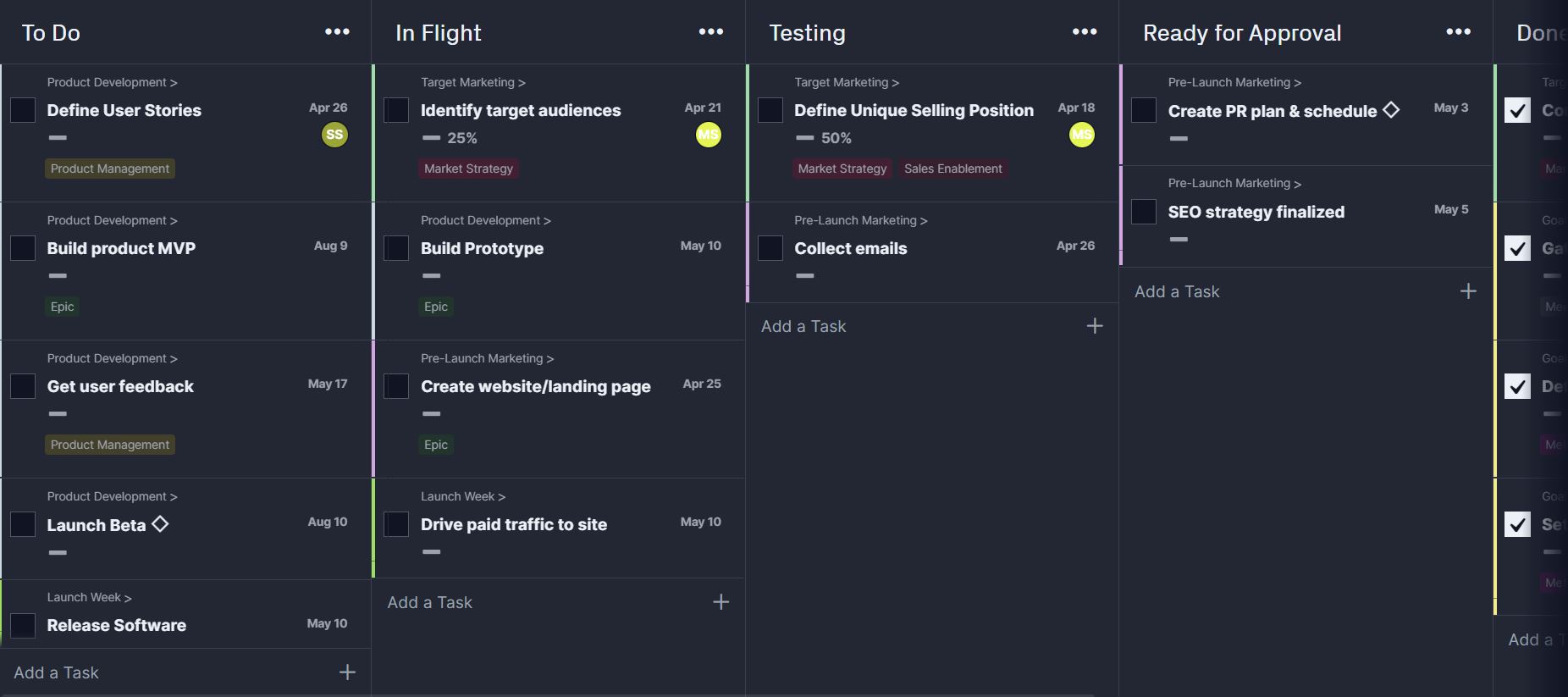
The kanban board view is especially useful here, with columns for each launch phase and cards for tasks like defining user stories, building prototypes and gathering feedback. Time tracking and one-click status reports keep every stakeholder informed without requiring additional meetings.
5. Product Backlog Template for Excel
A product backlog template is a prioritized list of every feature, enhancement, bug fix and work item your team needs to complete before a product is done. It is the foundation of agile planning, and without a well-maintained backlog, sprint planning becomes guesswork. This Excel template gives each backlog item a unique ID, type, description, priority rating and story point estimate so nothing gets lost or deprioritized by accident.
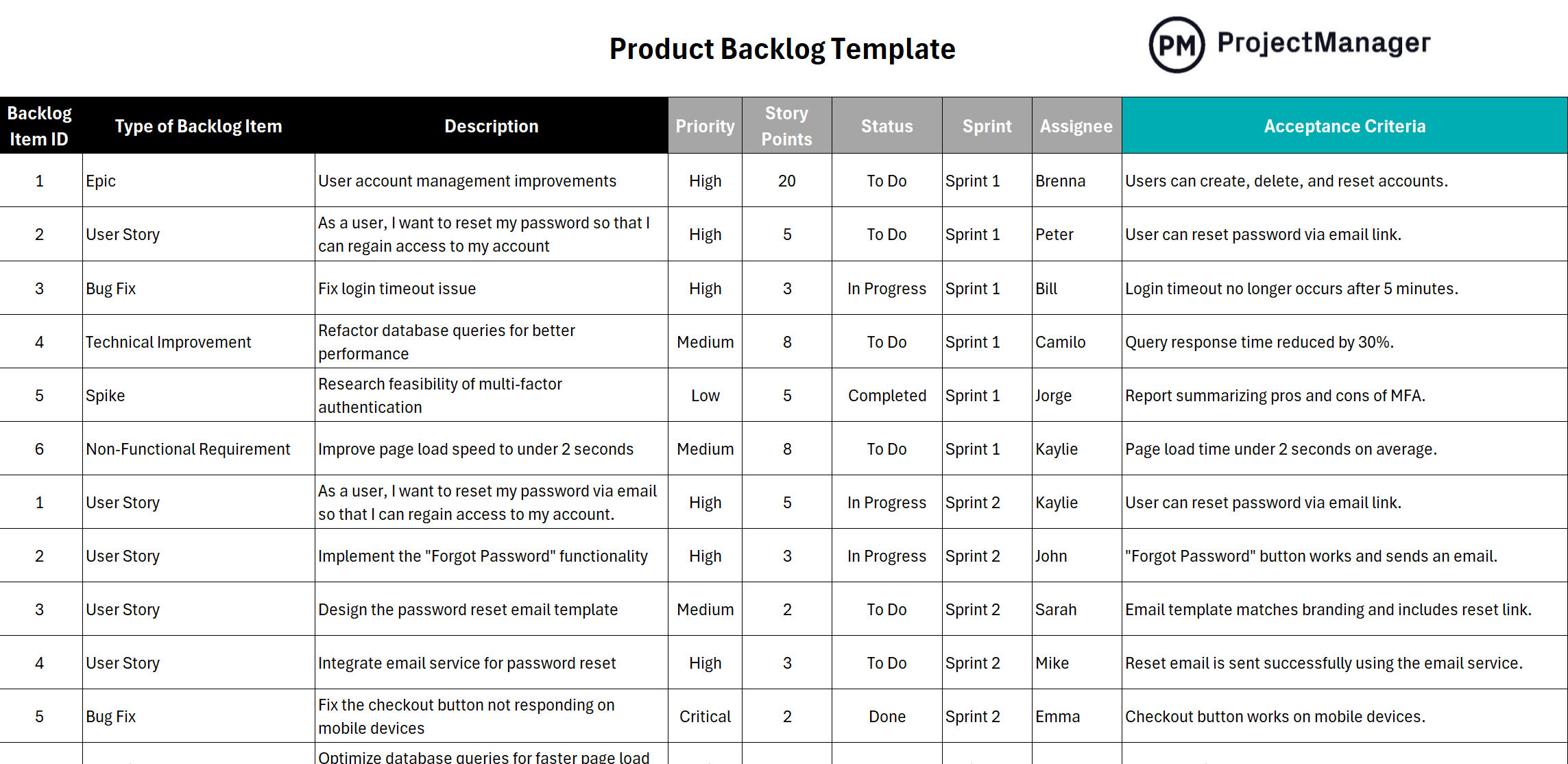
Additional fields for sprint assignment, assignee and acceptance criteria make it easy to move items from the backlog into an active sprint without losing context. The template can also be opened directly in ProjectManager kanban board view for real-time collaboration across your team.
6. Product Requirements Document Template for Word
A product requirements document template defines what a product needs to include before a single line of code is written. It serves as the source of truth for development and QA teams, documenting objectives, assumptions, user stories, feature lists and release criteria in one organized structure. Without it, development teams build from assumptions that can diverge from what stakeholders actually want.
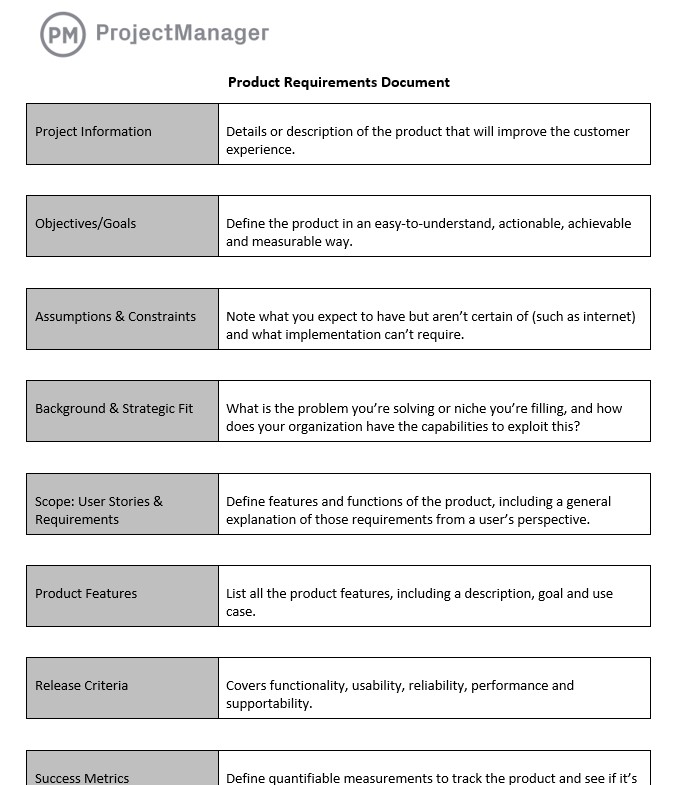
The nine-section template includes space for strategic fit, scope and exclusions alongside the core requirements, so the team knows not just what to build but why. Success metrics and release criteria give QA and stakeholders a clear standard for when the product is ready to ship.
7. Go to Market Strategy Template for Excel
A go to market strategy template ensures your product launch is backed by a documented, executable plan rather than improvised decisions made under deadline pressure. It covers the five components every successful launch requires: product and value proposition, market analysis, buyer persona definition, budget planning and execution timeline. Without this structure, teams often discover gaps in positioning or resource allocation only after the launch is live.
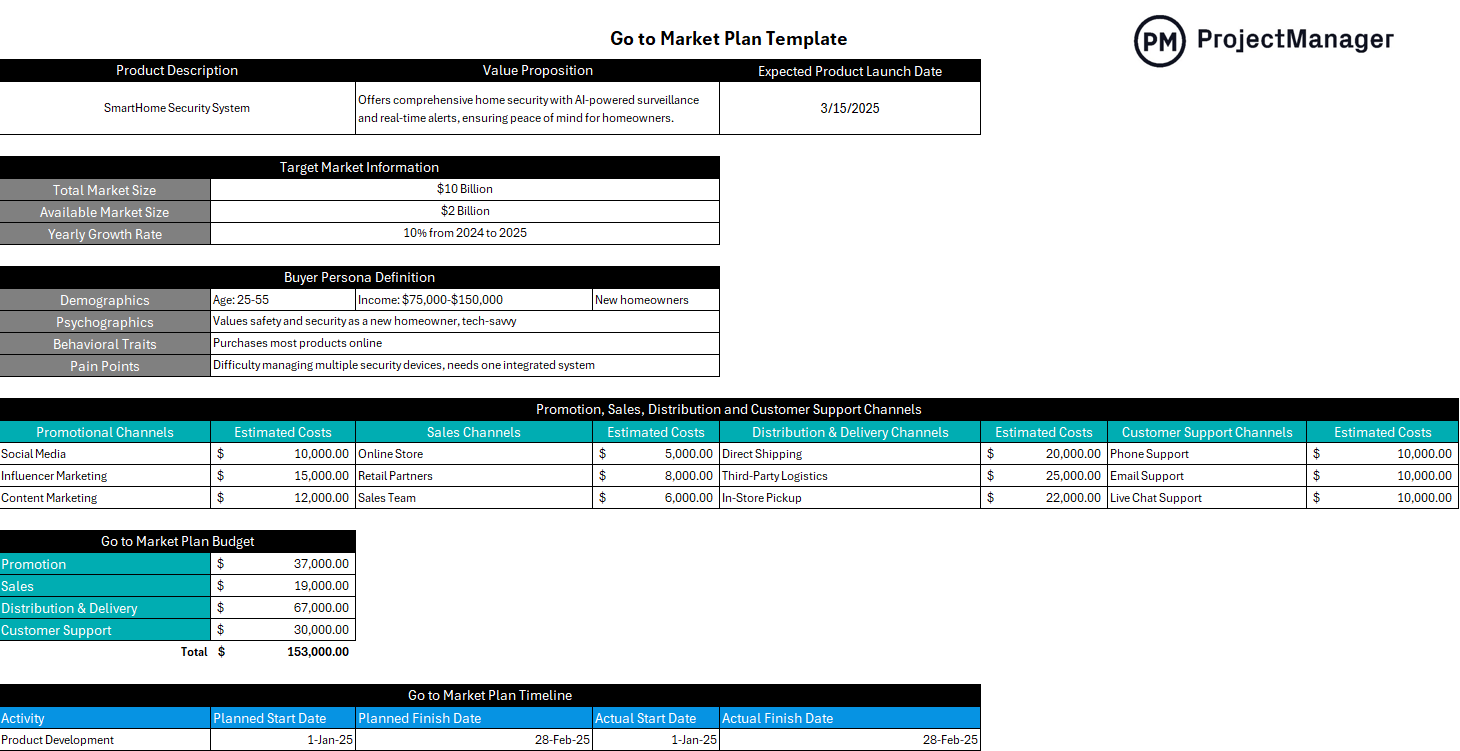
The market analysis section helps you quantify total market size and available market size so you can assess demand before committing resources. The budget planning section allocates costs across promotional channels, sales channels and distribution methods so nothing is underfunded at launch.
Manage Product Development With ProjectManager
Templates are a starting point. Managing an actual product through every stage of development requires real-time visibility, team collaboration and the ability to track work across multiple views simultaneously. ProjectManager is online project management software built for product teams of every size.
From sprint planning and backlog management to roadmap visualization and launch coordination, ProjectManager gives product teams a connected platform where every plan stays current and every stakeholder stays informed. Try it free for 30 days.
Plan and Track Sprints on a Gantt Chart
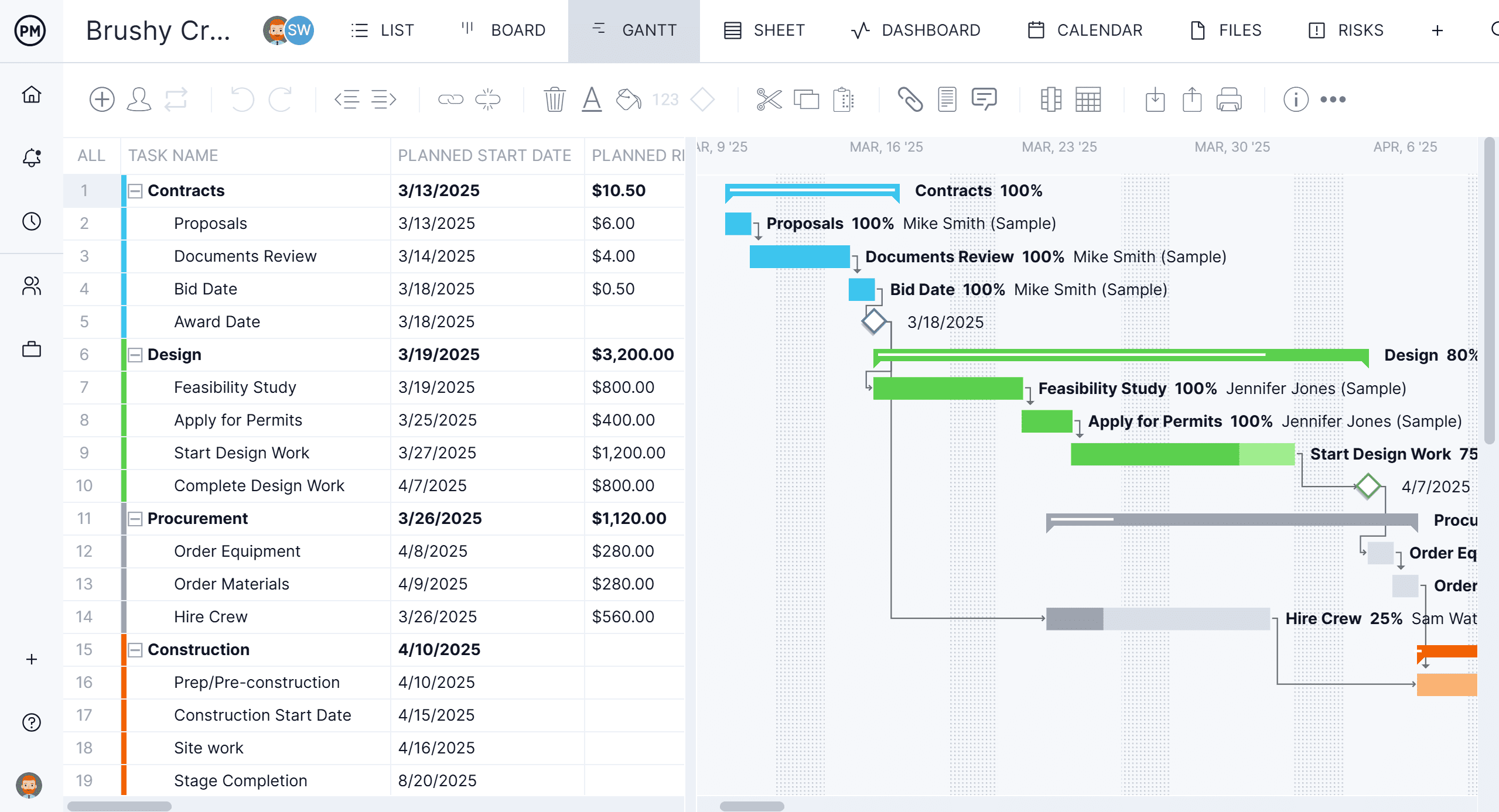
ProjectManager Gantt chart lets product managers map out every sprint, milestone and dependency in a single view. Set start and finish dates, link dependent tasks to prevent delays and filter for the critical path to see which tasks drive the timeline. As work gets done, progress updates in real time so the plan always reflects where the product actually is.
Monitor Product Health with Real-Time Dashboards
ProjectManager portfolio dashboard gives product leaders instant visibility into status, budget, workload and progress across all active product initiatives. Color-coded health indicators surface problems before they escalate, and customizable reports make it easy to share updates with leadership without spending hours pulling data together.

Related Content
- 18 Free Software Development Templates for Excel, Word and More
- 8 Agile Templates: Which Free Agile Template is Right for You?
- 6 Project Report Examples (Free Download)
- 8 Free Status Report Templates for Excel
The post 7 Free Product Management Templates appeared first on ProjectManager.