Scaling Pediatric Accessibility: How Eye Aim Arena Leverages the Google WebAI Ecosystem- LiteRT.js + MediaPipe Iris
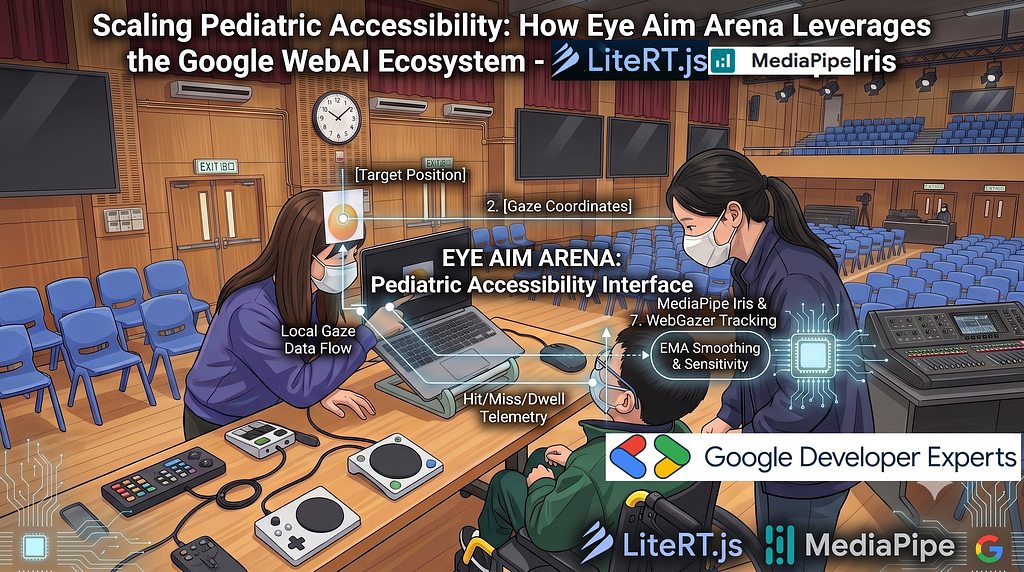
1. Introduction: The Accessibility Imperative in Pediatric Oculomotor Therapy
Oculomotor visual training represents a fundamental pillar of pediatric physical and occupational therapy, particularly for children presenting with complex neuro-developmental or physical impairments such as Cerebral Palsy, spasticity, and Cortical Visual Impairment (CVI). Traditional clinical solutions for eye-gaze tracking and interactive target practice have historically relied on specialized, proprietary hardware suites. These closed systems present severe financial and logistical barriers for educational institutions and families.
To address this challenge, Eye Aim Arena offers a client-side, real-time gaze-controlled framework that runs natively in modern web browsers. Developed by software engineers and educational researchers at the Hong Kong Institute of Information Technology (HKIIT), the platform leverages standard web camera hardware to achieve precise gaze estimation. By using open-source machine learning frameworks directly inside the browser, the application provides high-fidelity oculomotor exercise training without requiring external hardware.
The system architecture functions as a low-friction, clinically viable tool for pediatric rehabilitation. Through continuous game-based tasks, the game aids in the development of visual tracking, fixation, and visual-motor coordination, transforming highly repetitive muscle-strengthening exercises into an engaging digital experience.
Play the game now — https://wongcyrus.github.io/Eye-Aim-Arena/
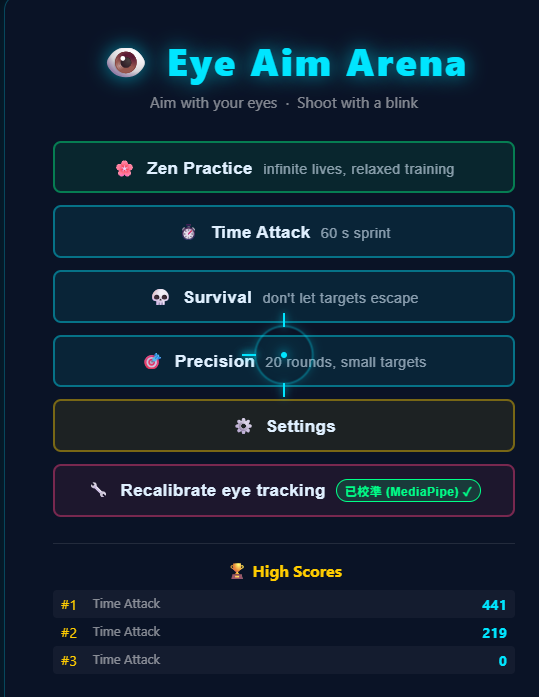
2. System Architecture and Processing Pipeline
The core operational paradigm of Eye Aim Arena is its strictly client-side execution model. By conducting all visual inference, user-gaze mapping, and language model generation locally in the browser, the application achieves zero-latency execution, mitigates cloud-hosting costs, and guarantees absolute patient privacy.
The block diagram below maps the data journey and feedback loops:
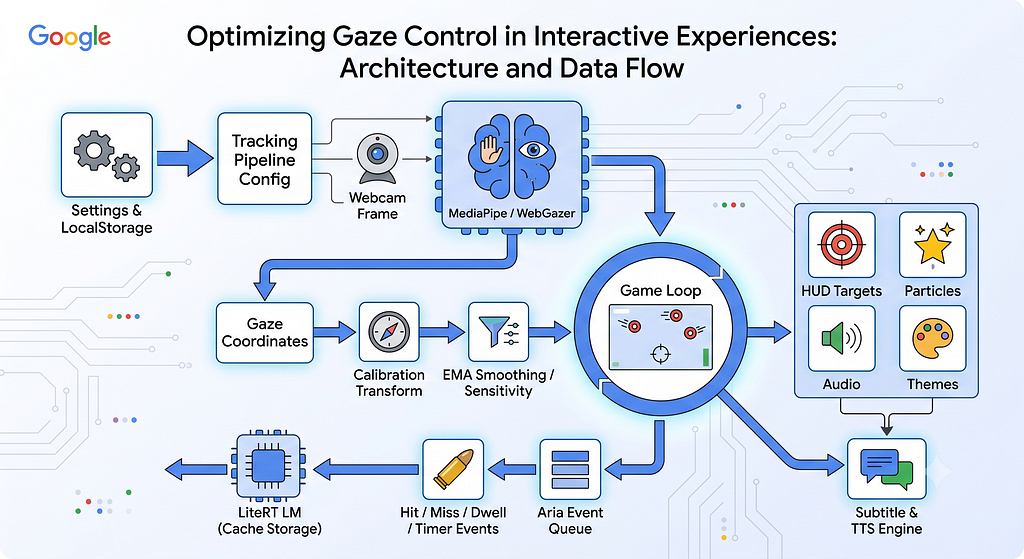
This multi-tiered execution pipeline is analyzed through six distinct operational steps:
- Runtime Initialization: System settings, calibration data, and volume levels are parsed from localStorage to define the tracking engine parameters and interface configurations.
- Webcam Input Processing: Real-time frames are captured from the selected camera device (cameraSelect) and passed directly into the active computer vision tracking library inside a secure context (HTTPS/localhost).
- Tracking & Coordinate Mapping: The active tracking library (Google MediaPipe Iris or WebGazer.js) detects anatomical landmark vectors to yield raw screen gaze coordinates.
- Filtering and Signal Processing: Raw coordinates undergo affine transformations, Exponential Moving Average (EMA) smoothing, axis inversion checking (invertXCheckbox/invertYCheckbox), and sensitivity scaling.
- Interactive Game Loop: Refined coordinates drive collision detection, score calculation, state transitions, and custom asset rendering on each animation frame.
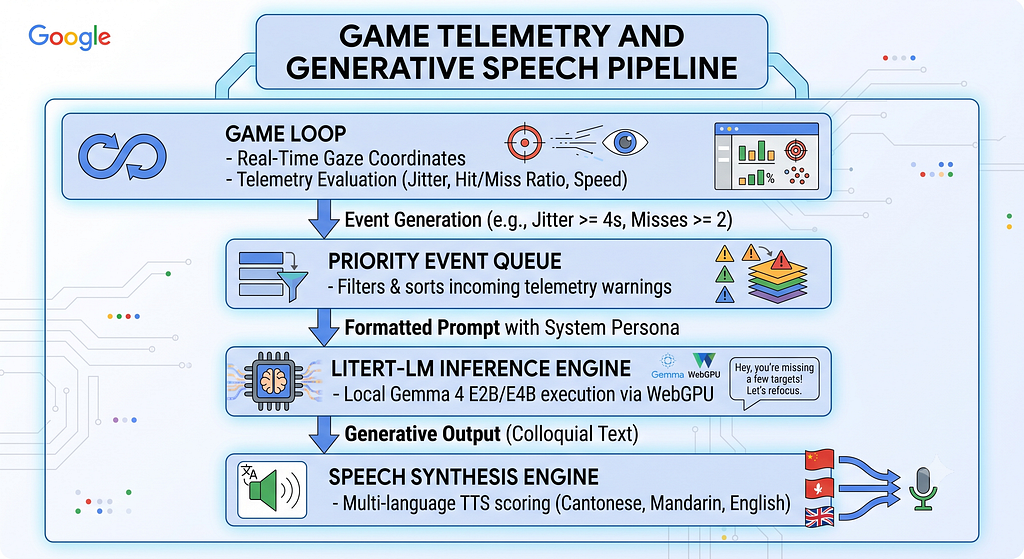
- Aria Edge AI Co-Pilot Execution: Gameplay events (such as tracking jitter, streaks, or misses) are sent to a priority event queue. This queue feeds into the local LiteRT-LM framework via WebGPU to dynamically generate spoken therapeutic feedback.
To run this complex structure offline, the application maintains a clean file system and local storage layout:
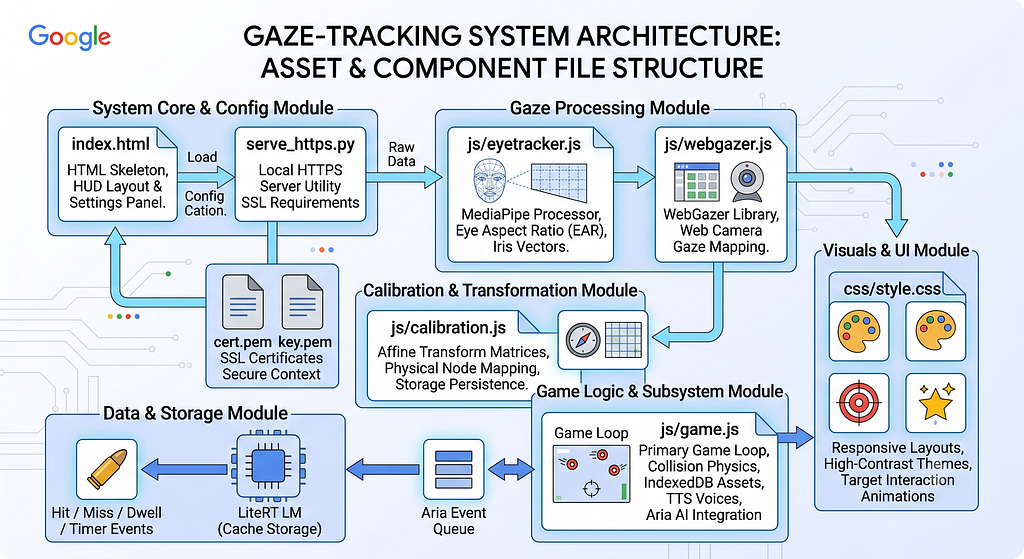
3. Computer Vision and Spatial Alignment Calibration Engine
To accommodate varying computational profiles and physical environments, the system provides a toggle between two major tracking libraries via trackingModeSelect. The operational differences between these tracking modes highlight their clinical trade-offs:
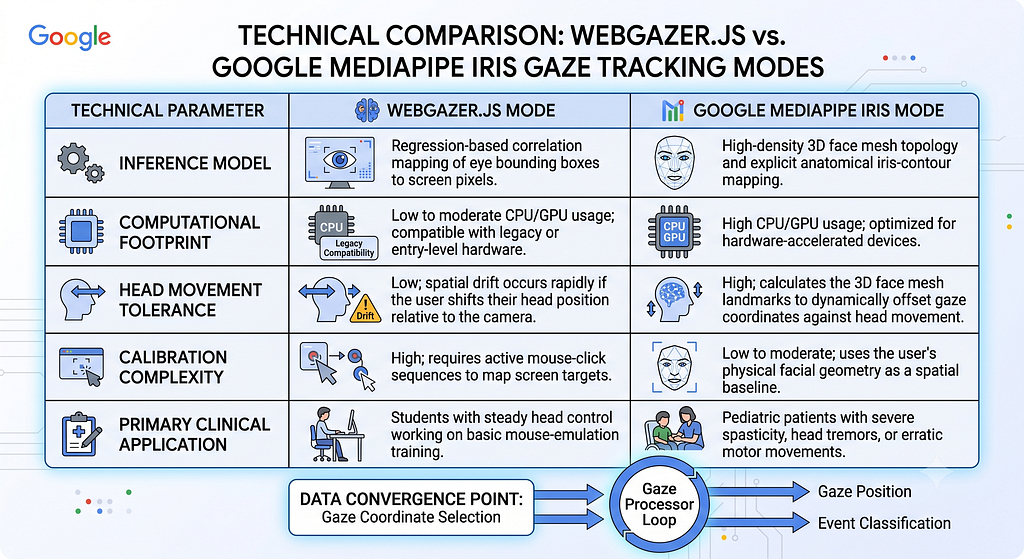
Spatial Mapping via Affine Transformations
To translate raw pixel gaze vectors derived from tracking libraries into screen-space pixel coordinates, the system computes a 9-point affine transformation matrix upon successful calibration. The mathematical mapping is defined as:
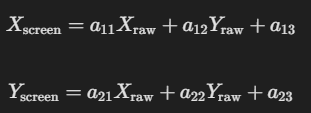
This matrix maps arbitrary head and camera geometries to standard two-dimensional monitor coordinates, allowing the software to account for off-center webcams, screen rotations, and tilted posture.
Implementation Reference (js/calibration.js)
This transformation matrix is evaluated and run in js/calibration.js inside the coordinate resolution pipeline to translate tracking inputs to the DOM viewport space:
// Located in js/calibration.js
function transformGaze(rawX, rawY, matrix) {
    const screenX = matrix.a11 * rawX + matrix.a12 * rawY + matrix.a13;
    const screenY = matrix.a21 * rawX + matrix.a22 * rawY + matrix.a23;
    return { x: screenX, y: screenY };
}
The resulting 9-point calibration matrix is automatically written to localStorage upon completion, displaying a Calibrated ✅ badge on the main menu to eliminate the need for recalibration during subsequent therapy sessions.
https://medium.com/media/b3f7e013695eae7c8f61f5324370759c/href
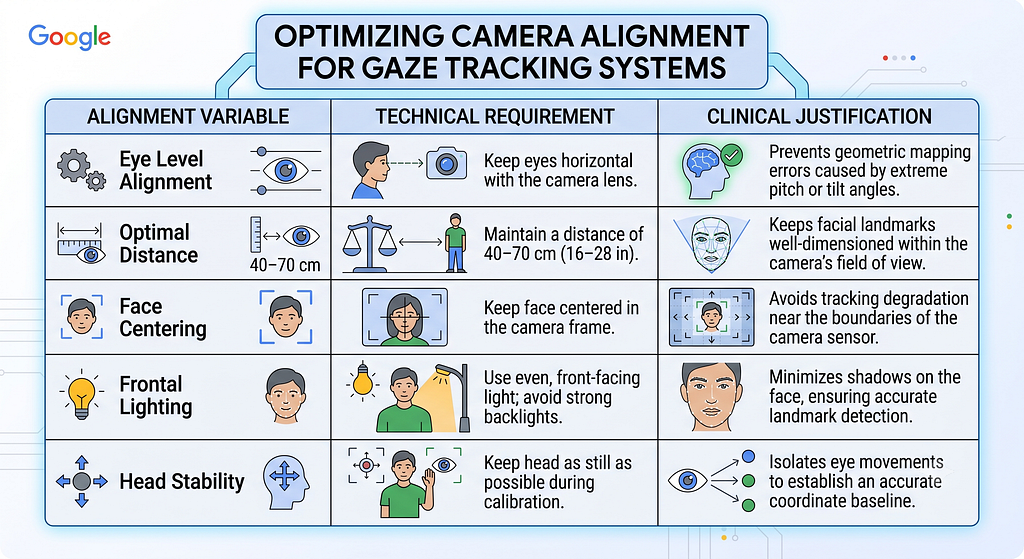
Pre-Calibration Setup Guidance Checklist
To minimize physical tracking errors during calibration, the interface displays an optional checklist modal (showCalibrationGuideCheckbox) with instructions for physical alignment:
4. Digital Signal Processing for Tremor Mitigation and Intentional Action
Tremor Mitigation through Exponential Moving Average
Pediatric patients with motor disorders, such as Cerebral Palsy, exhibit rapid spastic eye movements and micro-tremors. To stabilize the gaze reticle and prevent rapid, frustrating shaking of the targeting interface, the tracking pipeline implements a configurable Exponential Moving Average (EMA) smoothing algorithm:

Where St represents the final stabilized coordinates, Yt is the raw gaze coordinate extracted from the active tracking library, and alpha is a variable smoothing coefficient derived from the user’s settings profile:
Implementation Reference (js/eyetracker.js or js/game.js)
This DSP logic is implemented as a standard frame-based update step to scale down erratic movements:
// Located in js/eyetracker.js or js/game.js (gaze smoothing update)
function smoothCoordinates(rawX, rawY, lastX, lastY, alpha) {
    const smoothedX = alpha * rawX + (1.0 - alpha) * lastX;
    const smoothedY = alpha * rawY + (1.0 - alpha) * lastY;
    return { x: smoothedX, y: smoothedY };
}
The heavy tremor filtering mode heavily dampens incoming high-frequency signals, prioritizing trajectory consistency and allowing users with spastic neck movements to achieve sustained target focus.
Intentional Blink Detection via Eye Aspect Ratio
When the shooting mode is configured to utilize blink detection, the system calculates the anatomical Eye Aspect Ratio (EAR) based on six coordinate points mapping the upper and lower eyelids:
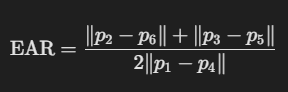
Where p1 and p4 represent the horizontal eye corners, and the remaining coordinate pairs denote the vertical boundaries of the eyelid.
Implementation Reference (js/eyetracker.js)
This eye gesture parser evaluates vertical-to-horizontal proportions on each animation frame:
// Located in js/eyetracker.js
function calculateEAR(p1, p2, p3, p4, p5, p6) {
    const vertical1 = Math.hypot(p2.x - p6.x, p2.y - p6.y);
    const vertical2 = Math.hypot(p3.x - p5.x, p3.y - p5.y);
    const horizontal = Math.hypot(p1.x - p4.x, p1.y - p4.y);
    return (vertical1 + vertical2) / (2.0 * horizontal);
}
A physical blink triggers a sharp, transient drop in the EAR value below a personalized threshold, enabling physical input without requiring a tactile switch.
Adaptive Interaction and Dwell Mechanics
For patients who cannot blink reliably, the system features a Dwell Trigger mode where hovering the gaze reticle over a target for a set duration registers a shot:
- Trigger Timing Presets: Clinicians can select from pre-configured dwells, including Short (0.5s), Medium (0.8s), and Long (1.2s).
- Custom Dwell Time Slider: For advanced clinical scenarios, the system provides a slider (gazeDwellSlider) adjusting dwell triggers from 1.0 to 4.0 seconds in 0.25-second increments. This serves patients who need deliberate, slow-focus visual target training.
- Safe Area Margin Constraints: To accommodate users with limited range of motion, the system can restrict targets from spawning near the screen edges (safeAreaMarginSelect with up to a 38% inset), keeping targets within a comfortable, narrow visual field.
5. Aria: The Adaptive Edge LLM Therapist and Dynamic Difficulty Adjustment
The integration of Aria, the local AI adaptive therapist, represents an advanced implementation of Edge AI in rehabilitative game design. Running locally via LiteRT.js and utilizing the WebGPU API, Aria acts as a real-time, context-aware digital coach.
Dynamic Clinical Adjustments
Aria evaluates telemetry logs during gameplay to modify system settings in real time, preventing player frustration and encouraging physical progress:
- Dynamic Difficulty Adjustment (DDA): If the telemetry stream registers two consecutive target misses, the system immediately scales target dimensions to 1.6x their standard size, enlarging the physical gaze hitbox. Once the child registers six consecutive successful hits, the scaling factor returns to 1.0x to encourage fine motor accuracy.
- Automated Tremor Filtering Adaptation: If the system detects sustained high-amplitude gaze jitter for four consecutive seconds, it automatically engages the Heavy Gaze Smoothing filter. This stabilizes the gaze reticle and allows the patient to aim comfortably without manual clinical adjustments.
Prompt Injection and System Persona Customization
Therapists can customize Aria’s virtual coaching style through the settings panel (aiSystemPrompt). The system merges this prompt with real-time gameplay metrics before executing the local Gemma model [cite: 6]. The prompt structure is organized as follows:
[System Instruction Boundary]
You are Aria, a warm physical therapist speaking to Timmy. He loves dinosaurs.
Keep responses under 15 words, maintain a highly encouraging tone, and do not use markdown.

[Context Boundary]
Current Event: User missed two consecutive targets.
System Action: Targets expanded to 1.6x size to assist aiming.

[Generation Boundary]
Aria's Speech Output:
This merges physical therapy strategies with personalized clinical targets. The resulting spoken output remains supportive and medically relevant without requiring an active internet connection .
To optimize local inference performance across different client devices, the settings panel provides detailed parameter controls:
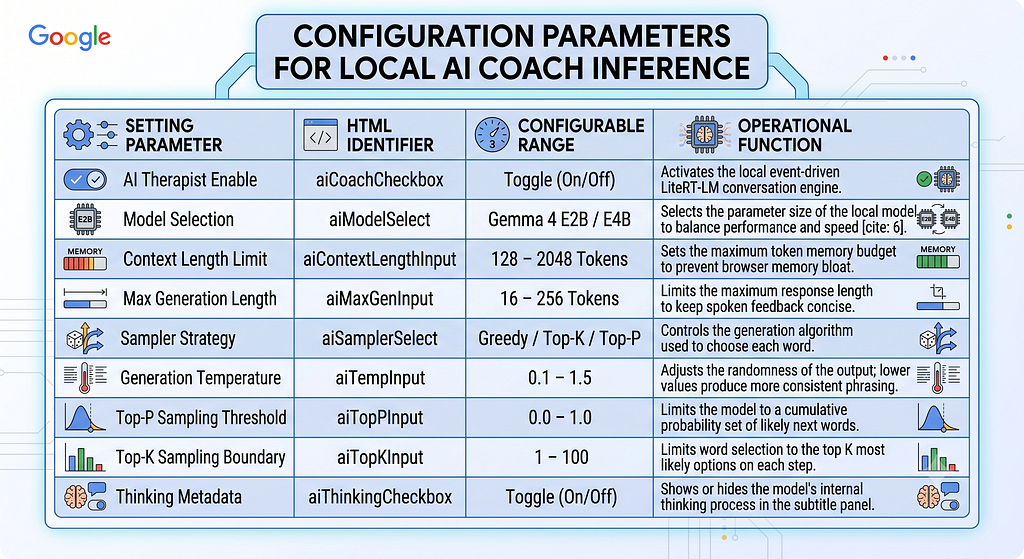
https://medium.com/media/f4cf5bb9e9922f22afa8de5b073c1965/href
6. Audio-Visual Accessibility and Pediatric Customization Profiles
Multi-Language Speech Assistant Heuristics
To motivate young children during repetitive therapy sessions, the game employs a speech assistant (voiceGuidanceCheckbox) that uses a client-side JavaScript heuristic algorithm to automatically find and select friendly, natural-sounding female voices on the user’s operating system:
- Voice Selection Pipeline: The heuristic queries available system voices using the native Web Speech API (window.speechSynthesis.getVoices()).
Heuristic Scoring and Penalties: It scans voice properties (metadata strings and locales) to match specific platform-specific keywords:
macOS / iOS: Prioritizes high-quality voices like Sin-ji for Cantonese and Mei-Jia for Mandarin.
Windows / Microsoft Edge: Selects modern online voices, including Microsoft Hiuting Online (Natural) for Cantonese and Microsoft Tracy Online (Natural) for Mandarin.
- Google Chrome / Android: Routes output to Google 粵語 for Cantonese.
- It applies negative weights to voice names containing words like default, male, or robotic fallbacks to guarantee a comforting, soft pediatric experience.
Target Customization and Audio Asset Optimization
Using the local IndexedDB storage layer, parents and therapists can upload custom images and background tracks directly into the game’s interface to keep children engaged:
- Custom Graphic Integration (targetImageUpload): Users can upload up to 10 PNG, JPG, or WebP images (maximum 2 MB per file) directly to IndexedDB to replace the default targets. The game automatically falls back to standard visual bubbles if no custom targets are present.
- Custom Background Music (bgMusicUpload): Supports uploading an MP3 audio file up to 20 MB. Music automatically pauses and resumes with the game’s state, and volume levels can be set via a dedicated slider (bgMusicVolumeSlider).
- Visual Theme Selection (targetThemeSelect): Provides a quick toggle between pre-configured theme templates, including Pastel Bubbles, Friendly Animals, or high-contrast Glowing Stars designed for users with visual impairments.
- High-Contrast Canvas Options (gameThemeSelect): Offers high-contrast Black-and-White or Blue-and-Lime-Green themes to help children with CVI or color blindness distinguish interactive elements from the background canvas.
7. Telemetry Analytics, Diagnostic Heatmaps, and Clinical Export
A major challenge in physical therapy is obtaining objective, quantifiable metrics showing a patient’s motor control progression over time. Eye Aim Arena solves this by converting gameplay tracking coordinates into diagnostic telemetry.
https://medium.com/media/d6529430d9ec4e13309e4df319dc405e/href
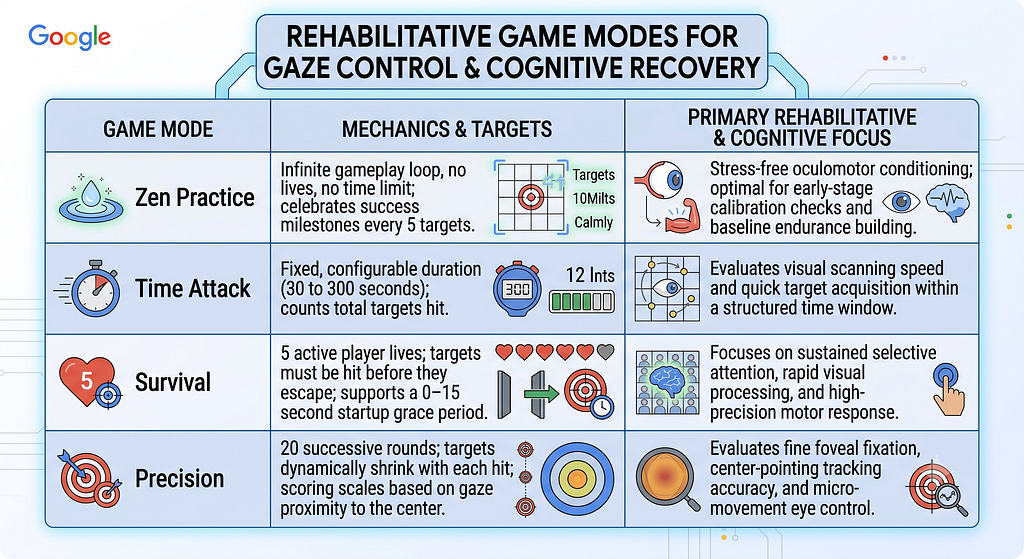
Multi-Mode Clinical Focus
The application features four target tracking structures tailored to specific therapeutic goals:
Visual Heatmaps and Telemetry Exports
At the conclusion of each game session, the tracking data undergoes diagnostic processing to generate a Session Review panel:
- Interactive Gaze Heatmaps: The game renders a visual representation of the gaze path overlaid on screen coordinate fields, mapping clusters where the patient’s eyes lingered, tracked, or struggled to focus.
- Visual Telemetry Export: Practitioners can export the processed heatmap as a PNG image for quick visual reference.
- Raw Telemetry Logs (CSV): The system exports complete, timestamped coordinate lists (recording millisecond intervals alongside calculated screen positions X and Y), allowing clinicians to import patient data into analytical software for deep longitudinal evaluation of motor skill recovery.
8. Deployment, Security Framework, and Compliance Analysis
Because modern browsers restrict webcam access to secure contexts, local deployments must run over HTTPS or localhost. This is managed via the bundled serve_https.py server script:
# Located in serve_https.py
import http.server
import ssl

server_address = ('localhost', 8000)
httpd = http.server.HTTPServer(server_address, http.server.SimpleHTTPRequestHandler)

context = ssl.create_default_context(ssl.Purpose.CLIENT_AUTH)
context.load_cert_chain(certfile="cert.pem", keyfile="key.pem")
httpd.socket = context.wrap_socket(httpd.socket, server_side=True)

print("Secure server active at https://localhost:8000")
httpd.serve_forever()
For production, you can run this application by forking the repository and enabling GitHub Pages.
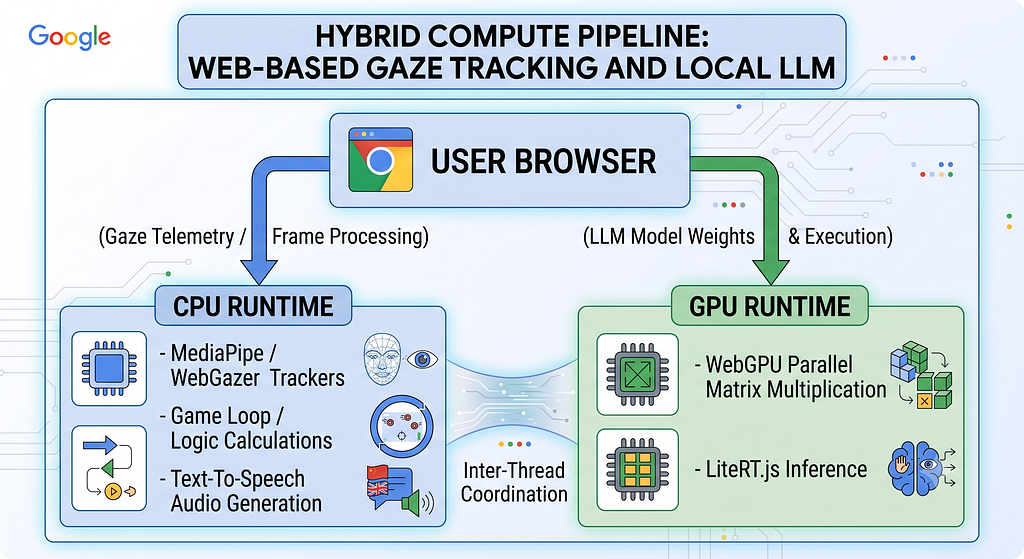
Executing real-time face tracking, physics calculation, client-side neural language inference, and text-to-speech engines simultaneously in a browser poses unique resource demands. The application addresses these through hardware-accelerated APIs:
WebGPU Parallel Processing
By utilizing the WebGPU standard, LiteRT.js offloads heavy matrix calculations for the Gemma LLM directly to the system’s graphics card, freeing up the CPU’s main thread [cite: 6]. This allows the game loop to continue rendering targets smoothly at 60 frames per second, preventing latency spikes that could cause tracking errors or visual discomfort for the patient.
Smart Model Caching
To prevent long download times before every therapy session, the browser’s Cache Storage API saves the model’s weights and configuration files upon the initial download. This ensures the application can boot instantly and run fully offline in classrooms and remote clinics.
Absolute Security and Regulatory Compliance
Because the game does not rely on cloud services to process gaze data or generate AI text, it inherently bypasses many complex regulatory hurdles . Patient biometric coordinates and face video frames never leave the local device, ensuring complete alignment with privacy laws such as HIPAA and GDPR. This makes the tool easy for schools, hospitals, and clinics to adopt without complicated data processing agreements.
9. Conclusion: Transforming Assistive Rehabilitation via Edge Intelligence
Eye Aim Arena demonstrates how combining modern web frameworks, edge computing, and client-side machine learning can revolutionize accessible health tools. By integrating lightweight gaze tracking with responsive difficulty scaling and a comforting AI therapist, the application shows how consumer-grade webcams can successfully replace expensive medical hardware in pediatric motor rehabilitation.
Presenting an elegant blend of smart game design, edge AI, and clinical utility, the platform stands as a highly effective model for modern, accessible assistive technology.
GitHub Repo — https://github.com/wongcyrus/Eye-Aim-Arena
About the Author

Cyrus Wong is the senior lecturer of Hong Kong Institute of Information Technology (HKIIT) @ IVE(Lee Wai Lee).and he focuses on teaching public Cloud technologies. He is a passionate advocate for the adoption of cloud technology across various media and events. With his extensive knowledge and expertise, he has earned prestigious recognitions such as AWS AI Hero, Microsoft MVP — Microsoft Foundary, and Google Developer Expert — Cloud(AI).

Scaling Pediatric Accessibility: How Eye Aim Arena Leverages the Google WebAI Ecosystem- LiteRT.js was originally published in Google Developer Experts on Medium, where people are continuing the conversation by highlighting and responding to this story.