


Last updated: November 20, 2026
TeamGantt is online Gantt chart software for planning and tracking project schedules. It’s made by TeamGantt, a company that says more than 20,000 teams use its product, and it’s built for small teams that want a drag-and-drop Gantt chart they can learn in an afternoon. It has a free plan for one person and one project, and its paid plans are priced per account rather than per user.
In this guide, you’ll learn what TeamGantt is used for, which features come with each plan, what it costs in 2026 and where it starts to feel limited. If it doesn’t fit your team, compare these TeamGantt alternatives.
Outgrowing TeamGantt? ProjectManager adds timesheets, baselines and MPP import and export that’s lossless for schedule data to the Gantt chart, plus a workload page on the Business plan that shows each person’s hours across all projects. Try it free for 30 days.
What Is TeamGantt?
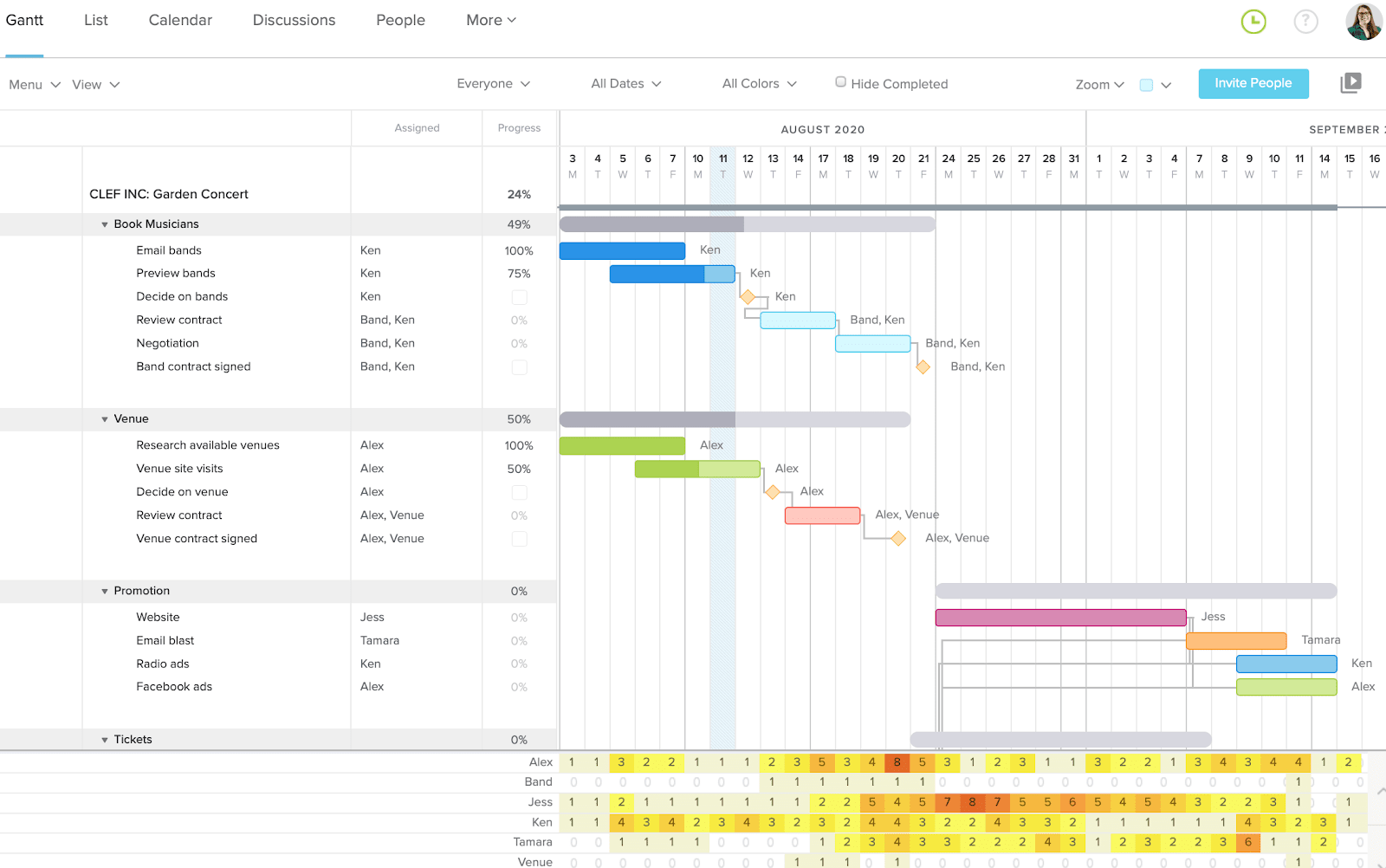
TeamGantt is a web-based scheduling tool built around one live Gantt chart. You add tasks and milestones, drag them along a timeline, link them with dependencies and assign them to people. Teammates update progress, comment and share files on the same schedule, and clients can follow it through a view-only share link.
TeamGantt runs in the browser on Mac and PC and has iOS and Android apps. Its paid plans are Base, Business, Builder Edition and Enterprise. Builder Edition is aimed at construction teams, with lookahead schedules, material lead time tracking, a client portal and a one-way sync from TeamGantt to Procore.
What Is TeamGantt Used For?
Teams use TeamGantt to turn a project plan into a visual timeline that everyone can see and update. Here are the most common uses.
- Planning a project timeline: A small agency planning a website launch can lay out phases for discovery, design, development and launch, add a milestone for client sign-off and link the tasks so that a late design review pushes the build dates back automatically.
- Sharing the schedule with clients: The same agency can send its client a view-only share link instead of emailing PDF exports every week.
- Tracking progress: Collaborators mark tasks complete, check off checklist items and comment, so the manager sees where each task stands without status meetings.
- Balancing workloads: On the Business plan and above, managers can see each person’s assigned tasks or estimated hours across every project and move work before someone is overbooked.
- Scheduling construction jobs: Home builders, remodelers and trade contractors use Builder Edition for lookahead schedules, subcontractor schedule confirmations by text or email and material orders tied to install dates.
TeamGantt works best for small teams running a handful of straightforward projects. A growing team that adds more projects and people will run into its plan limits sooner, as the pricing section below shows.
TeamGantt Features
TeamGantt covers the core of Gantt chart scheduling on every paid plan, and keeps resource and tracking features for Business and above. Here are its main features and the plans that include them.
- Gantt chart: A drag-and-drop Gantt chart with task groups, subtasks, milestones, checklists and labels. Critical path highlighting is included on all paid plans, so you can see which tasks drive the finish date.
- Dependencies: TeamGantt supports all four dependency types with lead and lag. Its pricing page lists advanced dependencies on the Business plan and above.
- Baselines: Business and Builder Edition include unlimited baselines, so you can compare planned dates with actual progress.
- Workload and resources: Business and above add workload management, hourly estimating and team resourcing. You can assign tasks to people, teams or assets such as equipment and spaces, and see demand across all projects by tasks or estimated hours.
- Time tracking: Business and above include time tracking and timesheet reports that compare estimated and actual hours.
- Collaboration and guest access: Collaborators can update progress, check off checklist items, comment, share files and track time, but they can’t change dates or edit tasks. Clients and stakeholders can view a live schedule through a public share link, which is on all paid plans.
- Templates: Save a project as a template and start new projects from it. TeamGantt also offers Gantt chart and construction templates.
- Import and export: TeamGantt imports Microsoft Project MPP files, CSV files and Primavera P6 schedules. MPP imports bring over task names, dependencies, start and end dates and percent complete, but not resources or resource assignments. Projects export to CSV, PDF or “Microsoft Project format”.
- AI: AI project creation is on all paid plans: it builds a starting plan with phases, tasks, milestones and durations from a description of your project. A newer version of TeamGantt’s AI Assistant, in beta, also helps manage the schedule, such as pushing back remaining tasks after a delay.
Here’s a summary of which plan includes each feature.
| Feature | Base | Business | Builder Edition |
| Gantt chart, critical path, calendar and list views | Yes | Yes | Yes |
| AI project creation, public share links, exports | Yes | Yes | Yes |
| Advanced dependencies, baselines | No | Yes | Yes |
| Workload, time tracking, kanban view, portfolio management | No | Yes | Yes |
| Lookahead schedules, client portal, Procore sync, financial forecasting | No | No | Yes |
TeamGantt Views and Integrations
TeamGantt gives managers and team members several ways to look at the same schedule.
- Gantt view: The main view, with the task list on the left and the timeline on the right.
- Calendar and list views: Tasks by date or as a list, on all paid plans.
- Board view: A kanban board on the Business plan and above.
- My Tasks: Each person’s own assigned work across projects.
- Portfolio dashboard and workloads: Status across projects and each person’s workload, on Business and above.
On mobile, TeamGantt’s help center says its iOS app shows a list view only, so plan to edit the Gantt chart in a browser.
TeamGantt’s integrations include Slack (create tasks from messages and get assignment notifications), Trello through a Power-Up, Zapier, Dropbox, Basecamp 2 and calendar feeds for Google Calendar, iCloud Calendar and Outlook. Builder Edition adds the one-way Procore sync, and an open API is available for custom connections.
TeamGantt Pricing
TeamGantt charges a flat price per account, not per user, and each plan caps the number of projects and tasks. Yearly billing saves 20%, and paid plans come with a 14-day free trial that needs a credit card and bills automatically when it ends.
| Plan | Monthly | Yearly | Users | Projects | Tasks per project |
| Personal | Free | Free | 1 | 1 | 40 |
| Base | $59/month | $589/year | 1 manager, 10 collaborators | 5 | 150 |
| Business | From $120/month | From $1,140/year | Unlimited managers and collaborators | 5 included, +$24/month each, up to 20 | 500 |
| Builder Edition | From $199/month | From $1,908/year | Unlimited | Starts with 10, more can be added | Unlimited |
| Enterprise | By quote | By quote | Unlimited | Unlimited | Not listed |
Prices are list prices as of November 2026 and change often.
Flat pricing is good value for a small team with a few projects. A five-person agency with one project manager and four client projects fits on Base for $59 a month. If that agency grows to eight active projects, it needs Business, which costs $120 a month for five projects plus $24 a month for each of the three extra projects, or $192 a month. At 20 projects, Business reaches its limit, and the next step is Builder Edition or Enterprise.
Pros and Cons of TeamGantt
TeamGantt does a few things very well, and its limits show up mostly as teams and project counts grow.
Pros
- The drag-and-drop Gantt chart is easy to learn, so team members can start updating tasks with little training.
- The free Personal plan lets one person plan one project at no cost.
- Flat per-account pricing suits small teams: Base covers a manager and 10 collaborators, and Business has unlimited users.
- Critical path and all four dependency types with lead and lag help keep plans realistic.
- View-only share links let clients and stakeholders follow the schedule without an account.
- It imports Microsoft Project, CSV and Primavera P6 files, and connects to Slack, Trello, Zapier and Procore.
Cons
- Project caps: Base allows 5 projects, and Business tops out at 20, with each project over 5 adding $24 a month.
- Task caps: 150 tasks per project on Base and 500 on Business can be tight for detailed schedules.
- Baselines, workload management and time tracking need the Business plan or above.
- MPP imports don’t bring over resources or resource assignments, so you reassign people after importing a Microsoft Project file.
- The iOS app shows a list view only, not the Gantt chart.
- The free trial requires a credit card and bills automatically when it ends.
TeamGantt Alternatives
If TeamGantt’s project caps or plan limits don’t fit, these tools are worth comparing. See the full list of TeamGantt alternatives for prices and feature tables.
- ProjectManager: Best for growing teams that need workload across projects, timesheets and Microsoft Project round trips. It has a Gantt chart with critical path and baselines, MPP import and export that’s lossless for schedule data, and ChatGPT and Claude integrations at no extra cost. The Team plan ($15/user/month, billed annually) covers up to 10 users and 20 projects, and the Business plan ($28/user/month) covers up to 100 projects and adds the workload page. Compare ProjectManager vs TeamGantt.
- GanttPRO: Best for small teams that want a simple Gantt tool priced per user, with critical path and baselines on every plan. Plans start at $8/user/month, billed annually, for teams of 1 to 15. Compare ProjectManager vs GanttPRO.
- Smartsheet: Best for teams that already plan in spreadsheets and want a Gantt view on top. Pro costs $9/member/month and Business $19, billed annually; critical path starts on Pro and baselines on Business.
TeamGantt FAQ
Is TeamGantt Free?
Yes, TeamGantt has a free Personal plan for one user, one project and up to 40 tasks. It works for planning a single small project on your own, but it doesn’t cover a team. Paid plans start at $59 a month and come with a 14-day free trial that requires a credit card. ProjectManager, online project management software with Gantt charts, critical path, baselines and workload management across projects, offers a 30-day free trial for teams that want to compare.
How Much Does TeamGantt Cost?
TeamGantt costs $59 a month for Base, from $120 a month for Business and from $199 a month for Builder Edition, with 20% off for yearly billing. Enterprise is priced by quote. The price is per account, not per user, but each plan limits projects: Business includes 5 and charges $24 a month for each extra project, up to 20.
Can TeamGantt Import Microsoft Project Files?
Yes, TeamGantt imports Microsoft Project MPP files. The import brings over task names, dependencies, start and end dates and percent complete, but not resources or resource assignments, so you assign people again after importing. TeamGantt says it exports to “Microsoft Project format” without naming the file type. ProjectManager imports MPP and Microsoft Project XML files, including assignees, and its MPP import and export is lossless for schedule data, so tasks, durations, dates, dependencies and WBS stay intact.
Does TeamGantt Have Resource Management?
Yes, but only on the Business plan and above. Business adds workload management, hourly estimating and team resourcing, and lets you assign tasks to people, teams or assets such as equipment and see demand across all projects by tasks or estimated hours. Base doesn’t include workloads. ProjectManager’s workload page is also on its Business plan: it shows each person’s assigned hours across all projects, with over-assigned days in red, alongside timesheets.
Is TeamGantt Good for Large Teams?
TeamGantt suits small teams better than large ones. Business has unlimited users but caps an account at 20 projects and 500 tasks per project, and Builder Edition and Enterprise remove more limits at a higher price. Large teams also need baselines and workloads, which start on Business. ProjectManager has limits too: the Team plan covers up to 10 users and 20 projects, and the Business plan up to 100 projects, so check your project count against each plan.
Does TeamGantt Have a Mobile App?
Yes, TeamGantt has iOS and Android apps, and the web app runs in the browser on Mac and PC. TeamGantt’s help center says the iOS app shows a list view only, so team members can check and update tasks on a phone, but plan to edit the Gantt chart in a browser. If your crew updates work from the field, test the mobile app during the 14-day trial before you commit.
Want to see how your TeamGantt project would look? Start a free 30-day trial of ProjectManager and import your schedule.
Related Content
- Best TeamGantt Alternatives (Free & Paid) for 2026
- ProjectManager vs TeamGantt: Software Comparison (2026)
- 11 Best Gantt Chart Software of 2026 (Free and Paid)
- ProjectManager vs GanttPRO: Software Comparison (2026)
- 7 Best Gantt Chart Software for Mac (2026)
- What Is Microsoft Project? Uses, Features and Pricing
ProjectManager is online project management software with Gantt charts, critical path, baselines and workload management across projects. Teams plan on the Gantt chart, track time with timesheets and share progress on dashboards, all in one place. Try ProjectManager free for 30 days.
The post What Is TeamGantt? Uses, Features and Pricing appeared first on ProjectManager.


