Introduction
Open-source LLM models have been improving rapidly with tool calling, extended context windows, and native vision and audio capabilities, all while delivering strong benchmark performance. Gemma 4, recently introduced by Google Deepmind brings all of these features together in sizes efficient enough to run locally.
In this article, we’ll look at the capabilities of Gemma 4 and build a multimodal (Text, Vision, Voice) CLI agent (gemma4-agent) with function-calling capabilities. By the end, you’ll have an agent that can chat, write, execute code, analyze images, and process voice instructions to deliver highly grounded responses.
What is Gemma 4 Model ?
Gemma 4 is Google DeepMind’s open model family, released in April 2026 under the Apache 2.0 license. Built from the same research and technology behind Gemini 3, Gemma 4 is designed for high-performance reasoning, coding, multimodal understanding, and local AI execution across different model sizes.
Features of Gemma 4 Models
- Improved Tool calling : Native function calling and tool orchestration, letting agents act autonomously without bloating prompt instructions
- Thinking mode : Built-in step-by-step thinking mode via the <|think|> token for complex multi-turn logic
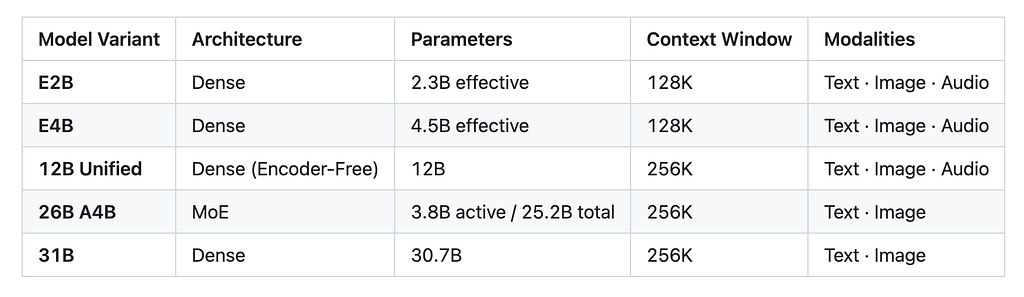
- Context Windows : Up to 256K tokens on the 12B and larger models (128K on the edge-sized E2B/E4B) for processing long document and tool outputs
- Extended Multimodality : Gemma 4 models can process text,voice and images simultaneously like extracting data from charts, analyzing screenshots , and reviewing UI mockups.
Gemma 4 Architecture
Gemma 4 comes in five model sizes built around four architectural variants, each making different trade-offs between performance, inference speed, compute, and memory.
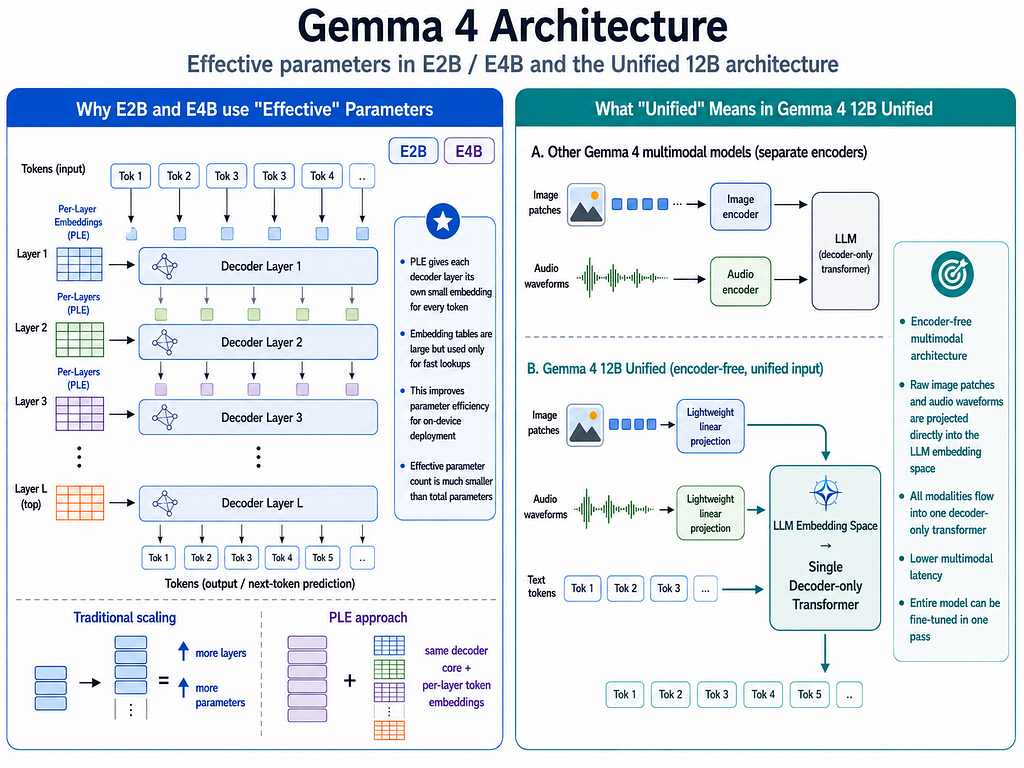
- Effective-parameter models (E2B and E4B) are dense transformer models optimized for edge and on-device deployment. The “E” stands for effective parameters use Per-Layer Embeddings (PLE), where each decoder layer has its own token embeddings. This architecture is designed to make larger-capacity models practical for phones, browsers, and edge devices
- Mixture-of-Experts (26B) : Mixture-of-Experts (MoE) architecture where only a subset of the model is activated for each token. The model has about 25.2B total parameters but activates roughly 4B per token, reducing inference compute while retaining the capacity of a much larger model.
- Dense model(31B): Gemma 4 31B is the conventional large dense model in the family. Unlike the MoE model, its transformer weights are broadly involved during token processing rather than dynamically routing each token through a subset of experts. It offers the highest capability but requires substantially more compute and memory.
- Unified model (12B): Uses an encoder-free multimodal architecture where image and audio inputs are projected directly into the LLM embedding space using lightweight projection modules. Text, image, and audio then flow through the same decoder-only transformer, reducing multimodal latency and simplifying the overall architecture.
Implementation Steps
Let’s dive into building a local multimodal terminal agent using Gemma 4 12B and Ollama .
Project Structure
gemma4-agent/
├── gemma_agent/
│   ├── agent.py          # orchestrator: tool loop, dedup, self-healing
│   ├── tools.py          # 11-tool registry + SSRF guard
│   ├── backends.py       # Ollama REST client + vision encoding
│   ├── skills.py         # SKILL.md fetcher (google/skills + community)
│   ├── voice_input.py    # VAD + selectable STT (Whisper / Gemma native)
│   ├── ui.py             # rich rendering + TTS
│   ├── cli.py            # REPL + slash commands
│   └── mcp.py            # experimental MCP config registry
├── tests/                # 60 tests: unit + e2e REPL + real-audio
├── pyproject.toml
└── README.md
Core Components
gemma4-agent is designed to run locally by default, with external services available only as optional integrations.
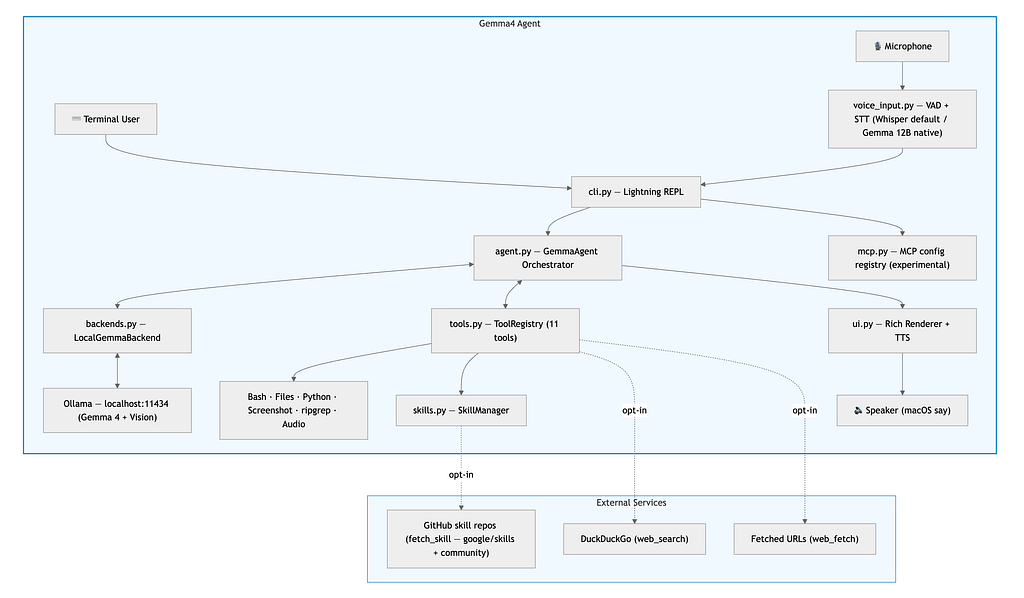
- User Interface: cli.py provides the interactive terminal REPL, while voice_input.py captures microphone input using VAD and local speech-to-text with faster-whisper.
- Agent Orchestration: agent.py contains the orchestrator ,conversation history, multi-step tool-call loops with deduplication and self-healing retries, and automatic web-grounding for topics beyond the model’s knowledge cutoff.
- Local Model Backend: backends.py connects the agent to Ollama running on localhost:11434, where Gemma 4 handles text, reasoning, and vision locally.
- Tool System: tools.py provides a ToolRegistry with tools for Bash, file operations, Python execution, screenshots, ripgrep, and other local actions.
- Skills: skills.py manages reusable Agent Skills that can extend the agent with additional instructions and capabilities.
- MCP Integration: mcp.py provides an experimental MCP server configuration registry, laying the foundation for future MCP client integration.
- Terminal UI & Voice Output: ui.py renders responses using Rich and can optionally provide local text-to-speech through macOS say.
- Optional External Services: Features such as DuckDuckGo web search, URL fetching, and GitHub-hosted skills are opt-in. The core agent does not require them to operate.
GitHub Repository
You can find code repository here
Pre-Requisites
- Python 3.10+
- Ollama installed and running locally
Step 1: Install Ollama and pull Gemma 4 model
# macOS
brew install ollama

# Linux
curl -fsSL https://ollama.com/install.sh | sh
Then start the server and pull the model:
ollama serve
ollama pull gemma4:12b
If you installed the Ollama desktop app, the server starts automatically at login and sits in the menu bar — ollama serve is only for CLI-only installs (brew/curl).
To confirm the server is up and see which model is actually loaded in memory, hit the local API directly:
curl http://localhost:11434/api/ps
{
  "models": [
    {
      "name": "gemma4:12b",
      "details": {
        "family": "gemma4",
        "parameter_size": "11.9B",
        "quantization_level": "Q4_K_M"
      },
      "expires_at": "2026-08-08T18:06:07.541672-04:00",
      "size_vram": 8427646483,
      "context_length": 32768
    }
  ]
}
Step 2: Install gemma4-agent
Clone the repository, create an isolated virtual environment, and install in editable mode
git clone https://github.com/arjunprabhulal/gemma4-agent.git

cd gemma4-agent

#setup virtual environment
python3 -m venv .venv && source .venv/bin/activate

#Install dependencies
pip install -e .
Step 3: Set Up the Voice Model
For voice interaction, you can optionally download and cache the ~74 MB Whisper model for fully local speech-to-text:
gemma4-agent --setup-voice
This step is optional as text, tools, and vision work without Whisper. Once downloaded, the model is cached locally and subsequent voice transcription runs offline.
Step 4: Launch the Agent
Make sure ollama serve is still running in another terminal, then start the CLI
gemma4-agent                       # interactive REPL
gemma4-agent --model gemma4:12b    # lighter model
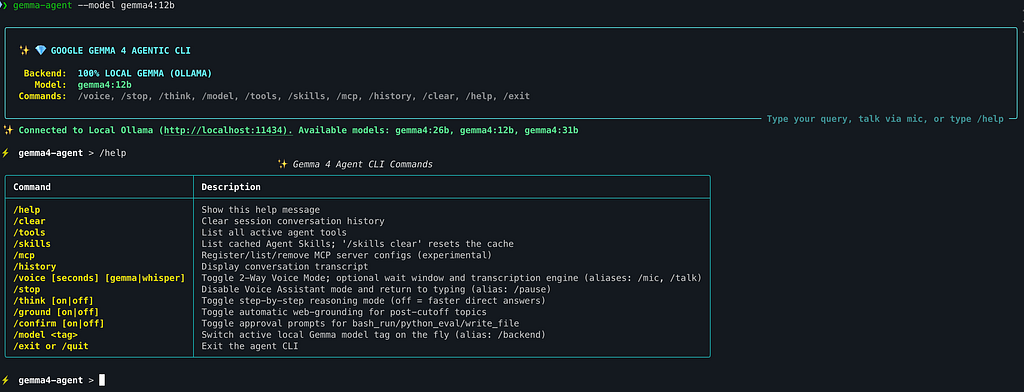
Step 5: Explore CLI Commands
Inside the REPL, /tools lists the available capabilities, /model
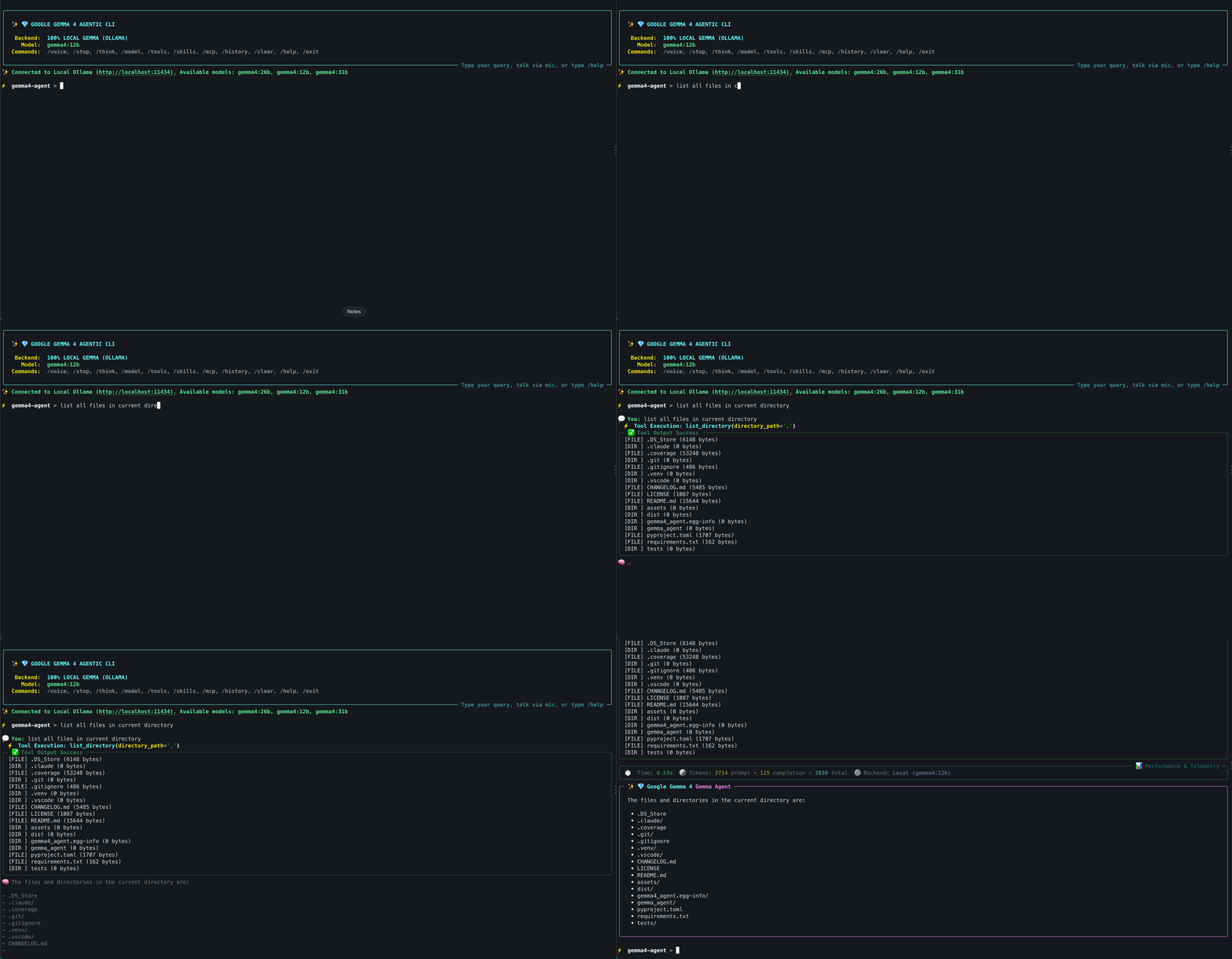
Step 6: Explore Function Calling capabilities
Gemma4 Agent is not limited to text generation. It can invoke function tools and perform agentic tasks. Depending on the request, the agent can work with files, execute shell commands, run Python code, search local content, capture screenshots, and access additional capabilities through Agent Skills.
Step 7: Explore Image analysis with native vision
Gemma 4’s native vision capabilities allow the agent to reason directly over images.
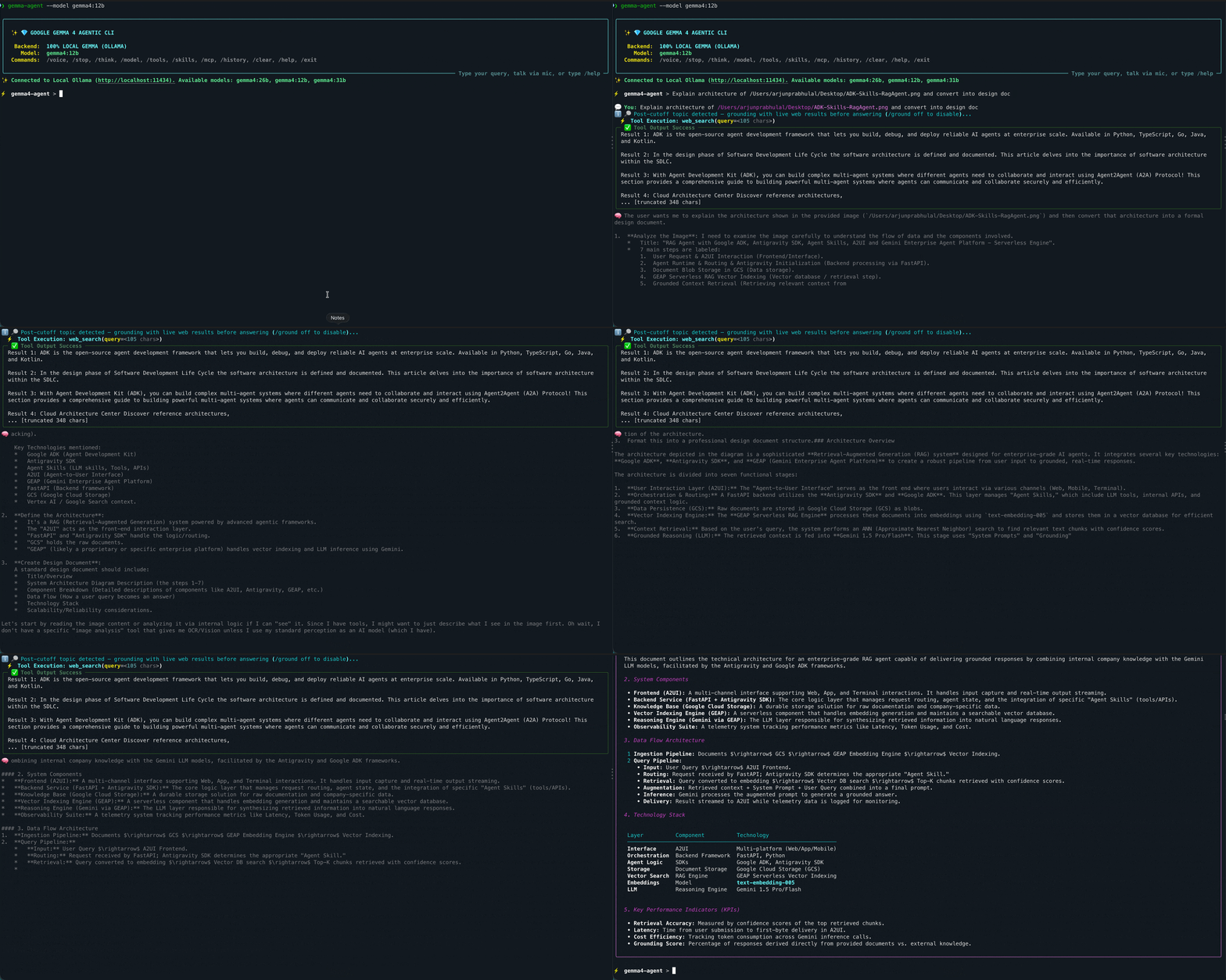
To analyze an image, simply include the image path anywhere in your prompt even at the beginning.
Example: Using RAG Agent Architecture diagram from previous blog asked Gemma4 to design and generate the plan as you can see its invoking function tool as well as thinking mode to extract the text from image and constructing the design document
Step 8: Talk to Gemma 4 with Voice and Native Audio
CLI also supports a two-way voice assistant mode:
By default, microphone input is transcribed locally using faster-whisper:
⚡ gemma4-agent > /voice # Whisper (fast, default)
You can also switch the speech engine to Gemma 4’s native audio capabilities:
⚡ gemma4-agent > /voice gemma # Gemma 4 12B handles the audio
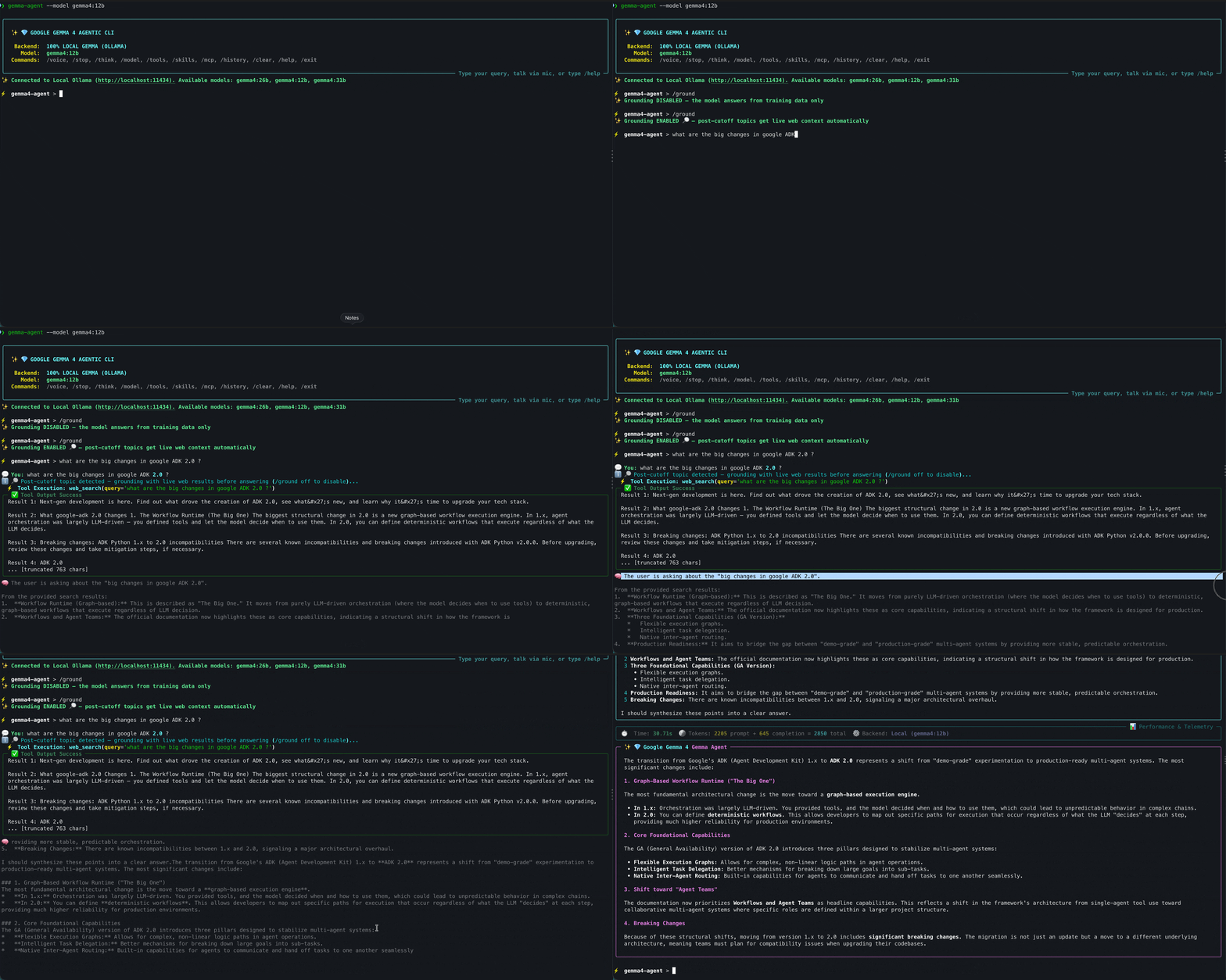
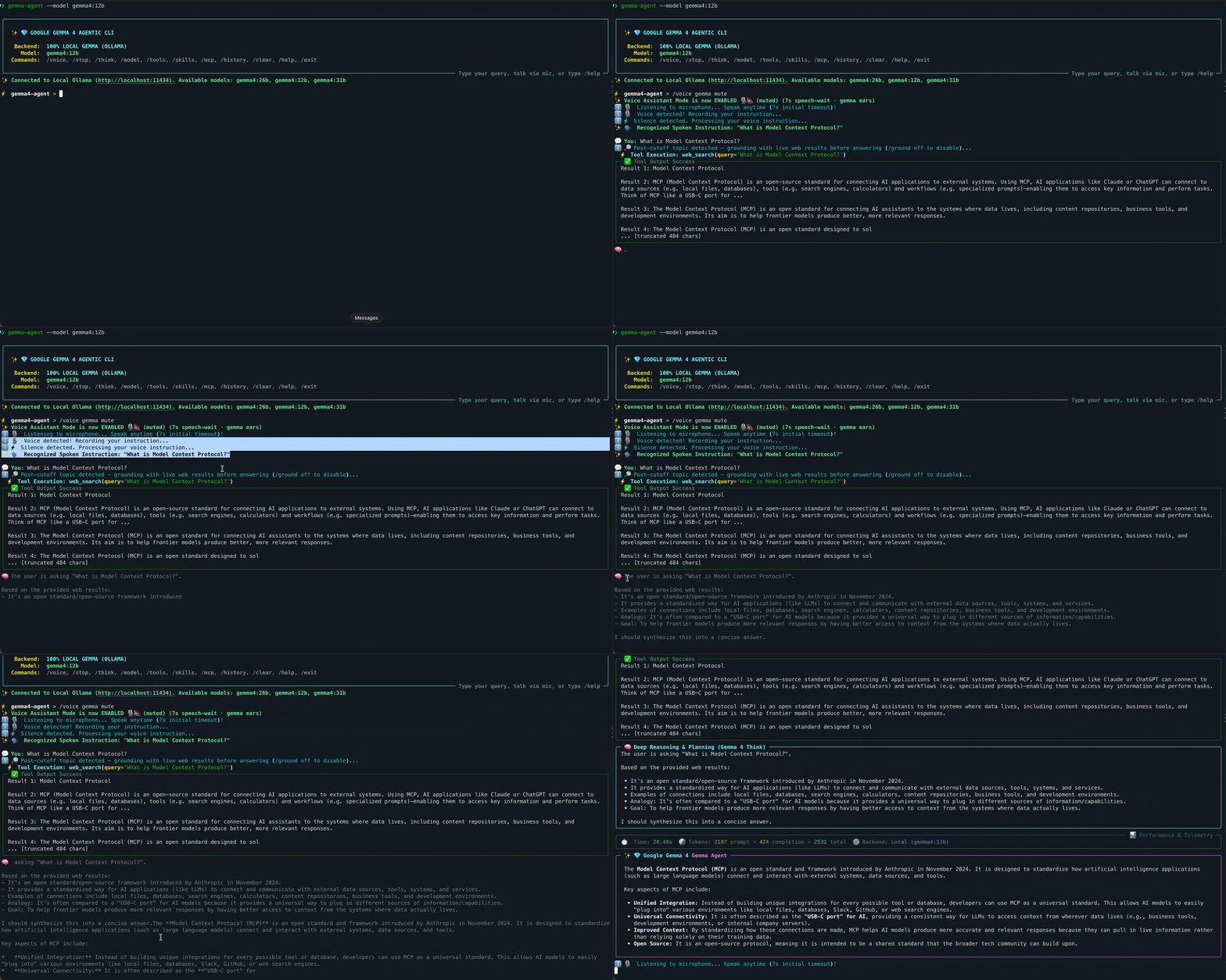
In the example below, the agent detects my voice, Gemma 4 transcribes the instruction, retrieves current web context when grounding is required, and reasons over the results before generating the final response.
Conclusion
In this article, we built a local multimodal terminal agent using Gemma 4 and Ollama. We extended Gemma 4 with function calling, native vision, and voice interaction allowing Gemma4 model to move beyond text generation and interact with the local environment as an agent.
References:
- Google DeepMind Gemma: Gemma Open Models
- Ollama Model Library: Ollama Gemma 4 Models

Building a Local, Multimodal AI Terminal Agent with Gemma 4 was originally published in Google Developer Experts on Medium, where people are continuing the conversation by highlighting and responding to this story.