A Practical Guide to preparing and using Google’s smallest function calling model for Mobile and Web Developers

Why I Believe in Offline Agents
I’m the creator and maintainer of flutter_gemma — a Flutter plugin for running LLMs locally on mobile devices. The more I work with on-device AI, the more I’m convinced: the future belongs to local or, at the very least, hybrid agents.
Why?
Imagine you’re a developer who wants to build a mobile or web app with an AI agent. When the agent lives in the cloud, you face a whole bunch of problems:
- Latency — users wait for responses, speed depends on connection quality
- Token costs — you need to balance between user pricing and your margins
- Privacy — GDPR and other regulations require careful handling of data
- Network dependency — no internet = no service
All of this can be solved by moving AI to the device.
I wrote about this in detail in The Dawn of Offline AI Agents in Your Pocket. But the examples from that article are more like demos than production solutions. Models like Gemma 3n handle function calling well, but they’re too large: they don’t fit in the app bundle, require separate downloads, and inference is slow even on flagships. On low-end devices, they simply won’t run. Smaller models, on the other hand, often hallucinate and struggle to remember tools.
For production, you need a specialized model:
- Small — fits in phone memory
- Fast — decode >100 tok/s
- Built for function calling — not general-purpose chat
And such a model now exists — FunctionGemma.
What is FunctionGemma?
FunctionGemma is a specialized version of Gemma 3 270M, designed specifically for function calling.
Google released it in December 2025 (a few days ago). It’s the answer to developers’ main request after the Gemma 3 270M release — native functio calling support for on-device agents.
Key specifications:
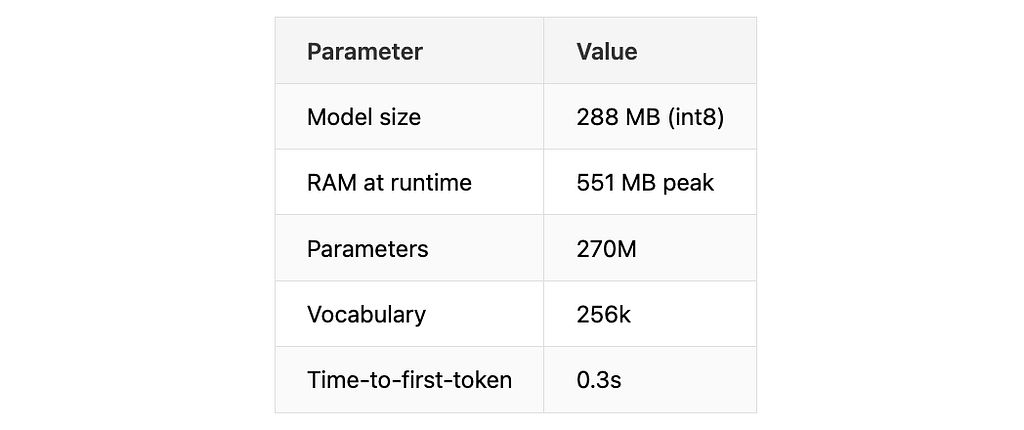
What this means in practice:
- 288 MB— can be embedded directly in the app bundle, no separate download needed
- 551 MB RAM — runs even on budget devices with 4 GB memory
- 270M parameters — 10x smaller than Gemma 3n E2B, but sufficient for function calling
- 256k vocabulary— large vocabulary works well with structured data and JSON
- 0.3s TTFT — model starts responding almost instantly
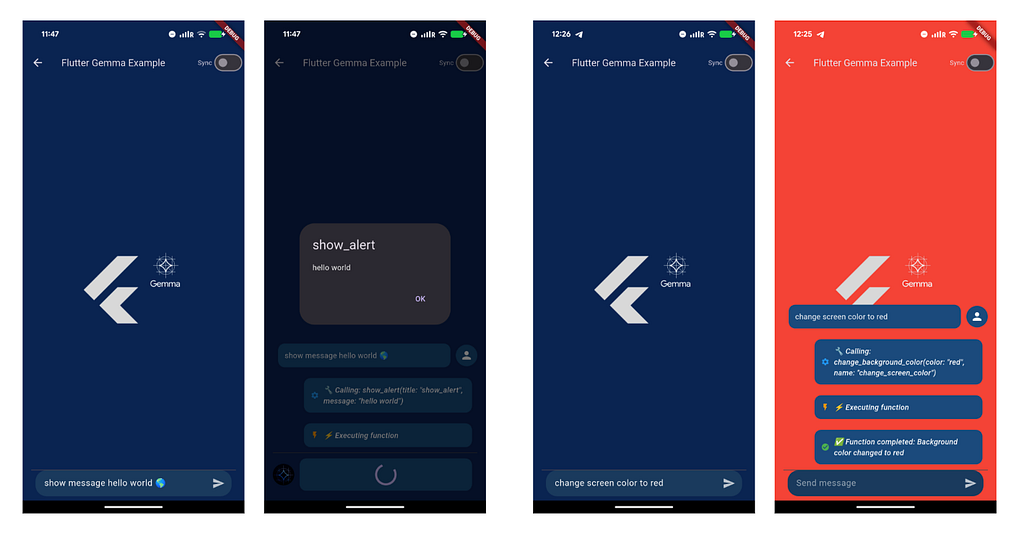
Take a look how fast it is in example app of flutter_gemma plugin
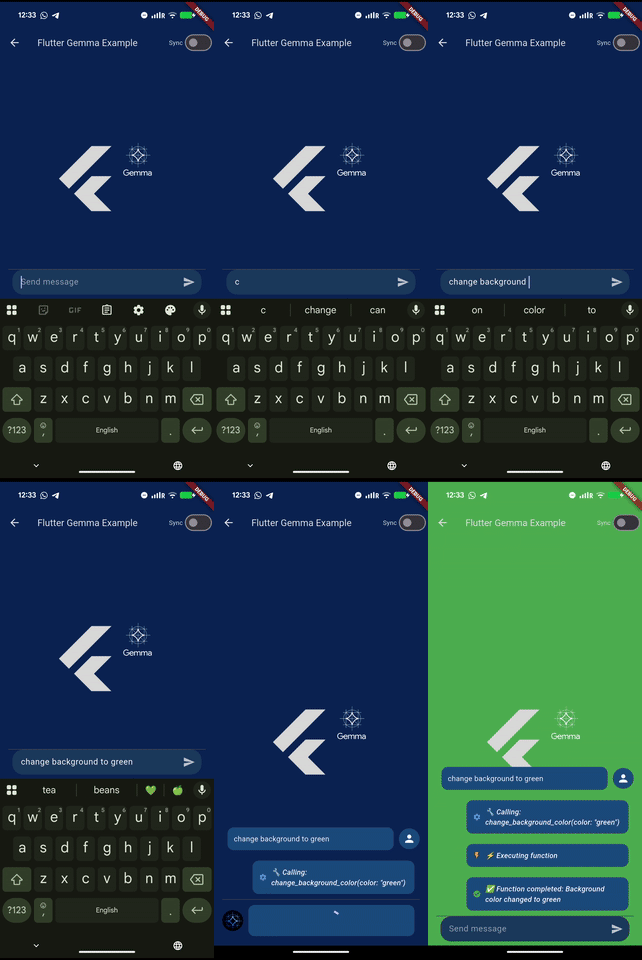
There’s one important thing. Out of the box, the model’s accuracy is only 58%. Doesn’t sound very production-ready, right?
But here’s the thing: FunctionGemma is easily fine-tuned on your specific functions. After fine-tuning, accuracy jumps to 85%. +27% — that’s the difference between “sometimes works” and production-ready.
Comparison with Competitors
For fun, let’s compare FunctionGemma with the closest alternatives: Gemma 3n and Gemma 3 1B as indirect competitors (general-purpose models with function calling support), Llama as a popular open-source option, and Hammer— a direct competitor from MadeAgents, specifically built for function calling.
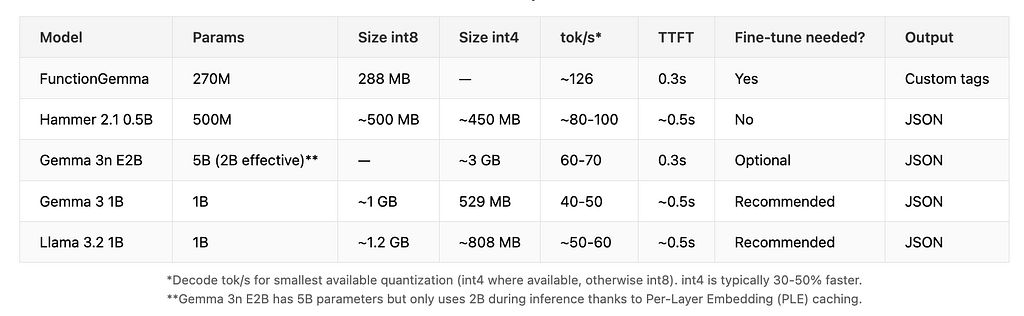
FunctionGemma is only available in int8 (288 MB) — that’s enough since the model is already tiny. Gemma 3n E2B is the opposite — only int4, because in int8 it would be ~6 GB.
int8 vs int4 — what’s the difference?
Quantization compresses model weights from 32/16-bit numbers to 8-bit (int8) or 4-bit (int4). Fewer bits means smaller size and faster inference, but potentially lower quality.
– int8 — balance between quality and size. Quality loss is minimal (~1–3%), size reduces by ~2x compared to FP16.
– int4 — maximum compression, size reduces by ~4x. Quality loss is more noticeable (~2–10% depending on model), but usually acceptable for function calling.
There’s another important metric — accuracy. The Berkeley Function Calling Leaderboard (BFCL) is the standard benchmark for evaluating function calling capabilities. Gemma 3 1B scores ~31%, Llama 3.2 1B — ~26%, both weak without fine-tuning. Gemma 3n wasn’t tested since it’s general-purpose. Hammer 2.1 0.5B has no public data, but 1.5B scores ~73% out-of-box — though it weighs ~1.5GB in int8, 5x larger than FunctionGemma (288MB).
When to Choose What
- Quick prototype without fine-tuning → Hammer or FunctionGemma base model.
- Maximum speed + minimum size + maximum accuracy → FunctionGemma (270M, ~126 tok/s, 85% after fine-tuning)
- Multimodal agent (text + images) → Gemma 3n
FunctionGemma’s Unique Format
Unlike most models that use JSON, FunctionGemma has its own format with special tokens.
Function Call Format
call:change_background_color
{color:red }
Let’s break it down: `
The developer Role
FunctionGemma was fine-tuned with `developer` as the instruction role. Using `system` (like in Hammer or standard Gemma) won’t activate function calling mode — the model will ignore your tools definition entirely.
messages = [
    {"role": "developer", "content": "You are a model that can do function calling..."},
    {"role": "user", "content": "make it red"}
]
Using `system` won’t activate the function calling mode.
Enum Support
A 270M model can hallucinate parameter values. Without constraints, asking “make it red” might produce `{“color”: “crimson”}` or `{“color”: “rouge”}`. Enum forces the model to choose only from valid values, making function calls reliable.
Format:
enum:[red , blue , green ]
When declaring a function, enum is specified between `description` and `type`:
color:{description:The color name,enum:[red,...],type:STRING}
Stop Tokens
What are stop tokens? Special tokens that tell the model when to stop generating. For FunctionGemma, two tokens are needed: `
Why they matter: Without `
stop_tokens=[
    "",
    "",  # Model stops, waits for result
]
Model Preparation Pipeline
Let’s go through the model preparation pipeline in detail — from fine-tuning to the format that can run on-device. This is important to understand because Google released FunctionGemma only in PyTorch format, and conversion is needed for mobile deployment.
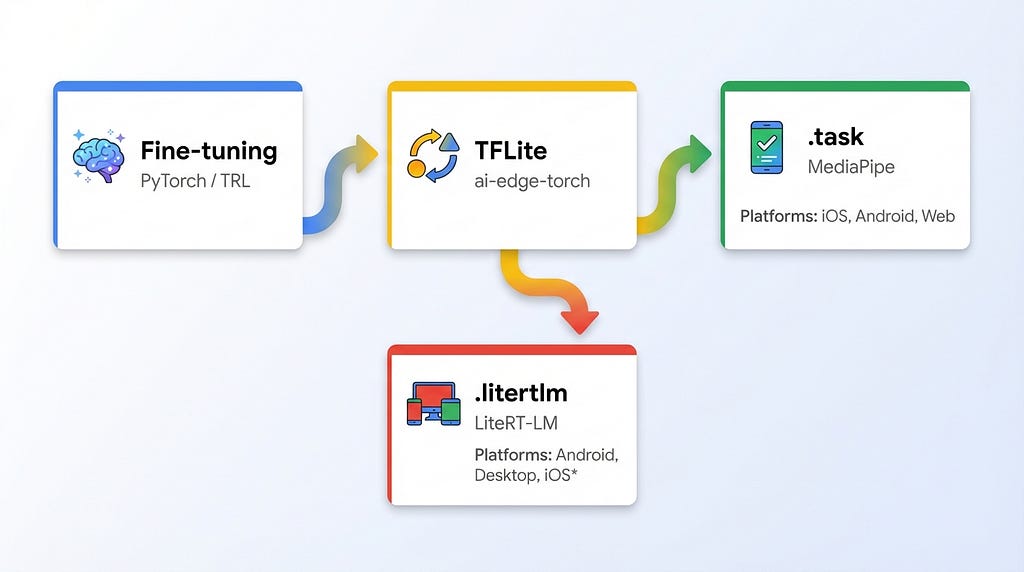
The pipeline starts with fine-tuning the base `google/functiongemma-270m-it` model on your training data in JSONL format using TRL/SFTTrainer. Once trained, the model is converted to TFLite format using `ai-edge-torch` with `dynamic_int8` quantization. The final step depends on your target runtime: for MediaPipe, combine the TFLite model with a tokenizer and stop tokens into a `.task` bundle that runs on iOS, Android, and Web. Alternatively, package it as `.litertlm` for the LiteRT-LM runtime, which offers NPU acceleration and broader platform support including desktop.
After converting to TFLite, you have a choice — package the model in one of two formats that work on-device: `.task` for MediaPipe or `.litertlm` for LiteRT-LM.
task — this is the MediaPipe format, battle-tested over time. MediaPipe LLM Inference API has been around for several years, works reliably on iOS, Android, and Web. The model is packaged together with tokenizer and metadata in a single file. GPU acceleration. This is what flutter_gemma uses right now.
litertlm — a new format from Google, an evolution of .task with better compression and additional metadata. MediaPipe can also run .litertlm on iOS, Android, and Web — but without additional capabilities like NPU. The main advantages of .litertlm are unlocked through a separate runtime LiteRT-LM: NPU (Neural Processing Unit) support for even more acceleration, plus desktop support — Linux, macOS, Windows, and even Raspberry Pi. But LiteRT-LM runtime is still in Early Preview status: iOS isn’t supported yet (coming soon), Web neither.

What to Choose?
Mobile (iOS + Android) or Web app — go with `.task`. Natively it’s MediaPipe LLM Inference API: there are ready examples for Android and iOS. On Flutter — flutter_gemma supports it out of the box.
Android only + squeezing max from hardware — `.litertlm` with LiteRT-LM runtime will give you NPU acceleration. Check out AI Edge Gallery on Google Play for Android and on TestFlight for iOS — Google’s demo app with FunctionGemma, voice commands, and a mini-game. Here is the source code: GitHub. It is Android only for now
Desktop (Linux, macOS, Windows) — only `.litertlm` through LiteRT-LM. Several integration options:
- CLI tool `lit` — pull models from HuggingFace and run inference in one command. Binaries for macOS, Linux, Windows
- Kotlin API — full SDK for Android and JVM (Linux, macOS, Windows)
- C++ API — Engine, Session, Conversation classes for native integration with streaming support
flutter_gemma Support
flutter_gemma supports `.task` and `.litertlm` formats on iOS, Android, and Web — through MediaPipe LLM Inference API.
As for LiteRT-LM runtime with NPU and desktops — work is already underway. As soon as Google opens the public API for iOS (hopefully early 2026), we’ll add full support. Desktops are also in the plans — stay tuned, coming soon.
Ready-to-Use Colab Notebooks
I’ve prepared notebooks for the complete pipeline:
1. Fine-tuning — load base model, prepare JSONL dataset, train with TRL/SFTTrainer, save to Drive
2. TFLite conversion — convert PyTorch to TFLite with ai-edge-torch, apply int8 quantization
3. Task bundle — combine TFLite + tokenizer + stop tokens into .task for MediaPipe
4. LiteRT-LM bundle — convert to .litertlm with ai-edge-torch-nightly, add metadata and stop tokens for LiteRT-LM runtime
Training Data Format
To fine-tune FunctionGemma on your functions, you need training data — examples of user requests paired with the expected function calls. The format is simple JSONL, where each line maps a user phrase to a function name and its arguments.
{"user_content": "make it red", "tool_name": "change_background_color", "tool_arguments": "{"color": "red"}"}
{"user_content": "rename app to Hello", "tool_name": "change_app_title", "tool_arguments": "{"title": "Hello"}"}
{"user_content": "show alert saying hi", "tool_name": "show_alert", "tool_arguments": "{"title": "Alert", "message": "hi"}"}
How Many Examples Do You Need?
For my demo app with 3 functions, I used 284 examples — roughly 90–100 per function. Variety matters: not just “make it red” repeated 94 times, but different phrasings like “change to red”, “set background red”, “I want a red background”, “can you make the background red please”, and so on. The model needs to see how real users phrase requests.
Integration with flutter_gemma
https://github.com/DenisovAV/flutter_gemma — my Flutter plugin for running Gemma models locally (in case you forgot) 🙂
Model Setup
Choose the model type — this activates the special FunctionGemma parser.
// ModelType.functionGemma activates the special parser
final model = Model.functionGemma_270M;
// or your fine-tuned version
final model = Model.functionGemma_demo;
Defining Functions
Describe your functions using JSON Schema format — same as OpenAI function calling.
final tools = [
  Tool(
    name: 'change_background_color',
    description: 'Changes the app background color',
    parameters: {
      'type': 'object',
      'properties': {
        'color': {
          'type': 'string',
          'enum': ['red', 'blue', 'green', 'yellow', 'purple', 'orange'],
          'description': 'The color name',
        },
      },
      'required': ['color'],
    },
  ),
];
Creating a Chat with Tools
Pass your tools when creating the chat — the plugin will generate the system prompt automatically.
final chat = await model.createChat(tools: tools);
Handling the Response
Process the stream — you’ll get either text tokens or function calls.
await chat.addQuery(Message.text(text: userInput, isUser: true));

await for (final response in chat.generateChatResponseAsync()) {
  if (response is TextResponse) {
    // Regular text
    appendToUI(response.token);
  } else if (response is FunctionCallResponse) {
    // Function call!
    final result = await executeFunction(
      response.name,  // "change_background_color"
      response.args,  // {"color": "red"}
    );

    // Send result back to the model
    await chat.addQuery(Message.toolResponse(
      toolName: response.name,
      response: result,
    ));
  }
}
What Happens Under the Hood
1. Plugin automatically generates prompt with function declarations
2. `FunctionCallParser` parses the special FunctionGemma format
3. Streaming-safe function call detection
4. Cross-platform: iOS, Android, Web
Practical Example
Demo App — you’ve already seen screenshots from it above. I created a demo with three functions: `change_background_color` (changes background color), `change_app_title` (changes the title), and `show_alert` (shows an alert dialog).
Example Dialog
User: “make the background red”
Model: “
Plugin: Parses function call, calls `changeBackgroundColor(“red”)`, sends result to model, model generates response: “Done! Background is now red.”
Ready-to-Use Models — No Conversion Needed
To try FunctionGemma, you don’t have to go through the whole pipeline or do fine-tuning. I’ve prepared ready-to-use models:
1. Base model (converted to .task):
Google released FunctionGemma only in PyTorch format. I went through the entire conversion pipeline and uploaded the ready `.task` file: sasha-denisov/function-gemma-270M-it. This is Google’s original model without fine-tuning. Accuracy ~58% — not perfect, but enough for experiments and prototypes. Just want to try function calling on device? Grab this model and go.
2. Fine-tuned for the demo app:
If you want to see the difference after fine-tuning, here’s a model trained on functions from the flutter_gemma example: sasha-denisov/functiongemma-flutter-gemma-demo. Trained on 284 examples for 3 functions (`change_background_color`, `change_app_title`, `show_alert`). Accuracy is significantly higher than the base.
Conclusion
FunctionGemma is Google’s smallest specialized model for function calling — 270M parameters, 288 MB, ~126 tok/s decode. Yes, it requires fine-tuning (58% → 85% accuracy), yes, it has a weird custom format instead of JSON. But it fits in any phone, responds instantly, and actually works. You can build apps with offline AI agents right now — small, fast, and reliable enough for production. No need to wait for some magical future where models get smaller and devices get faster. The future is already here!
Flutter makes this especially easy — one codebase, all platforms: iOS, Android, Web, and Desktop. And if you want to push this further, flutter_gemma is open source. Contributors are always welcome.
This article is part of my ongoing series about practical AI implementation in mobile apps. Next up: “Fully On-Device RAG — The Complete Guide” — subscribe to stay updated.
Connect with me: GitHub, LinkedIn, Medium, X
Links
- FunctionGemma Model Card, Google Blog — FunctionGemma, FunctionGemma on HuggingFace, flutter_gemma, Hammer 2.1, Gemma 3n, LiteRT-LM

On-Device Function Calling with FunctionGemma was originally published in Google Developer Experts on Medium, where people are continuing the conversation by highlighting and responding to this story.