A Design Exploration: From Text Prompt to Editable Grid
Written by GDEs Margaret Maynard-Reid, Chansung Park & Sayak Paul
Today, many use cases of fashion AI center around branding and marketing. Being able to apply AI in the early fashion design process for “finding inspiration” is transformative with both speed and imagination.
A fashion moodboard is a visual tool with a curated collage of images that helps the designer with brainstorming and early concept development. To explore a design direction with a moodboard by manually collecting references and finding a color palette can be time-consuming. This project is a small web app that generates a structured fashion moodboard from a text prompt and lets the designer refine parts of the image with targeted edits.
Check out our project: full code on GitHub, an interactive version hosted on Hugging Face Spaces 🤗 and a short YouTube video.
https://medium.com/media/82a55e56a1fa76895d0157cf98383bc0/href
How it works
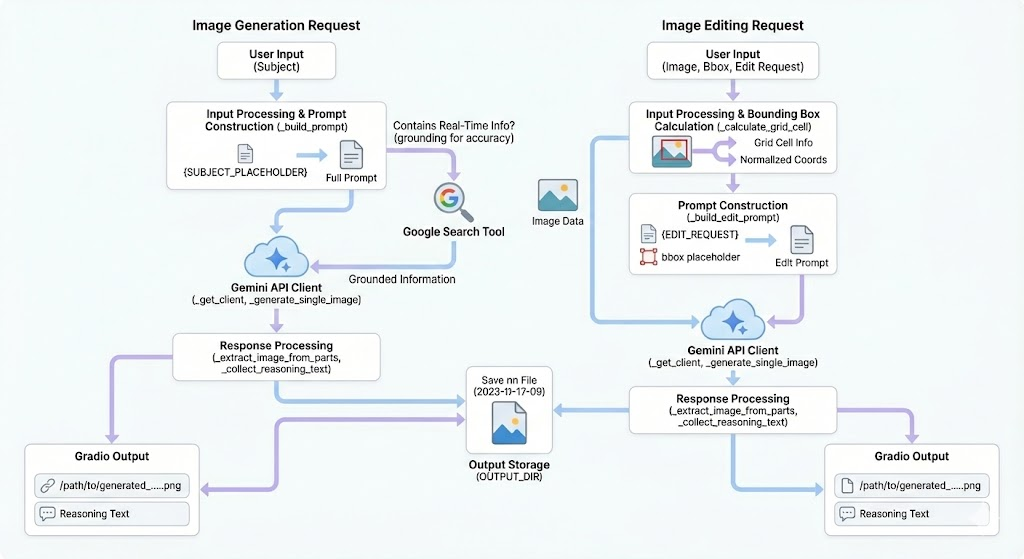
Here is how the app works:
- The user enters a short “subject” prompt defining the fashion mood or style, for example, “sustainable luxury dress collection…”
- The app generates a moodboard image in a consistent 2×4 grid layout.
- A reasoning trace from the model (Gemini 3 or 2.5) alongside the image.
- You can either edit a specific region (via a bounding box), or the entire image (no bounding box selected).
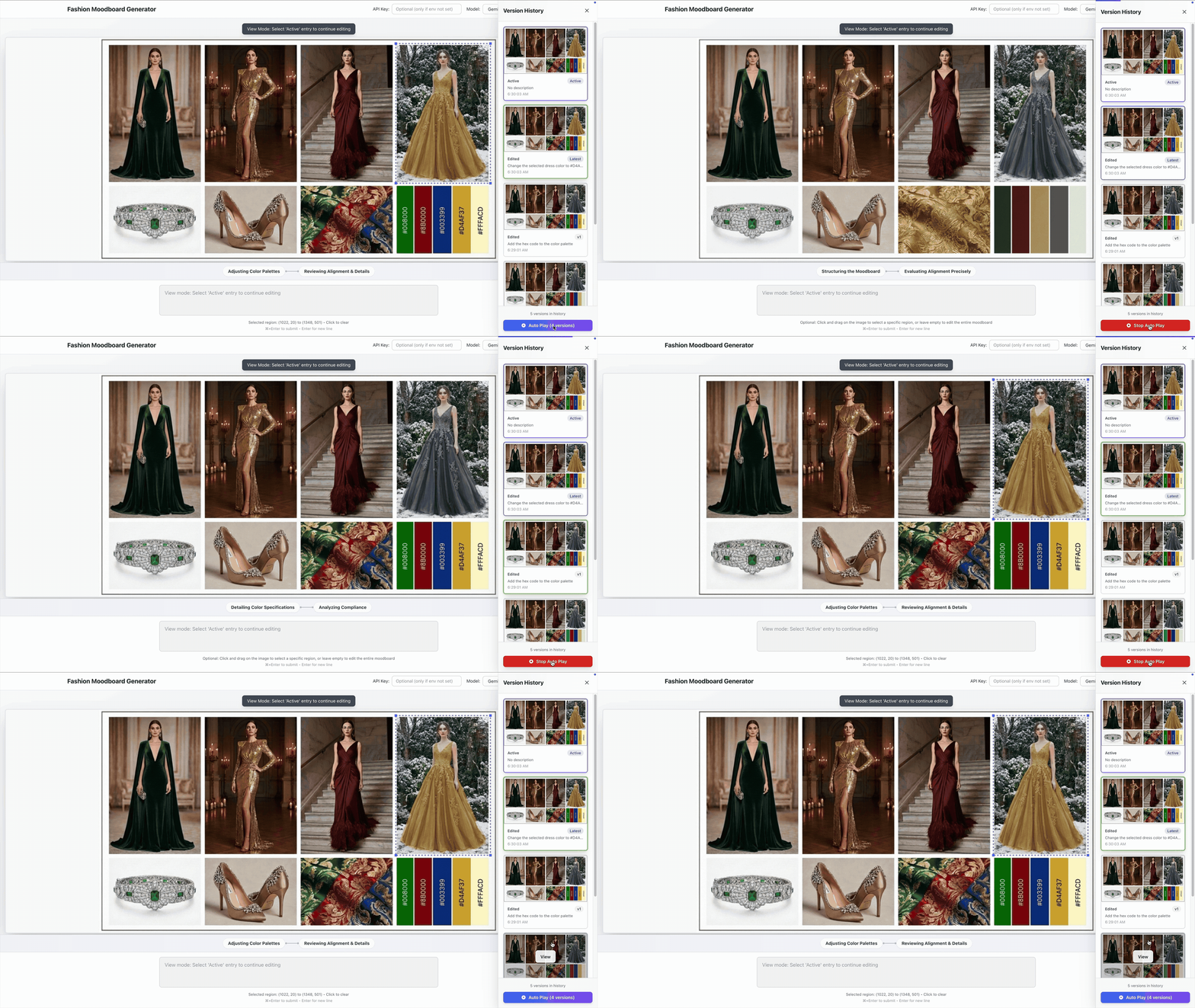
- The app saves every generated/edited image as a new file, so you can keep versions to see your creative history.
- You can also play back the versions from your edit history.
The key idea: a prompt template that enforces structure
The moodboard has a defined 2×4 grid UI layout, which is enforced with a prompt template (stored in prompt_templates/prompt_template.txt) that encourages Gemini to consider moodboard-critical aspects like layout configuration. Your subject is substituted into `{SUBJECT_PLACEHOLDER}` and the model is instructed to produce a fixed layout:
- Canvas: `1440×1024`
- Layout: 2 rows x 4 columns
- A strict “no text in the image” constraint
This template-driven approach keeps the output consistent so that you can iterate and compare variations without fighting layout drift.
The high-level tech stack
Backend: Python + Gradio + Gemini
The backend is a Gradio app in mb_app.py, which exposes two named API endpoints via Gradio: generate_image and edit_image_region.
It calls the Gemini image models gemini-3-pro-image-preview or gemini-2.5-flash-image and saves the generated images to outputs/. Additionally, it collects the model’s “thought” parts and returns them as a reasoning trace.
There’s also a small helper that detects prompts that might benefit from search grounding (mainly time-sensitive prompts) and enables it only when needed.
Frontend: React + Vite
The React app lives under frontend/. During development, Vite proxies API traffic to the Gradio server frontend/vite.config.js. The app UI supports:
- model selection between Gemini 3 and 2.5
- image generation vs edit mode
- click-and-drag bounding box selection
- version history — so the user can review earlier states
You can find more information including how to run the app locally, on our GitHub README. We welcome you to give it a try!
Create the moodboard
Enter a prompt: “A high-fashion holiday moodboard for 2025 featuring elegant evening dresses” and click on Ctrl/CMD + Enter to submit it.
Then a moodboard of 2×4 grid gets generated:
- Top row: 4 fashion looks in portrait mode
- Bottom row: 4 square images with the first two as accessories, third as fabric texture and the 4th one as the color palette
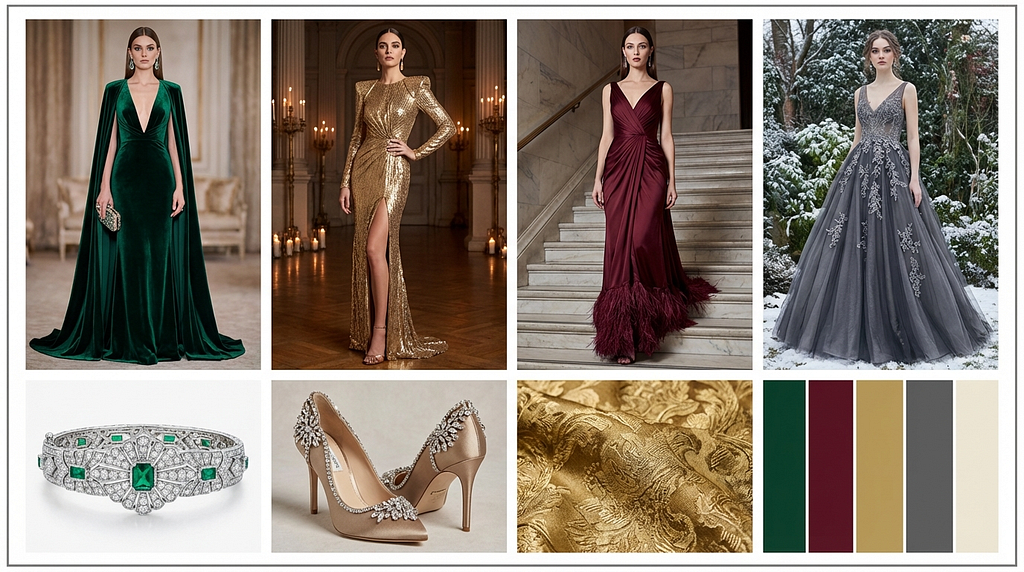
The moodboard is generated with Nano Banana Pro with high-quality visual, search grounding, and thinking.
Search grounding, a new feature in Nano Banana Pro, helps incorporate seasonal trends into the image generation. This is very useful when a designer would like to create a moodboard based on current fashion trends. The prompt above contains ‘2025’ which puts search grounding in motion.
Showing the thinking process of how the moodboard is generated will help the designer to tweak the prompt or subsequent editing.

Edit the moodboard:
Select a region, then describe the change
After generating a moodboard image, you can refine the result by selecting a region with your mouse and then submit an edit request, such as::
- “Replace the footwear with a more minimal silhouette.”
- “Make the fabric texture more raw linen, less glossy.”
- “Adjust the color swatches to warmer earthy tones.”
On the backend, the edit prompt is built from prompt_tempaltes/edit_templates.txt, including:
- the edit request text
- optional bounding box coordinates (absolute + normalized)
- a “grid cell” description (which panel the region overlaps)
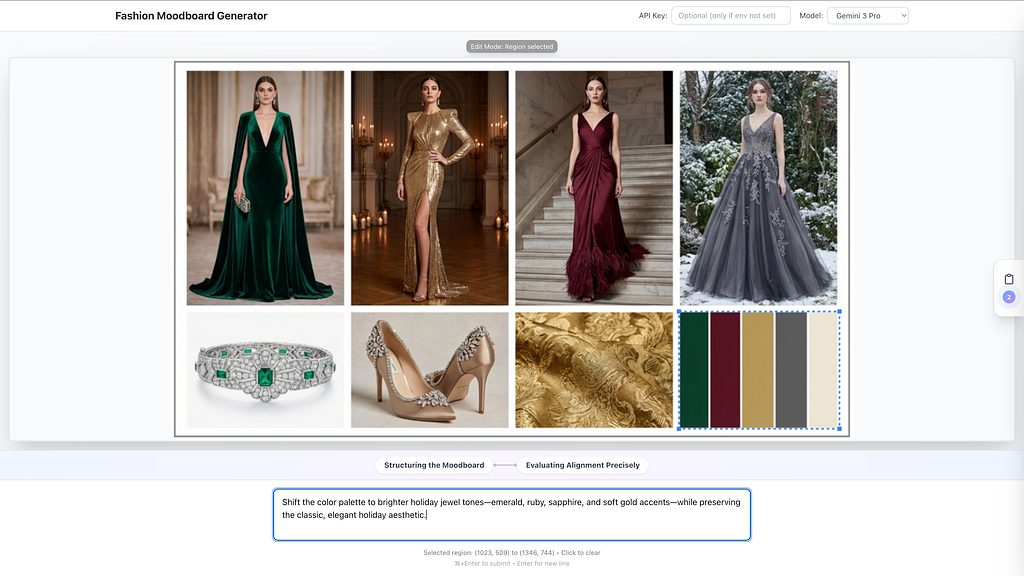
For this particular example, let’s select the color palette then ask the model to change it to be brighter: “Shift the color palette to brighter holiday jewel tones — emerald, ruby, sapphire, and soft gold accents — while preserving the classic, elegant holiday aesthetic.”
Now the color swatches have changed while keeping the rest of the moodboard unchanged.
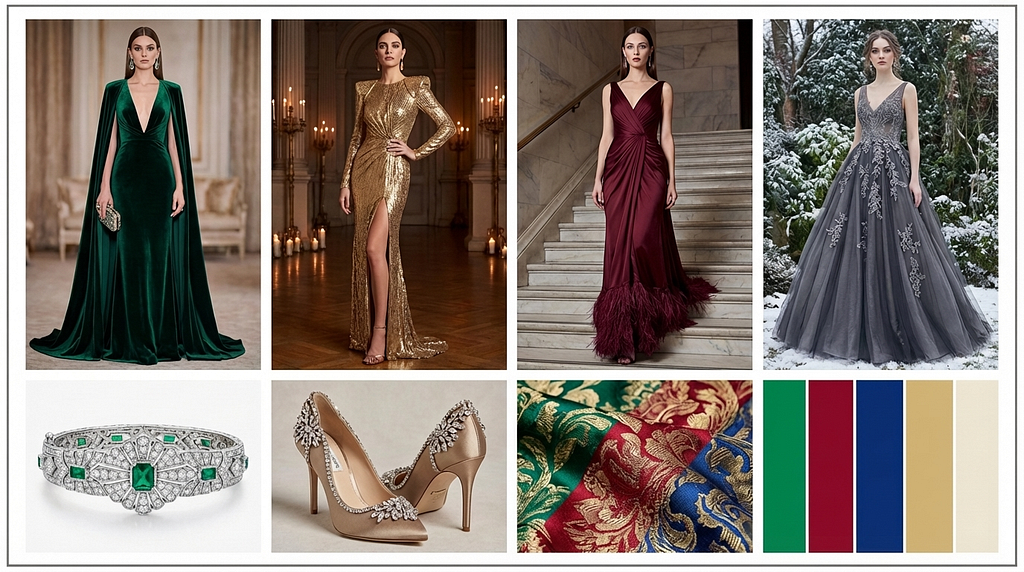
Note: the fabric has also changed with the new color palette. To make sure the rest of the images don’t change, simply add that to the color palette change prompt.
Making a change without selection
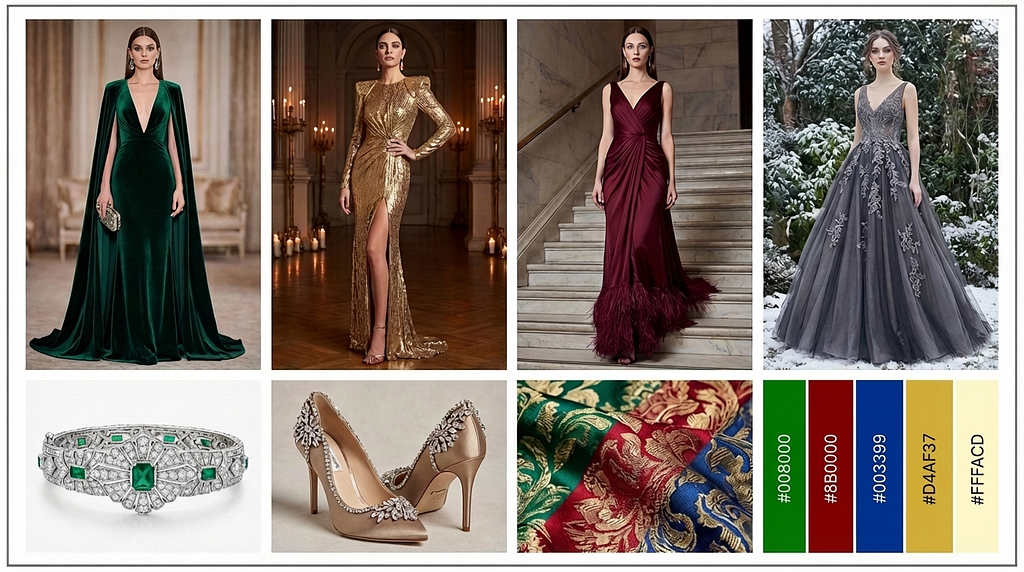
For the color palette, I could simply request changes without selecting a region: “Add the hex code to the color palette”. Then the hex code gets added to the color palette of the moodboard.
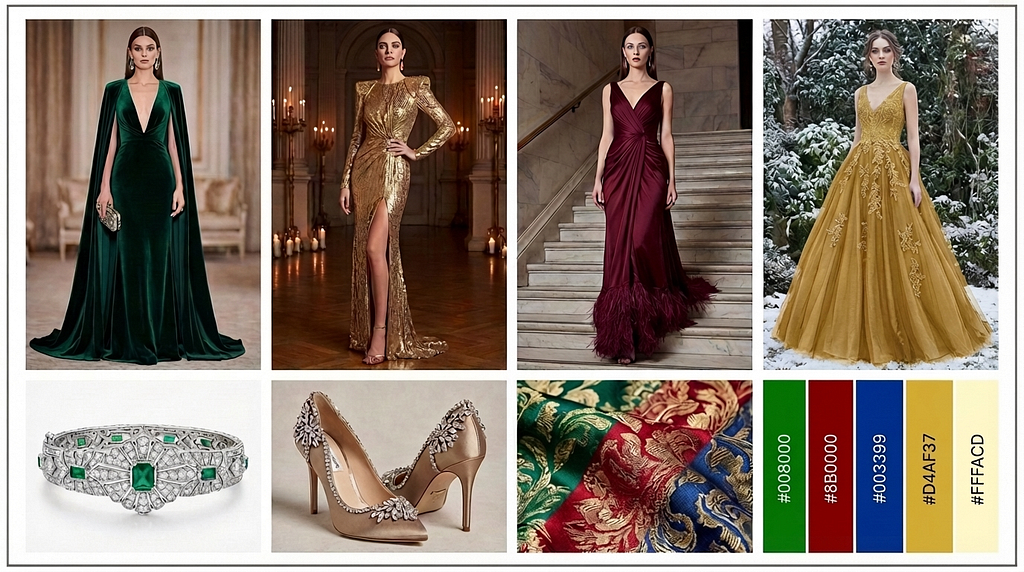
Finally, I’m selecting the 4th dress to change it to a particular color: “Change the selected dress color to #D4AF37”:

Voila, the 4th dress color has changed with the exact color hex code!
Edit history with moodboard versions
Our app also keeps track of the moodboard version changes, allows the designer to look back at the edit history, and select a past version for editing. In addition, a playback feature that shows a simple animation through the edit history
Let’s take a look at the changes we’ve made so far:
Design beyond a single aesthetic
Nano Banana Pro excels at creating visuals across cultures, eras, and lifestyles etc.
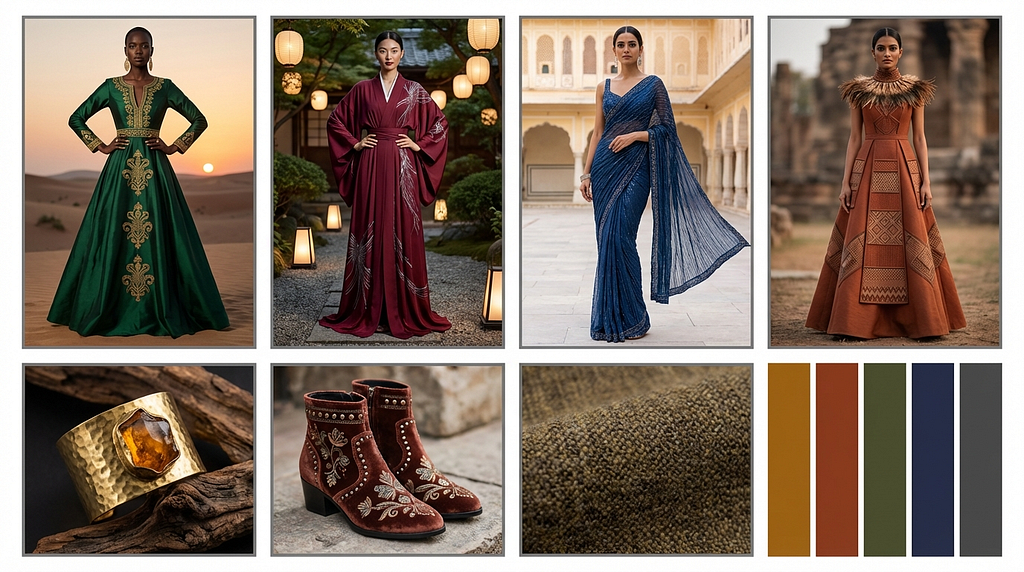
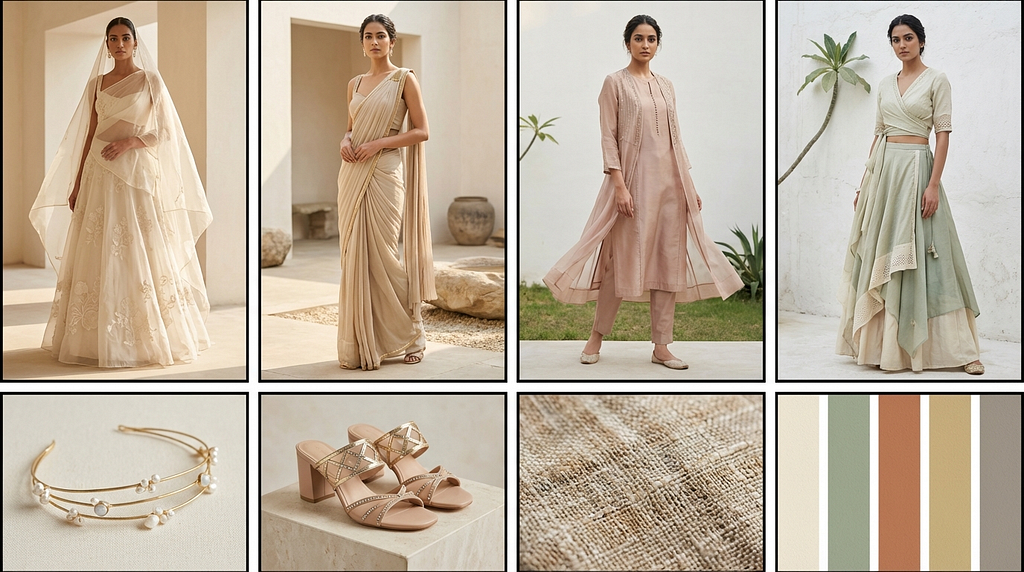
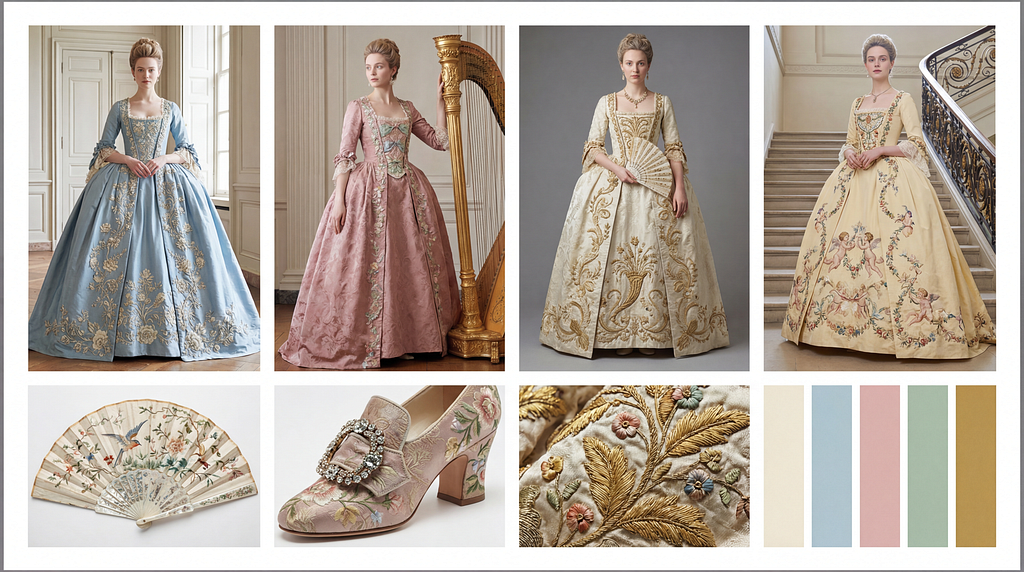
Here are a few examples to illustrate its powerful world knowledge for image generation.
Adding to the previous prompt for a more diverse look: “A high-fashion holiday moodboard for 2025 featuring elegant evening dresses, reflecting a diverse culture”. The resulting moodboard has a more diverse, less U.S.-centric holiday look:
Below is a beautiful mood board of Indian bridal looks. Try it out with the prompt = “Create a layered fashion moodboard collage for a contemporary Indian bridal collection for the 2025–2026 season. The aesthetic theme is ‘The Modern Minimalist Bride: Ethereal Lightness”
Fashion design is often inspired by historical looks. Here is a moodboard of Rococo looks. Try it out with the prompt = “A moodboard for a Rococo era ballgown with accurate embroidery patterns”.
Successes and challenges
A seemingly simple moodboard interface took us considerable time to reach in UI/UX design, intuitive for any designer. The ability to select a specific region for editing further showcases Nano Banana Pro’s powerful editing capabilities.
One practical challenge was getting consistent “reasoning traces” from the model. Even when the documentation suggests they should be present by default, in practice, this project uses an explicit “thinking config” to reliably retrieve them. The challenge comes from working with a preview product such as Nano Banana Pro, where the configuration is not yet fully documented.
We also found out that it’s not possible to change the output resolution to any values other than “1K” when reasoning is enabled. While this appears to be practical from a cost-per-token perspective, various use cases (such as ours) may require the outputs to be in resolutions higher than 1K.
What is next?
We hope you find our project helpful whether you are developer building creative app or designer looking to use AI for your design workflow.
There are several additional features that that would be more useful as part of the moodboard. For example:
- Add an export flow (PNG + prompt metadata).
- Add reusable “styles” (saved templates) per brand/collection.
- Add simple controls for layout variants (while keeping the grid consistent).
Using AI to create and edit the moodboard creates opportunities more than what a traditional design workflow could offer. This means that the designer could potentially move from the early design phase to branding or marketing. With the powerful generation and editing features of Nano Banana Pro, the possibilities are endless.
Project Inspiration:
AI GDEs Margaret Maynard-Reid (U.S.), Chansung Park (Korea) and Sayak Paul (India) collaborated on this project.
Margaret:
I work in the intersection of AI, art and design, especially with fashion design. I’m passionate about transforming the fashion industry with AI, and helping designers (including myself) with the creative workflow. Teaming with Chansung and Sayak on this fashion AI project, showcasing the state-of-art Gemini 3, has been an inspiring collaboration.
Chansung:
As an AI-focused Problem Solver, I believe in diving deep into a domain to find real solutions. The Fashion Moodboard project was my first venture into the world of Fashion, providing me with vital insight into the entirely new requirements of creatives using AI. It was a rewarding experience to directly bridge cutting-edge technology with the actual design workflow.
Sayak:
I work in the area of image and video generation. I am passionate about making the open models in this area accessible to the community. Getting to know how powerful models like Nano Banana Pro can be extended to support fashion-related use cases has been exciting!
Acknowledgement:

We thank the Google ML Developers Program for providing GCP credits that supported this project. The early access granted to the GDEs have also allowed us the previews of the latest Google AI models which made this project possible
Additionally, Sayak acknowledges the GCP support he received from Hugging Face.

Fashion Moodboard with Gemini 3 & Nano Banana Pro was originally published in Google Developer Experts on Medium, where people are continuing the conversation by highlighting and responding to this story.