When working with Google Kubernetes Engine (GKE), you’ll come across two powerful concepts:
- 👉 Node Pools
- 👉 Node Selectors
These help you control how your workloads run on nodes inside your Kubernetes cluster. Let’s break them down step by step.
🟢 Node Pools in GKE
A Node Pool is basically a group of nodes in a GKE cluster with the same configuration.

- When you create a cluster, GKE automatically creates a default node pool.
- You can add more node pools with different configurations depending on your workload needs.
🔑 Each node in a pool has a label like this:
cloud.google.com/gke-nodepool: default-pool
cloud.google.com/gke-nodepool: linuxapps-pool
So, GKE automatically labels nodes by their pool name.
✨ Why Node Pools are Useful?
You can categorize workloads by creating node pools with specific configurations. For example:
- 🖴 Node pool with local SSDs for high I/O apps
- ⚡ Node pool with minimum CPU platform for performance tuning
- 💰 Node pool with Spot VMs for cost savings
- 🖥️ Node pool with a specific machine type (e.g., e2-standard-4)
- 🖼️ Node pool with a specific node image (e.g., Container-Optimized OS vs Ubuntu)
👉 You can resize node pools by adding/removing nodes.
👉 You can enable Cluster Autoscaler so node pools automatically scale up/down based on usage.
⚠️ Important: You cannot change a single node’s config inside a node pool. Any change applies to the entire pool.
🟡 Kubernetes Node Selectors

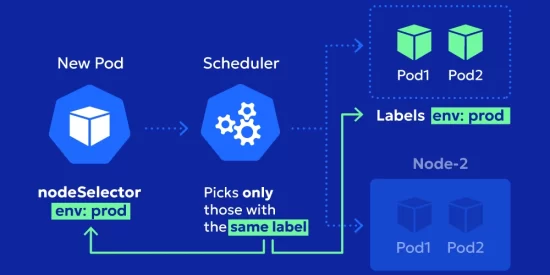
A Node Selector is a simple way to tell Kubernetes where your Pod should run.
It’s part of the Pod spec and works with key-value labels.
Example: If you want a Pod to run only in the linuxapps-pool node pool 👇
apiVersion: v1
kind: Pod
metadata:
  name: my-linux-app
spec:
  nodeSelector:
    cloud.google.com/gke-nodepool: linuxapps-pool
  containers:
    - name: my-container
      image: nginx
Here’s what happens:
- Kubernetes looks at your cluster nodes.
- It finds nodes with the label cloud.google.com/gke-nodepool=linuxapps-pool.
- It schedules your Pod there. ✅
🔑 Quick Recap
- Node Pools = groups of nodes with the same configuration.
- Node Selectors = simple rules to make sure Pods land on the right nodes.
Together, these give you fine-grained control over workload placement in GKE.